Thinking about the amount of havoc-wreaking viruses on the Web is like thinking about the amount of sickness-causing germs circulating within the public transit system. Most people don’t want to know about the scores of viruses waiting to infect their system, but it’s not something you can just actively dismiss if you want to maintain your health. Like the common cold unknowingly proliferates through the masses, so do worms, Trojans and the vast slew of other infectious malware that saturate the everyday software landscape. Luckily, there’s just as many free antivirus programs to combat the threat of an impending invasion as there are invaders themselves. If you’re looking for protection but don’t want to shell out the money for peace of mind, you’ve come to the right place.
Here’s our roundup of the best free antivirus programs that money doesn’t have to buy.
Looking for Mac-specific antivirus? Check out our guide to the best antivirus for Mac.
Ad-Aware Free Internet Security (Windows)
Lavosoft’s Ad-Aware is one of the most trusted spyware tools and has been a benchmark in the industry for years. The free version provides real-time anti-virus and malware protection, and the latest in emulation technology and identity protection to boot. It also features a scheduler, an applaudable addition given Lavosoft’s heavy reliance on user concern and constant updates, and a less-than-intrusive method of silently blocking pesky malware without the notorious pop-up fanfare of yore. Some of the returning features and software could use an overhaul, such as the mediocre phishing and rootkit protection, but all of the software’s hallmarks are still there and presented in an impeccably streamlined way that is both attractive and light on your system’s memory. Plus, there isn’t a blatant screen nagging users to upgrade around every corner.

Malwarebytes Anti-Malware (Windows)
Much has happened since Malwarebytes first introduced its application back in early 2008. Now boasting a whopping 200 million downloads worldwide (and counting), Malwarebytes offers quite a bit more for the nonexistent price tag. It continues to provide some of the best and most comprehensive virus-removal software available, frequently making it one of the first go-to sources for tech agencies and support groups alike. The program uses Chameleon technology to get the application running on already infected systems, triggering the “mbam-chameleon” app when necessary and helping install and update any required drivers crucial to the software’s functionality. Afterward, the app targets any processes that may have blocked Malwarebytes from running in the first place before scanning for other system threats. Access to the knowledgeable support network and the slew of language options are also an added perk to the free software.
Malwarebytes is the premiere removal-only software on our list, but it’s exclusively removal only; it can’t thwart incoming attacks or provide real-time protection like AVG or Avast can. The paid version, which costs $25, opens up real-time scanning, increased heuristic and an automatic scheduler for priority updates and scans.

Microsoft Windows Defender (Windows)
Microsoft’s innate malware protection has slowly been improving over the years, and we think it’s finally worth a look. Although Microsoft Windows Defender is enabled by default — offering real-time protection against spyware and pop-ups — it can also be disabled if Windows users want to utilize other defensive programs instead of the one bundled with your PC. The software’s monitoring system recommends actions when urgent attention is required, but interruptions are minimal, helping you stay on task without having to revert to an annoying dialogue box every five minutes.
The software still supports 64-bit platforms, updates virus definitions quickly, and sports a easily-navigable user interface regardless of your operating system. While Defender automatically runs in the background, you can also manually schedule scanning and removal times to a time that’s convenient for you or if you notice something suspicious with your system that leaves you skeptical. Note that software also provides the same level of malware protection as Microsoft Security Essentials, hence the latter is not even compatible with the newer operating system.
AVG Free Anti-Virus (Windows/Mobile)
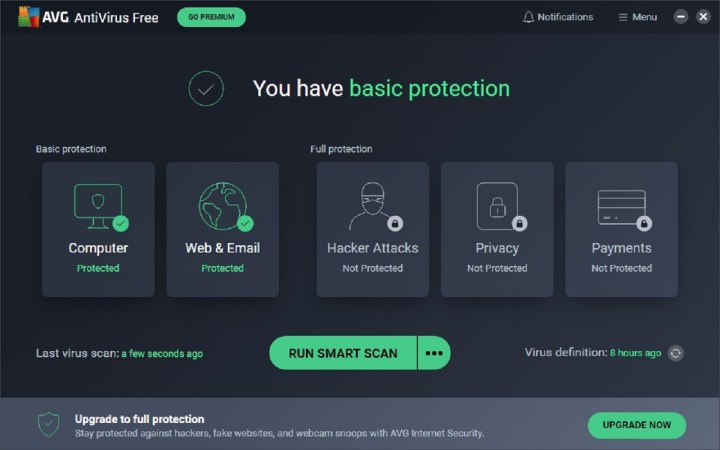
This popular free anti-virus software packs something extra: free anti-spyware protection built right in. It isn’t as potent an anti-virus solution as some free competitors, like Avira AntiVir Personal, but the spyware detection makes a compelling bonus, especially considering that most anti-virus companies (including Avira) only bundle that functionality into their paid packages. At $50, the paid version offers a more comprehensive feature set — such as protection for instant messages, email, downloads, and identity theft — but opting for the premium version is not a necessity if you’re simply look for easy-to-use, yet effective, virus protection with a gorgeous interface to match.
The free version also gives users access to the helpful 24-hour phone support in addition to a simple performance analyzer and one-time tuneup designed to make the most of your machine’s speed and efficiency. A mobile version of the protection software with added incentives, such as a remote wipe and a phone locator, is also available for Android.

Avast Free Antivirus (Windows/Mac/Mobile)
Avast Free Antivirus isn’t as quick or intuitive as its paid counterpart, Avast Pro Antivirus, but it certainly does the trick on a budget. Aside from the usual virus and spyware protection, the software comes with a slew of customizable installation options that you can toggle, as well as an Auto Sandbox that places programs deemed suspicious aside so they don’t harm your computer. It also dons a visually appealing UI akin to the panel-laden Windows 8 design and contains a comprehensive remote assistance feature that allows you to establish a connection and subsequently take control of a friend’s computer using a provided permission code. The program’s customizable options cater to the more tech-savvy crowd, but the default settings will do just fine for any beginner.

Panda Cloud Antivirus (Windows)
What sets Panda Cloud Antivirus apart from its competitors is in the name: the cloud. The program primarily uses cloud computing, meaning remote servers carry the weight of scanning and carrying out various antivirus functions so your computer doesn’t have to. The software is relatively lightweight – it doesn’t require much in the way of resources – and runs off a local cache when the network is unavailable. It also provides options for Web filtering along with optimized and custom scanning to isolate specific folders and files. It doesn’t get much simpler than Panda Cloud Antivirus, but simplicity sometimes comes at a cost; the software is notorious for bogging down your system.
Despite fairly impressive detection rates, the program also isn’t the most skilled when it comes to eradicating malware on infected systems, especially during offline use. The ad-free paid version ($30) features multilingual tech support, a community firewall, and automatic USB vaccination that helps protect against potentially harmful files found in portable storage devices.

Avira Free Antivirus (Windows/Mac/Mobile)
Independent tests from AV-Comparatives.org consistently place Avira near the top of the list for detection and blocking rates – and the latest software is no exception. When it comes to viruses, worms, and Trojans, Avira Free Antivirus offers solid protection and performance while maintaining the same clumsy interface that has continuously rendered the free software unattractive and a chore to navigate for years.
The software might be a bit slow when it comes to installation and execution depending on the amount of data stored on your machine, but the scanning is well-optimized and hassle-free once underway, providing quick and seamless threat detection that ranks amongst the best. However, it’s a shame that the included Avira toolbar is such a double-edged sword, eliminating browser tracking and blocking ads at the cost of user convenience and changing your default search engine. Avira’s software, though thorough, also leaves a bigger footprint on your system than many of its competitors.

Comodo Antivirus Free (Windows/Mac/Linux/Mobile)
Comodo Antivirus Free provides a solid line of defense against typical malicious threats like viruses and other malware. It also protects against other infectious sources, including email, instant messaging, and gaming. Its built-in detection technology, Defense+, prohibits anything to run other than the most trusted software, but comes with a barrage of warning alerts that often need your attention. Other features include an Auto Sandbox, cloud-based scanning and behavioral analysis, a well-built firewall and the Chromium-based Dragon browser with Comodo’s SecureDNS service for added security and privacy while surfing the Web.
Although the software may be a bit paranoid, upping the ante when it comes to over-the-top malware detection, it falls a bit short when it comes to disabling what it has deemed potentially hazardous. Nevertheless, Comodo has certainly stepped up its game in the world of free antivirus software, taking a fledgling product and fleshing out its capabilities with its latest release. Be sure to check out the mobile version of the software for Android phones if you’re looking for privacy, anti-theft and virus protection on the move.

Emsisoft Free Emergency Kit (Windows)
While Emsisoft’s kit won’t protect malware from infecting your system in the first place, the software collection does a nice job of cleaning up malware-seeped machines that are unable to install some of the more robust antivirus software elsewhere on our list. The installation-free kit has little trouble working working alongside other antivirus software and is designed for experts and novice alike, incorporating both an automatic and a manual commandline scanner catered to more advanced users and those looking to do batch jobs.
It’s not the most extensive program when it comes to functionality and elaborate features (it can’t even tackle rootkits), but it’s a great little tool for the worst case scenario, especially when combined with the included HiJackFree and BlitzBank software that provides considerably more control over your system. We recommend extracting the software contents to a portable flash drive so you’ll be better prepared just in case the worst does befall on you.

How did we do with our best antivirus software roundup? What software are you using to combat the viral legions of malware? Let us know in the comments below.

I thought you would have mentioned Microsoft Security Essentials. It works great and offers twice as much free protection as Defender.
Plus they have a new antivirus engine 2.0 coming out soon.
I would say Avast! is way better then AVG. I personally have seen AVG not catch a lot of malware, but Avast! will alert you even as the malware tries at enter your system.
Gotta agree here. AVG is nice, but I’d rather rely on Avast with Malware Bytes there to clean up the bad messes.
1. Ad-Aware: use to be a great product, but now the updates are sluggish, and the newest release hogs system resources. So a thumbs down!
2. Malwarebytes: Great standalone Anti-malware. Highly recommended in addition to your antivirus software to help remove the threats that your antivirus may leave behind. Two thumbs up!
3. Trend Micro Highjack: This software isn't compatible with my Windows Vista, but I have heard good things about this product from friends that have used it for years. So I would consider it to be a trusted software product, and would use it if it would work on my operating system.
4. SUPERAntiSpyware: I have used this product, but uninstalled it. It never found anything on my system, except a few tracking cookies, while Malwarebytes destroyed what this software failed to find and remove. Which leaves me in doubt about this software. So I neither give it a thumbs up or a thumbs down but rather a few ????
+1 for Maleware Bytes.
I’m not sure I would have listed Hijack This because novice users can REALLY screw up their computer if they don’t know what they’re doing.
Thumbs up for Windows Defender for obvious reasons; a good follow-up to this i…s ForeFront Security by MSFT.
-1 for no love of SpyBot or Avast!
I like windows defender since it is comes free with my Windows 7 ultimate. And it does not crash with 3rd party antivirus like Kaspersky. So its a kind of compliment to one another.
Good information. I make use of Immunet antivirus software. It is good on my PC and does not slow down the pace. Moreover, the protection against the threats has been the reason of my peace of mind these days.
5. Microsoft Windows Defender: Seems to be a great product, although I would not fully rely on it to defend my windows without other protection as backup. I have removed threats that this product has failed to detect and prevent from entering in. So it's always a good idea to have a helping hand with this software.
6. SpywareBlaster: Is a awesome product. It truly prevents spyware. Many clean scans from my other security software is a result of SpywareBlaster doing it's job. I use this product with confidence and I also highly recommend this as 1 of the best freeware programs available. Two Thumbs Up!
7. AVG Anti-Virus: I love it, and have been using it for several years to protect my system. Although I must say that sometimes it does fail, allowing some trojans through, that is why it is always good to have a few other "trusted" security programs to assist your anti-virus software as an extra layer of protection. I definately give this product a Two Thumbs up!
Active Protection :
1. Avira anti virus
2..Comodo Firewall
3. Threatfire
4.spywareguard
Passive and scanner protection :
1. Sbybot search and destroy Hosts protection , immunization
2. Spywareblaster
3.Malwarebytes
4.Super Anti Spyware
5. System maintenance program of choice IE: Iobit Advanced Windows care , CCleaner Etc .
follow this up with tweaking windows and program settings for a pretty good security setup .