For years, if you wanted the best antivirus software, you had to pay up for genuine protection and security. Any free antivirus software admittedly lacked some critical features, like fraud protection or link blocking.
While some antivirus programs cost money, there are plenty of free options with fantastic features. These days, you don’t always have to miss out on features like malware blockers just because these antivirus options are free. Plus, you can download these programs and start using them immediately.
The best free antivirus software at a glance
AVG AntiVirus Free
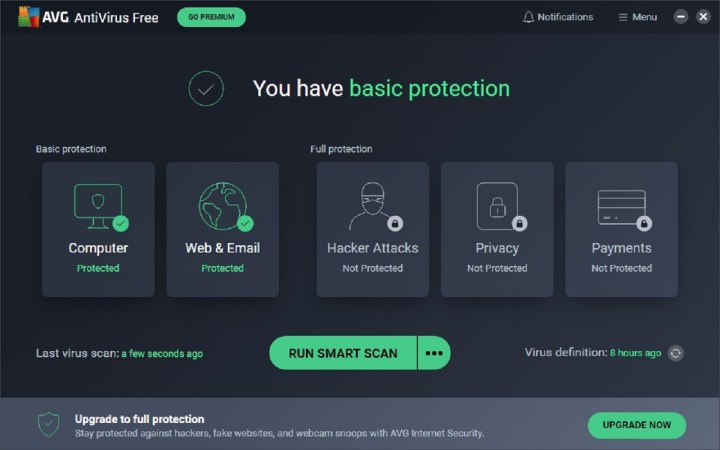
AVG has two major selling points. First, this free antivirus option has an impressively broad reach. The software will not only search for viruses and malware, but it also helps block suspicious links, prevent suspect downloads, and keep suspicious email attachments from being used. That makes the app a better choice for a family or elderly users on a budget.
The second benefit is AVG’s affinity with Google platforms, as it has one of the better Android downloads. With the Android app, you can do things like scan and remove malware and scan the Wi-Fi network you’re using. The
Malwarebytes Anti-Malware Free

Malwarebytes offers some of the best and most comprehensive virus-removal software available, frequently making it one of the first go-to sources for tech agencies and support groups alike.
The only caveat with the free version of Malwarebytes is that it’s more of a remediation tool than a live, protective shield. The scanning tool will find and remove anything once you’re already infected — effectively, too — but doesn’t prevent the infection from happening in the first place. For that, you need the premium version or one of the other tools on this list. Still, as a secondary layer of defense, the free version of Malwarebytes is a must.
Malwarebytes also has a free extension (Browser Guard) for Chrome, Edge, Safari, and Firefox browsers, which offers web protections such as blocking third-party ads and trackers, blocking webpages that have malware, and blocking online scams.
Avast Free Antivirus

In terms of essential protection, Avast is one of the best antivirus programs available. With Avast, you can expect an antivirus program that finds and blocks all kinds of threats including viruses, ransomware, and phishing. And two other features, Network Inspector and Smart Scan, can help you spot flaws in your security so you know what you need to fix to protect yourself. The software also includes a Silent Mode that completely silences alerts and pop-ups from Avast.
Since it’s a free program, you’ll be missing out on some features exclusive to the premium package, including remote hacking protection and the ability to protect up to 10 devices. Those wanting such upgrades will need to opt for a subscription plan, which is about $4 per month for one Windows PC or Mac for the first year, or about $50 per year. Another plan also gets you protection on 10 devices for about $6 per month for the first year. Still, sticking with the free version will keep you well-protected.
Avast also offers another, newer security suite: Avast One. There are three versions of it: Avast One Essential (the free one) and the premium versions (Avast One Individual/Family and Avast One Platinum). Avast One Essential offers more protection and performance features than Avast Free Antivirus, and it’s still free. Features include a firewall, a VPN, and a tool to help speed up your PC. If you’d like more features for free, Avast One Essential may also be worth looking into.
Avira Free Antivirus

Avira’s streamlined free antivirus software is one of the best options for getting exactly the security features you want without any unnecessary extras or annoying bloat. Download options are available for Windows, Mac, Android, and iOS — and Mac/iOS compatibility is particularly good, making this a strong choice for Apple users.
The free version of Avira’s antivirus program comes with virus scans and blocking, infected file repairs, real-time updates, a potentially unwanted application (PUA) shield, an ad blocker, and a tracking blocker.
Avira also has Avira Prime, which is $10 for one month covering 5 devices, $60 for a year covering 5 devices, or $195 for two years for 5 devices. This service has features like a password generator, encryption of your web browsing data, and other extras.
How do you know which free antivirus software is right for you?
It all depends on your security needs. Some free antivirus programs only focus on detecting and removing malware, but others may offer more protection in the way of anti-phishing and ad-blocking features. If you browse the web often or download email attachments often, you may want to consider antivirus options that offer web protection and email protection. If you want to be able to monitor and protect all of your devices (mobile and PC) at once with the same program, you should pick a free antivirus software that is available on all of the platforms your devices run on.
The best antivirus for Windows 11
At this time, most antivirus software companies have announced that their products are compatible with Windows 11. That said, most antivirus options that are compatible with Windows 10 should also work fine on Windows 11. Make sure to install one of them if you’re trying out Microsoft’s new operating system. If all else fails, you can stick with Windows Security, which is Microsoft’s free antivirus solution built into Windows 10 and
Editors' Recommendations
- 9 best 2-in-1 laptops in 2024: tested and reviewed
- Google Drive vs. Dropbox: which is best in 2024?
- Microsoft Word free trial: Get a month of service for free
- Best Adobe Photoshop deals: Get the photo-editing software for free
- Does your Mac really need antivirus software? We asked the experts