Detailed on the official Google Chrome Blog, the development team behind Chrome has pushed Chrome Remote Desktop out of beta and the extension is now available for download on the Chrome Web Store. Ideal for remote computer access between families, the Chrome extension allows a user to remotely access a computer at another location. For example, a tech savvy college student living on campus will be able to connect to their parent’s computer to provide troubleshooting support without having to travel back home. Small businesses could also utilize the free extension in order to provide IT support to employees.
 Google has been testing the extension in beta format over the last twelve months and the launch of the public version brings a couple new features into the mix. Chrome Remote Desktop users can now use a real time audio feed to listen to music stored on a computer in another location. This feature could be ideal for accessing music on a significant other’s home computer while away on a business trip.
The development team has also added the ability to transfer files between the remote and local computer. Rather than downloading a spyware removal tool to a computer through remote access, a user could simply transfer the installation file to the remote computer.
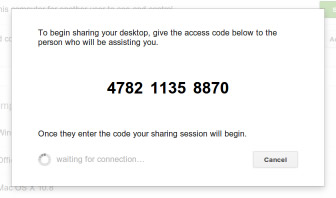
After installing the extension on both the local and remote computers, the user of the remote computer chooses to share their desktop by generating a unique 12-digit access code and providing that number to the other party. The other user enters the access code and the connection is created between the two computers. Regarding future additions to the extension, Google product manager Stephen Konig stated “We have more features in the works that will make Chrome Remote Desktop even more powerful.” Chrome Remote Desktop can also be useful to anyone utilizing a Chromebook in order to access content on a more powerful laptop sitting at work or home.
Editors' Recommendations
- 5 web browsers you should use instead of Google Chrome or Edge
- Google quietly launches a new text-to-video AI app
- How to fix the ‘Google Drive refused to connect’ message
- How to change your Google background in Chrome
- Google may build Gemini AI directly into Chrome