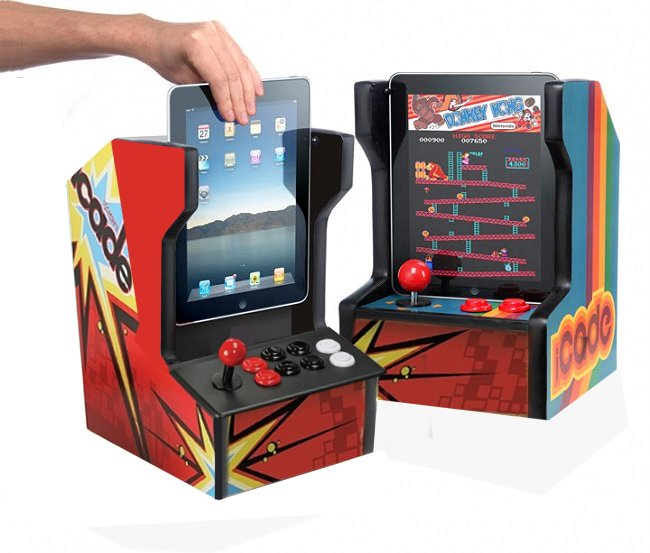
What originally started out as a ThinkGeek April Fool’s joke has come to life and is now a real retro arcade cabinet made just for your not-so-retro iPad or iPad 2. We all know that the iPad is already great for games, but if there’s one thing it’s lacking, it’s the tactile feel of retro arcade games. If you grew up in the era of Pong and Centipede, there’s no better way to play those in the modern era than with your unashamedly-retro iCade iPad Arcade Cabinet ($99). The cabinet works with Bluetooth and the Atari Greatest Hits app, which offers Missile Command for free, several game packs for $1 and all 100 available games for one in-app purchase of $9.99. We love the idea of this novelty toy, but $99 is a lot to spend on an iPad accessory, so we tested it out to let you know if it will be worth your while.
In our own testing experience, we found that setting up the iCade was not quite as quick and easy as we’d like. Users must first turn on Bluetooth on the iPad, press a series of buttons on the iCade, select the device to connect via Bluetooth, and then enter a passcode to get the two to pair. A few times it took long enough to do this, or one step didn’t work, that we were tempted to abandon it altogether. Once you get the sequence down it ought to make for a quicker pairing, but it will always take at least a couple minutes to get your iPad ready for game play, which is enough to turn off some casual users.
We would also suggest typing in your Apple ID and password in the App Store before you turn on Bluetooth and start the Atari Greatest Hits app with the intention of purchasing games or a game pack. When we tried to make our in-app purchase of a game pack, the iPad wouldn’t open up a keyboard (for password typing) because we were using Bluetooth. We had to exit the app, turn off Bluetooth, make the purchase, then return to the app once again. This makes us want to suggest just coughing up the $10 for all 100 Atari games because then you’ll only have to go through this tedious process once. As soon as you have your games purchased, you’re ready to play. The iCade has a classic red-ball joystick and six other buttons to help you control your way to gaming dominance.
We played some sessions of Missile Command and Pong, and while the controls seemed a little sticky in Pong, you’d probably get used to the tactile controls pretty quickly. Our biggest qualms about this fun novelty gift are the price tag and the time it takes to set up your iPad every time you want to play. If you can stomach both of those issues (the price tag probably being the biggest one) and you’re a big retro-gaming fan, you will probably get countless hours of fun play time out of the iCade. If you’re a bit more of a casual gamer and just think “hey, that looks kind of cool,” we’re guessing that you are not going to end up thinking it warrants spending $99 for the cabinet and $10 on games.
Editors' Recommendations
- It’s not on the App Store: How to play Fortnite on iPhone and iPad
- The best RPGs for iPhone and iPad in 2023: our 16 favorite games
- Today’s Best Deals: Apple iPad, Xbox Series S, and more
- The best iPhone and iPad games for kids
- How to play Google Stadia in Safari on the iPhone and iPad