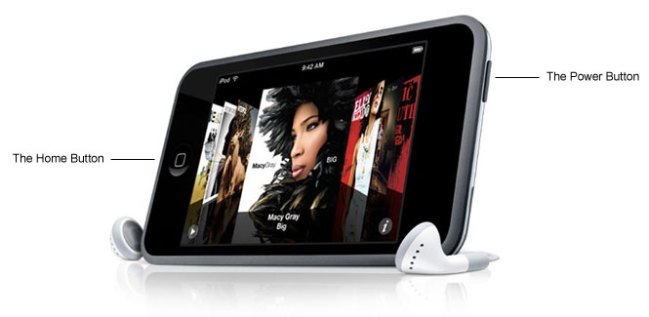
 Locate the power button. This is the rectangular button on the top left side of the iPod Touch.
 Locate the home button. This is the circular button on the face (screen) of your iPod towards the bottom.
 Hold the home button and the power button at the same time and wait until the device shows the Apple logo on your screen (should take around 30 seconds). Your iPod should reboot with your files just the way you left them.
 If the hard reboot doesn’t solve your problem then connect your iPod to iTunes. iTunes should detect a problem with your iPod and give you an option to restore it to factory settings (erases all your songs and files so back them up first).
Editors' Recommendations
- Here’s how Apple could change your iPhone forever
- Best iPhone 15 deals: How to get Apple’s latest iPhone for free
- Apple accidentally revealed a big iPad Pro display upgrade
- When will Apple release iOS 18? Here’s what we know
- Everything Apple says is wrong about the DOJ’s iPhone lawsuit