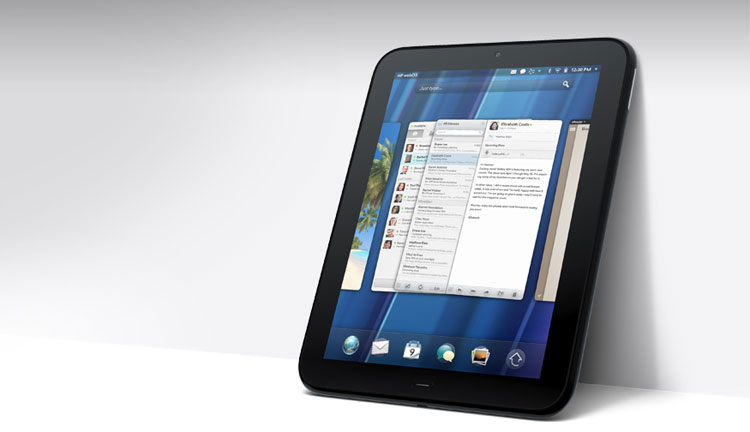
When the HP TouchPad tablet came out at a price of $500 in July, we were a bit critical of it. In our review, we noted the lack of a rear camera, the slow response speed of webOS (it’s operating system) on the tablet and how the whole tablet is a big fingerprint magnet. Those kinds of things are important when you’re buying a $500 device, but when it’s been discounted to $100, all bets are off. Late last week, HP declared that it is no longer producing webOS devices and may actually exit the PC business entirely. Fitting with this decision, the company stopped producing new HP TouchPads and has deeply discounted the remaining units in stores around the country. If you’re lucky, you may be able to find a TouchPad for as little as $100.
But what do you do now that you’ve got it? Well, we’ve compiled a few ways to use a so-so tablet as a number of other interesting things.
 As a video phone
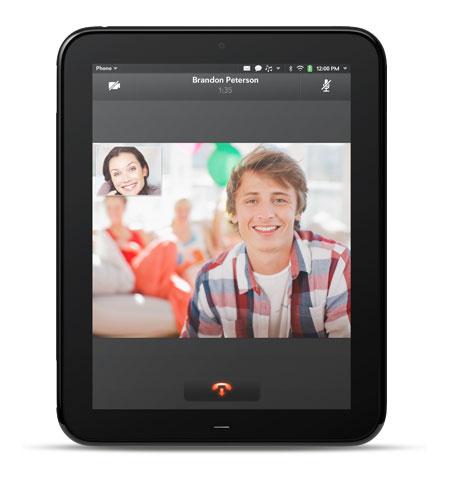
The HP TouchPad is one of the only tablets to come preloaded with heavy Skype integration. Simply log in with your Skype account and you can start video or voice (or both) chatting with your friends. Hopefully at some point, Skype and HP will add support for Facebook video chat, as that’s one of the most common ways people may be accessing Skype now that the two companies have partnered up. We haven’t done much video chatting on the TouchPad yet, but with everything built in, it’s surprisingly easy to use.
As a companion to your commute
Chances are, you already have a smartphone, but for those of you who frequently commute long distances or have to wait around, the TouchPad could ease your boredom. There are a few decent games like Angry Birds HD, Slice-It!, Robotek, and Radiant if you want a big screen gaming experience, but the device is much better as a mobile A/V player and e-book reader.
Kindle e-books are available in HP’s App Catalog, as are a number of magazine apps, most of which are free. Amazon’s Kindle app allows you to download books right onto the device for offline reading on the train or bus and apps like Paper Mache let you access news offline as well via Instapaper.
For music, radio, and podcasts, there are quite a few options including Pandora, Last.fm, Tune-In Music, drPodder, Stitcher, and others. There aren’t as many options for video, but you can always watch YouTube or hook the TouchPad up to your PC and load as many songs or movies on it as you’d like.
As an interactive digital picture frame
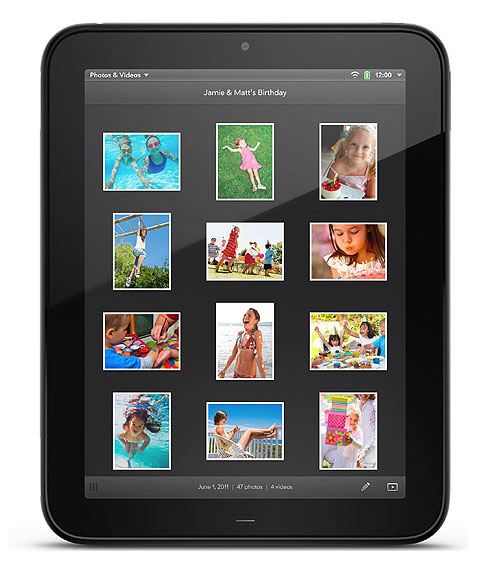
Thanks to some heavy Facebook integration, one of the easiest things to do on the TouchPad is view all of your photos from Facebook, Google, Snapfish, Dropbox, Photobucket, and other photo services. It’s just all loaded and works once you log in with the accounts. Another cool feature of the TouchPad is called Exhibition Mode. If an app is compatible, you can view that app in full-screen mode. Facebook, calendar, Accuweather, photos, and the clock all work like this, to name a few. The tablet automatically scrolls throw your photographs and other items, displaying whatever you wish for as long as you’d like. This feature is especially cool for the Facebook app, which displays random statuses and people in a pretty slick way.
As an Android tablet
A team of coders calling themselves TouchDroid have already pledged to bring Android Gingerbread, followed by Android Honeycomb, to the TouchPad. If they succeed, in the coming months (or weeks), you may be able to install Android on your TouchPad and do some real damage. We like webOS, but we are also realists: Until HP comes up with a plan for webOS, it’s a dying operating system. Android, on the other hand, is more alive than ever, with more than 250,000 apps available on the Android Market. Any app you can’t find on the TouchPad now is likely already on the Market.

We’re also optimistic that Android may just run faster on the TouchPad. WebOS is slow. We aren’t sure why, and most speculate that the TouchPad hardware may be to blame, but it’s been slow on every HP and Palm device so far, and we’re not holding out much hope that it will speed up anytime soon. Android, however, is updated and seems to get more efficient every few months.
We should note that installing Android likely won’t be easy and could damage your TouchPad, should the process go awry. Check out Geek.com for more details.
As the luxury computing device it is
You now own a luxury computing device that has no set purpose. You’re living the high life now — kind of cool, right? Keep your TouchPad in the living room on the coffee table, or in the bathroom, or next to your bed, or in the kitchen. You can keep it wherever you might want to casually use a computer.
 Like all tablets, the TouchPad is good for a lot of things. If you need to look something up in a snap, quickly chat with someone, check your email, look at some photos, check your calendar, read a document or e-book, there is no easier way than a tablet computer. While it’s a bit sluggish (hopefully HP will fix this in time) and it isn’t perfect for writing or doing any substantial multitasking, HP’s TouchPad can perform many of these basic functions more intuitively and conveniently than a PC, because of its long battery life and it built-in notifications system.
Not interested? Try giving it to Mom or Dad. If you set it all up and show them how to check email, almost anyone can effectively use a tablet to stay connected.
The price is right
We’ve run through quite a few tablets in the last few months. At $500 to $800, it’s difficult to justify their value unless you have money to kill. But at $100 to $300, even duds like the TouchPad might be worth it. Tablets are a luxury item: a small mobile computer that lies around until you feel like using it. They aren’t good when you need to get down to business, and they’re not mobile enough if you’re on the go and in a pinch (that’s what a smartphone is for). But they’re great for in-between computing. They’re good for things like looking up a name on IMDB, or checking the news when commercials are on. You now own the love child of the laptop computer and smartphone — make use of it!
Did you snag a TouchPad on deep discount this weekend? How do you plan to use it?
Editors' Recommendations
- How to sync your iPhone with your iPad for seamless use
- How to use your iPad as a second monitor for your Mac
- How to get iOS 12 on your iPhone, iPad, and iPod Touch
- How good does your handwriting have to be to use Scribble on the iPad?