

  1. Home
  2. Web
  3. Legacy Archives

Google rolls out Reader redesign, integrated Google Plus sharing

Add as a preferred source on Google
google-reader
Image used with permission by copyright holder

As expected, Google has rolled out its long-awaited redesign to its popular Reader, which includes integrated sharing through Google Plus. The update removes all the original sharing functionality of Reader, like friending, following, shared items, and comments – a move that has upset a surprising number of RSS aficionados.

According to Google, the redesign gives Reader a “look and feel that’s cleaner, faster and nicer to look at.” Basically, this means Reader now looks exactly like Gmail, which has received a number of updates over the past couple of years. 

Recommended Videos

While the new design of Reader – mostly cosmetic, and changes little in terms of functionality – is by far the most noticeable to the casual user, the real change is the new Google Plus sharing functionality. Users can now “+1” stories straight from Reader (which replaces the “Like” option). Anytime a user hits the +1 button, they now have the option to “Share” or “Share with Note” on Google Plus. 
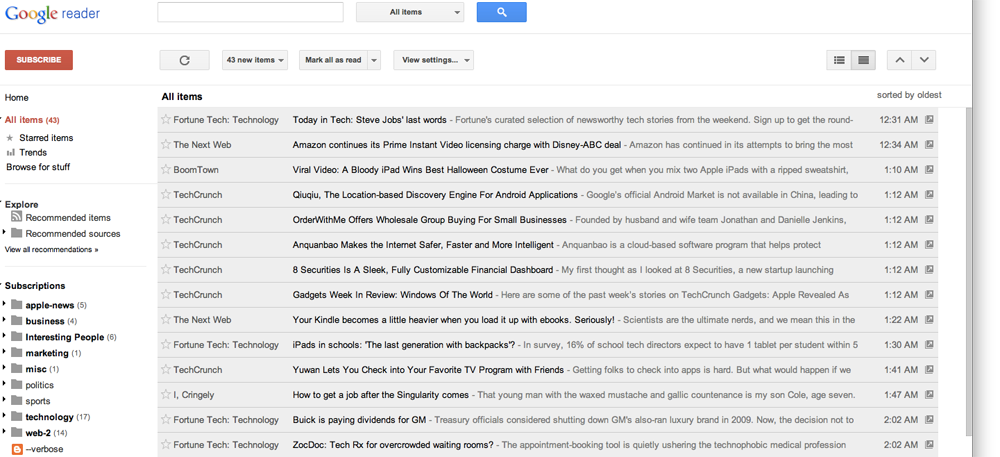
greader_1000

(Click for larger view)

The new sharing features might be good for Google Plus users – and it’s certainly good for Google, which is trying its best to build upon the early enthusiasm for Google Plus – but many hardcore Reader users, a group known as the Sharebros, are highly upset by the deletion of the old social functions, and have even launched a petition to save the old design and functionality. 

“Many of us have been faithful users of your Reader for years,” reads the petition, which was created by grad student Brett Keller. “It’s central to our daily information consumption routines…. Eliminating Google Reader or its features (like following friends’ shared items) is short-sighted because you will alienate some of your most loyal users, sparking a vocal backlash.”

The petition, which according to Mashable has now received more than 10,000 signatures, also states that the Sharebros see the new sharing features “as a backhanded attempt to force us to use Google Plus.” 

So, Google Reader users, what do you think? Is the redesign a welcome change, or simply a corporate plot trick users into contributing more to its flailing social network? Perhaps something in between? Let us know what you think in the comments.

Andrew Couts
Features Editor for Digital Trends, Andrew Couts covers a wide swath of consumer technology topics, with particular focus on…
The best free VPNs for 2026
The best free VPNs still come with compromises, but a few offer enough privacy and flexibility to be genuinely useful.
Proton VPN UI

A virtual private network (VPN) encrypts your internet traffic and routes it through a server run by the VPN provider. Websites see the VPN server’s IP address instead of yours, and you can get around geo-blocks, censorship, and ISP throttling. The best VPN services are paid, but there are still a handful of free options that do the job well. 

Most free VPNs come with a hidden cost, because running servers isn’t cheap and a company that doesn’t charge you has to make its money somewhere else. Many do so by logging your browsing activity and selling it to advertisers, while others flood you with ads and track you across apps. 

Read more
How to clear your browser cache in Chrome, Edge, Firefox, Safari, or Opera
A cluttered cache can slow you down and break websites, so here's how to clear it in every major browser in just a few seconds.
How to delete browser cache

A stocked computer cache may be convenient for logging into and out of go-to sites in seconds flat, but a major buildup of these tracking codes could significantly impact your PC’s performance. If you’ve noticed that your PC has been running rather slow of late, or you’re using a new browser and don’t know how to clear its cache, we’ve got you covered with the following guide.

Read more
How to find archived emails in Gmail and return them to your inbox
Archived emails in Gmail are easier to find than you think—once you know where Google hides them
Gmail icon on a screen.

If you’re looking to clean up your Gmail inbox, but you don’t want to delete anything permanently, then choosing the archive option is your best bet. Whenever you archive an email, it is removed from your inbox folder while still remaining accessible. Here’s how to access any emails you have archived previously, as well as how to move such messages back to your regular inbox for fast access.

Read more