This patent, titled “Configurable Force-Sensitive Input Structure for Electronic Devices,” was filed in September 2015 and was recently made available to the public on April 7. It states that this all-in-one input interface consists of a metal contact layer, and a sense layer combined with a drive layer mounted underneath. Other ingredients may include a rigid base layer under the drive layer, and a set of supports.
According to the patent, the sense and drive layers detect a force exerted on the metal contact layer. This is accomplished by using an array of pixels on the sense and drive layers that determine an input location when active pixels are aligned on both layers. The user then gets a response to his or her action thanks to a haptic feedback module and a light guide layer that lights up the “keys” through extremely tiny holes in the metal surface.
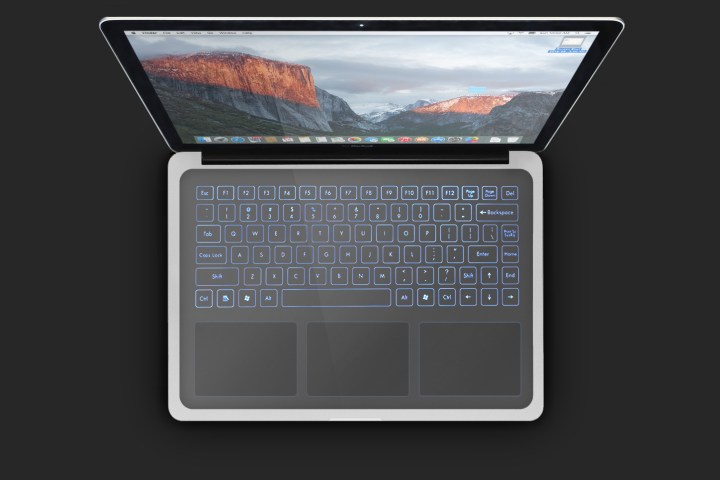
The components of the force-input sensitive “structure” are enclosed within the device’s chassis; thus the only exposed portion is the contact surface itself. For example, in a MacBook, that means you can open the device and see the touch surface that replaces the physical keyboard, touchpad, and palm rest. It sits flush with the base of the laptop, providing one entirely smooth, flat surface.

Related Offer: Now in two sizes, see the iPad Pro here.
In a provided drawing, the illustrated notebook shows four distinct input areas on the surface. However, the patent states that the device can have any number of input areas defined on the contact portion. For example, there could be one single input area spanning across the entire surface, or the touch input area could be divided up into two equally sized regions.
However, this touch-based input device isn’t limited to a MacBook.
“Although electronic device 100 is shown as a laptop computer, it is understood that electronic device 100 may be configured as any suitable electronic device that may utilize input structure 200,” the patent states. “In non-limiting examples, other embodiments can implement electronic device 100 differently, such as, for example, a desktop computer, a tablet computing device, a smartphone, a gaming device, a display, a digital music player, a wearable computing device or display, a health monitoring device, and so on.”
The patent is indeed interesting. In a MacBook scenario, owners could have a virtual keyboard positioned at the base of the screen, a virtual touchpad centered underneath in its usual location, and a virtual number pad programmed to the right. The keys would be “drawn” thanks to the super tiny holes (aka “micro-perforations”) in the surface that are illuminated by the LED layer underneath. The layout could thus change depending on the application the MacBook owner is currently using.
As this is a patent application, we may never see the resulting product. Again, using a touch surface spanning the entire base of a laptop may be awkward for customers who are used to pecking their fingers on physical keys. And while this solution will provide haptic feedback, it just may not feel the same as the real thing.
Editors' Recommendations
- The biggest threat to the MacBook this year might come from Apple itself
- Why you should buy a MacBook Pro instead of a MacBook Air
- The MacBook Air M3 has one change that fixes its biggest flaw
- MacBooks could soon fall behind the iPad Pro in this important way
- This one surprising laptop could actually challenge the MacBook Pro