  1. Home
  2. Computing
  3. Photography
  4. Legacy Archives

Beauty in the details: artist turns Google Maps into gorgeous Persian rugs

Add as a preferred source on Google
david_thomas_smith_google_maps
Image used with permission by copyright holder

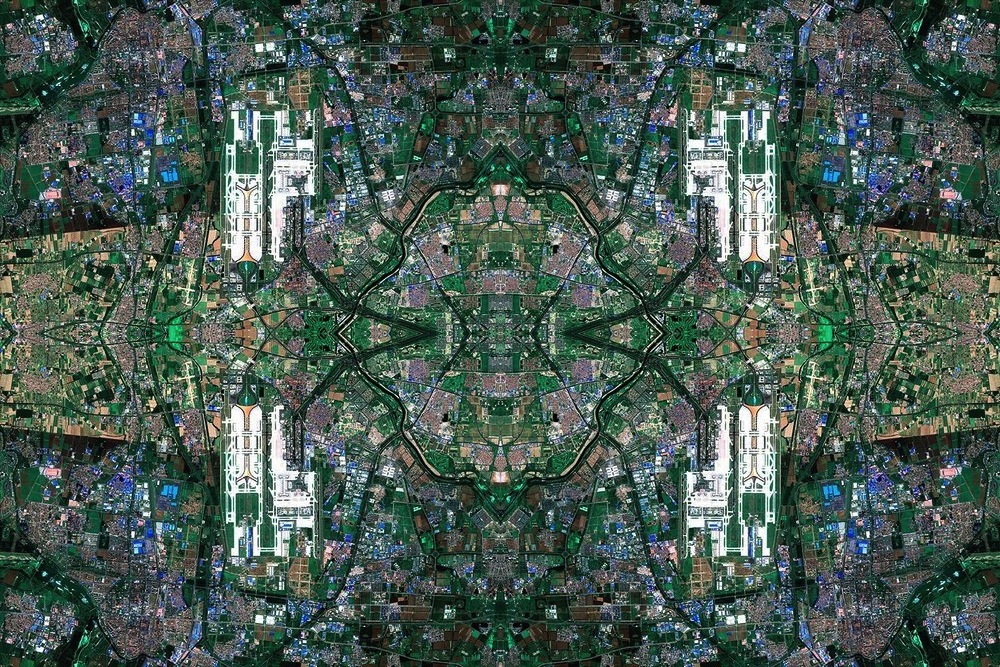
The carefully overlaid images of our world on Google Maps is an impressive sight even on the dullest computer screen, but one artist has taken Google’s documentation of Earth one step further … and the results are breathtaking. Dublin-based artist David Thomas Smith’s Anthropocene series is currently on display at the Copper House Gallery in Dublin and features notable locations reconfigured as striking Persian rug-like patterns woven together with images from Google Maps.

The results are astoundingly intricate and beautiful. Smith’s series features reconfigured images of Three-Mile Island, Las Vegas, Silicon Valley, and Beijing National Airport, as well as other notable locations. Each “rug” is made up of thousands of screen grabs of Google Maps and then reconstructed piece-by-piece with Photoshop. According to the gallery’s description of the project, “Anthropocene itself reflects upon the complex structures that make up the centres of global capitalism, transforming the aerial landscapes of sites associated with industries such as oil, precious metals, consumer culture information and excess. Thousands of seemingly insignificant coded pieces of information are sown together like knots in a rug to reveal a grander spectacle.”

google-map-rugs_dt
Image used with permission by copyright holder

Persian rugs date all the way back to 500 B.C. and are an important form of art and culture throughout the history of the Middle East, which makes it especially cool to see this centuries-old tradition combined with modern technology. In fact, we recently saw another artist who used computer parts to create rug-like sculptures, resulting in a colorful array of a PC’s internal organs. With Smith creating rugs with Google Maps, perhaps there’s a new trend of tech-influenced floor coverings on the way? 

[Images via Copper House Gallery]

Meghan McDonough
Former Contributor
Meghan J. McDonough is a Chicago-based purveyor of consumer technology and music. She previously wrote for LAPTOP Magazine…
Look, the MacBook Neo is a fine machine for building apps. And yes, I am utterly surprised
I am talking about apps with a generous dose of AI wizardry happening in the background.
MacBook Neo in yellow.

In a span of just one week, I have built a full-fledged Android app for my Galaxy Z Fold 8 foldable phone, three Mac apps, and an iPhone app. And here's the fun part. The entire journey of creating these apps actually started on a phone, jumped to my MacBook Neo, compiled just fine, and ran flawlessly, without making me want to tear my hair off. The latest example? 

It built my calendar-clipboard hybrid app in Terminal within 20 seconds, and an on-device transcription app with a retro look in roughly 15 seconds. I used to think building desktop software would have me burning the midnight oil. The MacBook Neo did it in less time than I can pour myself a can of soda and take the first sip. 

Read more
AI could be doing to our tolerance for hard work what social media did to our patience
Even brief AI use may make unaided work feel more frustrating once the help disappears.
ChatGPT on iPhone

It is no secret that social media, and especially the rise of short-form content, has played a major role in the declining patience many of us have for anything that takes too long to get to the point. A few seconds without something interesting happening is enough to make us swipe away and look for the next thing. AI appears to be doing something similar to the way we approach work.

A new peer-reviewed study found that people who used AI for around 10 to 15 minutes were more likely to struggle and give up once the AI was taken away. The researchers ran three randomized experiments with 1,222 participants who were given math and reading-comprehension tasks. AI helped them perform better at first, but their performance tanked once they had to solve the problems on their own.

Read more
Microsoft wants Copilot Notebooks to handle the work that comes after an AI answer
Built-in Office editing gives users somewhere to revise what Copilot produces
Copilot graphics

Microsoft is bringing Office editing into Copilot Notebooks through its Frontier preview. Users can work on Word, Excel and PowerPoint files alongside their project references, making changes themselves or asking Copilot to handle them.

Generating a report or presentation with AI still leaves someone responsible for getting it ready to share. The October update puts editing tools where that work begins, though having a document neatly formatted doesn’t make its contents correct.

Read more