  1. Home
  2. Computing
  3. Apple
  4. News

Evernote adds MacBook Pro Touch Bar support to simplify taking notes

Add as a preferred source on Google

Apple’s new MacBook Pro Touch Bar OLED touchscreen display continues to gain value as developers add support. Some of the most important creative applications already support the Touch Bar, and now productivity applications like Microsoft Office are taking advantage of the innovative input mechanism.

The latest productivity application to gain Touch Bar support is Evernote, one of the most popular note-taking and information management utilities on the market. Evernote’s developers took a little time to build Touch Bar support into their application, but the wait was likely worth it for devoted MacBook Pro users.

Recommended Videos

As with all applications that make good use of the Touch Bar, the focus is on making sure there’s a task-specific set of function keys that adapt efficiently to what a user is actually doing in the application. The ability to morph the function keys into task-specific buttons is at the heart of Evernote’s own efforts to provide relevant Touch Bar support, and that resulted in a “top-five” list of the most relevant functionality.

First up is the ability to use a single tap to create a new note:
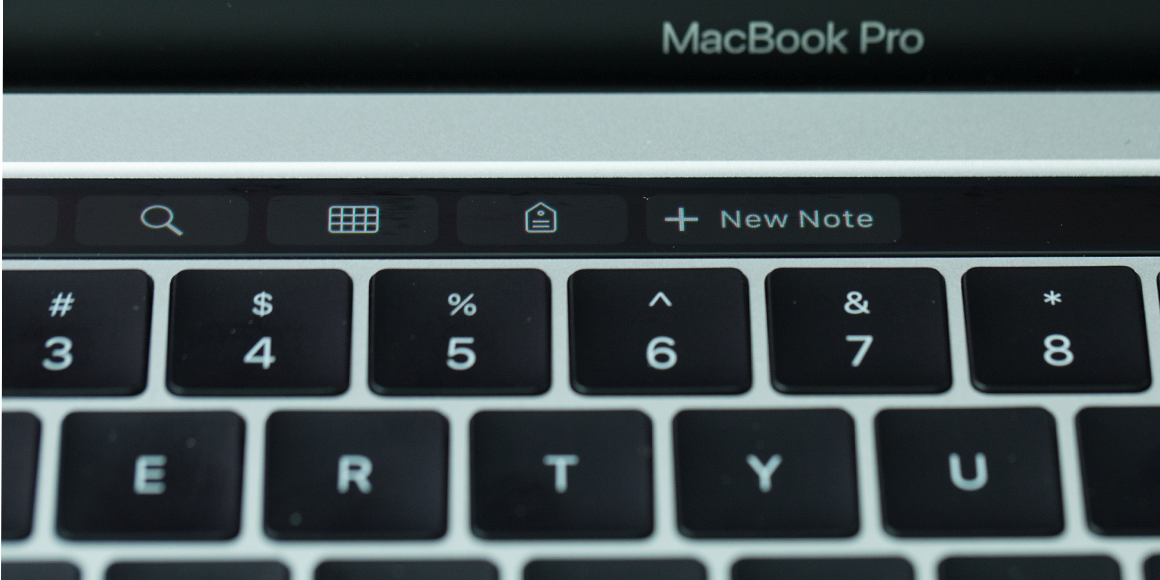
Image used with permission by copyright holder

Next, search functionality is enhanced with a simple way to kick off a new search:

Image used with permission by copyright holder

Tagging is also made significantly more efficient and intuitive with a note-specific list of available tags that can easily be scrolled to find the perfect one:

Image used with permission by copyright holder

The Evernote team also focused on making the color picker easier via the Touch Bar, by presenting a set of “crayon box” colors for customizing text, table borders, and table cells:

Image used with permission by copyright holder

Finally, Evernote users can more easily provide feedback to other users — or themselves, for future reference — with a set of annotation features provided via the Touch Bar. And Premium users can use the same set of tools for annotating attached PDFs:
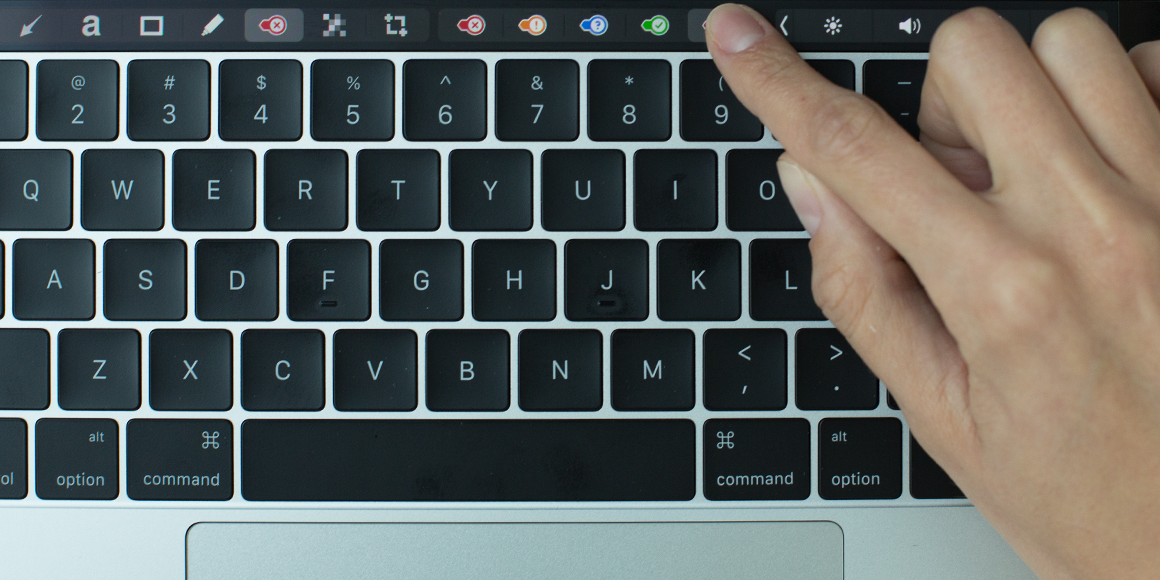
Image used with permission by copyright holder

You can check out more about the new Touch Bar support at the Evernote blog. If you haven’t already, head over to the Mac App Store and download the latest update to add in the new Touch Bar Evernote support.

Mark Coppock
Former Computing Writer
Mark Coppock is a Freelance Writer at Digital Trends covering primarily laptop and other computing technologies. He has…
Microsoft wants Copilot Notebooks to handle the work that comes after an AI answer
Built-in Office editing gives users somewhere to revise what Copilot produces
Copilot graphics

Microsoft is bringing Office editing into Copilot Notebooks through its Frontier preview. Users can work on Word, Excel and PowerPoint files alongside their project references, making changes themselves or asking Copilot to handle them.

Generating a report or presentation with AI still leaves someone responsible for getting it ready to share. The October update puts editing tools where that work begins, though having a document neatly formatted doesn’t make its contents correct.

Read more
Apple is reportedly giving the MacBook Pro a touchscreen and the iPad Mini a higher price tag
Apple might finally admit that touching a screen is useful on a laptop
A Macbook Pro sitting on a chair, illuminated with neon lighting.

Apple is preparing for a major Mac and iPad launch towards the end of October, with redesigned MacBook Pro models expected to take centre stage. According to Bloomberg’s Mark Gurman in his latest Power On newsletter, Apple is planning an event on or around October 27, where it could introduce touchscreen MacBook Pro laptops, updated Macs and a new iPad mini.

The launch could mark a significant shift for the MacBook Pro, which is reportedly getting its most substantial redesign in years. Apple had initially targeted a late-2025 release for the touchscreen laptop, but development priorities and supply-chain delays pushed the launch back. The new models are now said to be ready for their debut.

Read more
ChatGPT’s yes-man era may finally be coming to an end
ChatGPT is learning that agreeing with everything you say isn’t always helpful
ChatGPT

OpenAI says it is making progress in reducing a troubling behaviour in ChatGPT: the tendency to agree with users too readily, even when their beliefs may be false or harmful. The improvements come as researchers and mental-health professionals raise concerns about prolonged chatbot conversations reinforcing delusions, encouraging unhealthy dependence and failing to direct vulnerable users towards human support.

According to a report by The Wall Street Journal published on October 10, OpenAI’s older GPT-4o model was associated with several reported cases of serious harm following lengthy interactions. The report cited at least seven suicides, one murder-suicide and one mass shooting linked to extended ChatGPT conversations last year, while noting that other AI models were implicated in some cases. These reported associations do not, by themselves, establish that chatbot use caused each incident.

Read more