  1. Home
  2. Computing
  3. News

HP’s new 27-inch 4K desktop monitor packs USB Type-C port to charge devices

Add as a preferred source on Google

In October, HP used Microsoft to reveal the HP Envy 27 desktop monitor as part of its fall lineup. It was slated to arrive on December 4 with a starting price of $500 packing a 4K resolution and support for AMD’s FreeSync technology. It’s now listed on HP’s website to purchase directly from the company with an optional six-month payment plan for qualifying customers.

Here are the specs:

Recommended Videos
Screen size: 27 inches
Panel technology: IPS
Native resolution: 3,840 x 2,160 @ 60Hz
Contrast ratio (static): 1,300:1
Contrast ratio (dynamic): 10,000,000:1
Brightness: 350 nits
Pixel pitch: 0.1554 millimeters
Response time: 14 milliseconds
Aspect ratio: 16:9
Color gamut: 99 percent sRGB
Ports: 1x HDMI 1.4
1x HDMI 2.0
1x DisplayPort 1.2
1x USB Type-C (up to 60 watts)

For starters, the display is based on In-Plane Switching technology (IPS), a newer panel tech that offers brilliant colors and wide viewing angles. By comparison, the older Twisted Nematic (TN) technology has been around for a long while, and is best known for its brightness levels and fast response times. That leads us to the new panel’s 14ms response time, which is surprisingly slow compared to most other models on the market. This is the time it takes a pixel to go from white to black and back to white again.

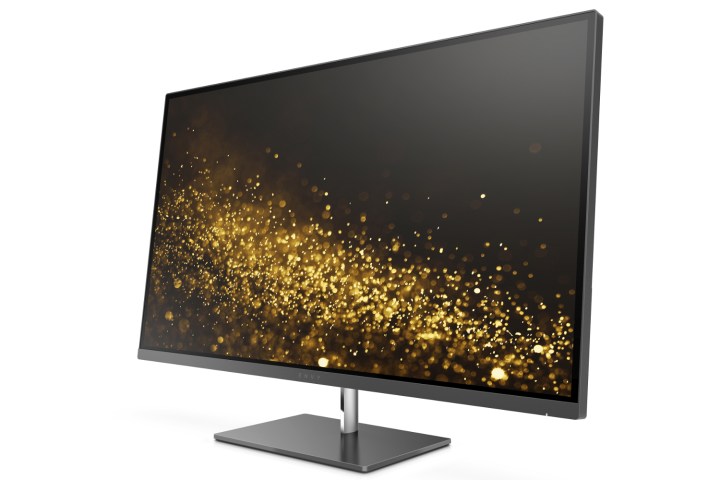
HP Envy 27 Display
Image used with permission by copyright holder

The FreeSync aspect means it’s great for PCs packing an AMD Radeon graphics chip. To better understand what it’s for, consider that the video output of a graphics card generates a number of frames per second (FPS). Likewise, the display flashes a number of frames per second as well (refresh rate). With FreeSync technology, the output of the Radeon graphics card is synchronized with the refresh rate of the display so that when framerates drop or rise, the display’s rate drops and rises too. That provides a smooth viewing experience, eliminating screen tearing and stuttering.

As the specs show, HP’s new panel provides a USB Type-C port for generating up to 60 watts of power to a PC or mobile device. Other notable features include a micro-edge design to provide more screen and less bezel, and support for millions of colors to present crisp, brilliant images in a 4K resolution. The panel doesn’t appear to be served up with any HP-specific features such as what we see crammed into other brands, providing a simple plug-and-play solution. However, it does come with a disc packing drivers.

Here is what comes in the box:

  • 1x power cable
  • 1x HDMI cable
  • 1x DisplayPort cable
  • 1x USB Type-C cable
  • VESA mount adapter
Kevin Parrish
Kevin started taking PCs apart in the 90s when Quake was on the way and his PC lacked the required components. Since then…
Everything Apple announced at its September event: iPhone Duo, iPhone 18 Pro, new Apple Watches, and AirPods 5
Apple packed its biggest September event in years with a foldable iPhone, new watches, and smarter AirPods.
Computer, Electronics, Tablet Computer

The "Surprise and Shine" September launch event was one of Apple's crispest, most elaborate, and most loaded launch events in a while. Instead of leaving the minute details in the spec sheet or fine print, Apple actually included them in its keynote presentation, not just for its big reveal but for all the devices it unveiled on September 9, 2026. 

While the 'Surprise' bit was covered by the new iPhone Duo, 'Shine' probably refers to the new colors in the iPhone 18 Pro lineup. Beyond these, Apple also announced two new Apple Watches and a refresh for the regular AirPods (not the Pro ones). Given that there's a lot of ground to cover, here's everything Apple announced at its September 2026 event. 

Read more
Before You Pay More for DDR5, Think About How Much Memory You Need
The MSI Cubi 5 1MA makes a strong case for looking beyond the newest specs
MSI Cubi 5 1MA compact mini PC with Intel Core processor

There is an easy trap to fall into when buying a new PC. The newer specification usually sounds like the better one, so choosing DDR5 memory over DDR4 can seem like an obvious upgrade. But with memory prices climbing to unusually high levels, it is worth asking whether you will actually benefit from paying more for that extra speed.

For many people buying a PC primarily for work, the answer comes down to how they use it. Everyday tasks such as browsing, email, spreadsheets, presentations, and video calls generally do not need the extremely high memory bandwidth DDR5 offers. Having enough RAM to keep several of those tasks running comfortably can be far more relevant.

Read more
Adobe Acrobat’s latest update could make working with PDFs considerably easier
New Acrobat features make it easier to understand, refine and present information in PDFs
Page, Text, Clapperboard

This post is brought to you in paid partnership with Adobe

PDFs remain one of those unavoidable parts of working life. Reports, research papers, presentations, proposals, financial documents and client material still tend to arrive as PDFs, and the real problem is rarely opening or reading them. It is dealing with everything that comes after: finding the useful information in a lengthy document, understanding it quickly and eventually turning it into something presentable.

Read more