  1. Home
  2. Audio / Video
  3. News

Spotify’s new Page Match feature can now sync your audiobooks with physical books

Scan a page from paper book and pick up your audiobook exactly where you left off

Add as a preferred source on Google
spotify-page-match-feature
Spotify

Spotify has launched a new feature called Page Match that lets readers move seamlessly between a physical or ebook and its audiobook. This feature builds upon the existing audiobook Recaps feature, which gives a quick audio summary to pick up from the section where you left off.

Page Match aims to solve a familiar frustration for readers who like to switch formats but keep losing track of the last page they read. Now, you can pick up a book, scan a page, and Spotify takes you straight to the matching moment in the audiobook.

How Spotify’s Page Match feature works

To use Page Match, open the Spotify mobile app and search for the book you are currently reading. Inside the audiobook listing, you tap the Page Match button, which activates your phone’s camera.

Recommended Videos

You then scan a page from your physical book, and Spotify analyzes the text on that page and matches it to the same section in the audiobook, starting playback from the correct spot.

The feature also works in reverse. If you have been listening to an audiobook and want to switch back to reading, Page Match can guide you to the exact page where you left off. In practice, matching a page to the audiobook is fairly straightforward. However, switching back from audio to print can be trickier.

Early use by The Verge shows that finding the exact page from audio is not always smooth, especially if editions differ. In some cases, it can mean flipping back and forth through pages and overshooting the right spot before settling in.

Even with those rough edges, Page Match highlights Spotify’s effort to make audiobooks feel more connected to traditional reading, especially for people who regularly move between formats throughout the day.

The music streaming giant has been rolling out a steady stream of updates lately to improve user experience. Just yesterday, Spotify announced offline lyrics with translation support and it has also been leaning on AI to reshape how podcast discovery works on the platform. With Page Match now joining the list, Spotify feels more intuitive across music, podcasts and books.

Manisha Priyadarshini
Manisha Priyadarshini is a tech and entertainment writer with over nine years of editorial experience.
TCL built a 22-speaker soundbar for turning living rooms into movie theaters, but it’s skipping the US
Here's everything inside TCL's new flagship Q95K soundbar, from its Bang & Olufsen tuning to its 360-degree sound tech.
Electronics, Speaker, Home Theater

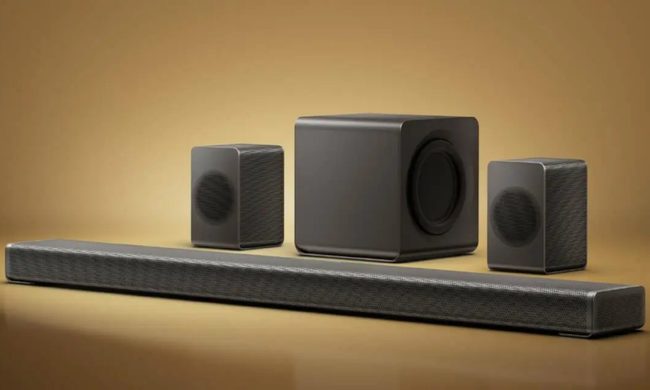
I've used enough soundbars to know most "360-degree audio" claims are marketing fluff dressed up as innovation. TCL's new flagship might actually have the hardware to back that claim up for once.

The Q95K is TCL's new flagship soundbar. It's built around an 11.1.4 channel Hi-Fi architecture and tuned in collaboration with Bang & Olufsen. To me, it sounds like a serious attempt to compete with premium home theater setups.

Read more
Lenovo brings Bose-tuned Yoga headphones to the US and they don’t cost a fortune
Lenovo has a sub-$200 Bose-tuned headset for anyone glued to a Yoga laptop
Electronics, Headphones

Lenovo is entering the crowded noise-cancelling headphone market with a pair priced just a penny shy of $200. Called the Headphone Yoga PC Edition, they combine Bose-tuned audio, ANC, and a design built to complement the company’s Yoga laptops.

Initially announced at CES 2026, the Cosmic Blue version is now available directly from Lenovo in the US. The headphones are designed to complement Yoga PCs, although Bluetooth 5.3 and a 3.5mm input allow them to work with phones, tablets, and computers from other brands.

Read more
Stop joining group projects with a blurry laptop webcam and buy one of these instead
Your laptop webcam is sabotaging your first impression. These five can fix it
I'm holding my Logitech C920 1080p webcam in my hands.

The webcam built into your laptop might be good enough for a quick call with friends and family. But its shortcomings become much harder to ignore when you are presenting a semester project, interviewing for an internship, or maybe if you're planning to stream for fun.

Laptop cameras also tend to sit far too low, especially when the computer is placed directly on a desk. Meanwhile, a dedicated webcam lets you position the camera closer to eye level. This improves the framing and brings larger sensors, better microphones, and more effective low-light processing.

Read more
