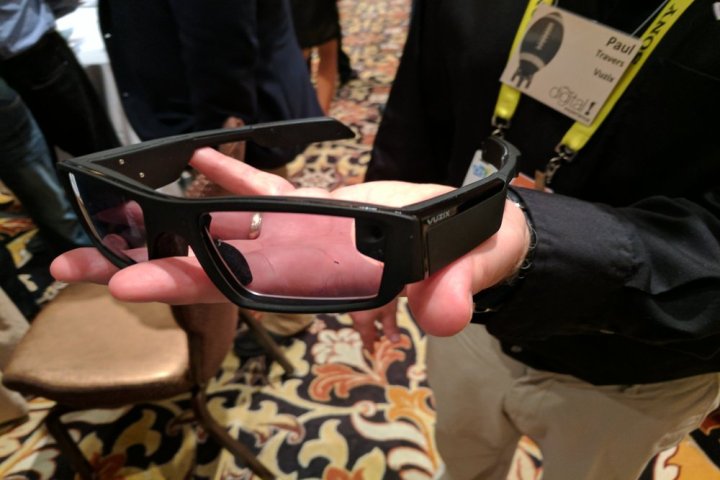
The Blade 3000, true to its utilitarian name, looks a little like a bulked-up pair of protective eyeware. But in execution, it recalls Google Glass. A tiny projector embedded in the Blade 3000’s side powers a display affixed to the right lens, driven by a quad-core Intel Atom processor. An internal 64GB storage module (expandable via MicroSD card) files away the Blade 3000’s software and apps, and a Bluetooth 4.1 chip provides connectivity.
Myriad sensors, meanwhile, track the wearer’s gaze and location. The Blade 3000 sports a built-in GPS and directional sensors including a gyroscope, accelerometer, and hull sensors. And a touchpad, replete with haptic feedback in the form of vibration, handles navigation, as does a built-in noise-canceling mic capable of voice recognition.
After trying on a pair of Blade 3000, this Digital Trends reporter came away impressed. The projected image — a demo video — appeared sharp and clear as it played in a loop. The lenses, which Vuzix says will eventually ship alongisde interchangeable lenses including prescription inserts, colors, and UV protection, were comparable to an off-the-shelf pair of sunglasses. And its trackpad responded quickly to both swipes and taps.
The Blade 3000’s software is firmly in the prototype stages, but Vuzix CEO Paul Travers showed an early demo of the Blade 3000’s menu — basically a horizontal scroll of app icons. The finished product will boast the ability to take calls, check messages, listen to music, perform web searches, serve up calendar alerts, text contacts, and post content to social media.
The software possibilities are virtually endless, Travers said. A fitness app could serve up activity tracking stats like distance and calories. A navigation app could provide turn-by-turn heads-up directions. And a directory app could overlay reviews atop real-world businesses.
But the Blade 3000’s social implications could put a dampen development. Google Glass, Google’s eponymous attempt at a heads-up AR display, became the subject of controversy as a result of its built-in camera, which privacy advocates said provided a surreptitious means to record subjects without their knowledge. Google Glass was banned from shops, bars, restaurants, and more before the search giant pulled the plug on public sales in 2014. Despite the popularity of Snapchat’s augmented reality Spectacles, it remains to be seen if the broader public’s comfortable with the idea of always-on electronic glasses.
The Blade 3000’s success rides, too, on the willingness of developers to support it. The hardware limitations of Google Glass led developers to abandon development for the platform.
That’s why Vuzix is taking an alternative launch approach. It will engage businesses and enterprise when the Blade 3000 launches later this year, and doesn’t have concrete plans to launch a consumer version — an approach with which Google found success. The search giant’s enterprise Glass for Work program saw General Motors workers tested the device on production line and med students at UC Irvine used the augmented reality glasses to watch surgical procedures from the view of the surgeon in charge.
It will likely have competition. Google is reportedly developing as many as three Glass-like devices “without displays,” including one targeted at enterprises, and debuted an improved model with an improved battery, support for faster wireless, and an external battery pack
Editors' Recommendations
- CES 2023: These 38-gram smart glasses aim to make AR practical
- Apple’s smart glasses could feature futuristic projection tech
- Apple Glass may be coming soon. Here’s everything we know
- Google Pixel 4 box hides augmented reality Easter egg: Here’s how to find it
- Patent suggest Apple may have solved major issue with augmented reality glasses