
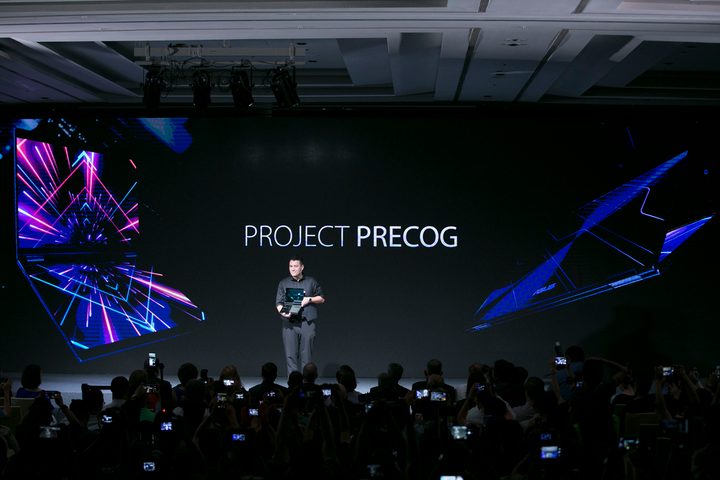
Asus introduced a concept design called Project Precog during the Computex technology show in Taiwan. It seemingly borrows Lenovo’s Yoga Book design to create an artificial intelligence-powered dual-screen 2-in-1 PC on a larger scale. But unlike the Yoga Book, the second screen can be used for more than just a touch-based keyboard and drawing pad.
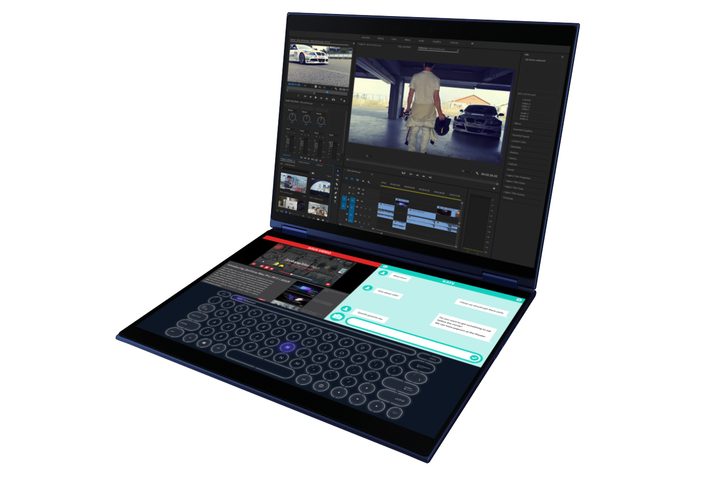
Unfortunately, Asus isn’t indulging us with the hardware specifics, given Project Precog is still a prototype design. What we do know is that the 2-in-1 sports a 360-degree hinge enabling four modes: Stand, book, tent, and flat. Since there is no physical keyboard and touchpad, the second screen can provide those inputs, depending on your current needs.
“Intelligent Touch automatically recognizes the input device you’re using and changes the virtual interface accordingly,” the company says. “It can automatically adjust the keyboard location depending on where you place your fingertips, or automatically switch to stylus mode when a stylus touches the lower screen.”
That fingertip detection aspect stems from Intel’s Movidius Myriad 2 vision processing unit, an always-on ultra-low power vision processor that accelerates machine vision tasks. In other words, the embedded camera in Project Precog can see where your hands are placed, understand what it is viewing, and tell the operating system where it needs to render the keyboard without consuming loads of battery power.
According to Asus, if you have a mouse plugged into the device, Project Precog won’t render a touchpad on the lower display. Instead, the virtual keyboard shifts down toward the front for easy typing while the space above the keyboard could be used to display two app windows rendered side by side. If you attach a keyboard, Project Precog will remove the virtual version altogether for a full two-screen experience. Want to play a game? Lay Project Precog flat on a table and use both screens as well.
“With support for the Windows Cortana and Amazon Alexa voice services, users can get more done with the power of their voice,” Asus says. “The dual-screen design of Project Precog lets users keep their main tasks in full view while virtual assistants process other tasks on the second screen.”
Given Project Precog sports two displays, battery drainage is definitely a concern. How long will a single charge last? The 2-in-1 will supposedly optimize its battery use depending on the time of day, which likely stems from the Myriad 2 vision processer and how the 2-in-1 learns your daily input schedule. According to Intel, this chip “provides a way to combine advanced vision applications in a low power profile.”
Again, that is all we know about Project Precog for now. Asus is calling on developers to create A.I.-based applications that take advantage of the dual-screen design. The company doesn’t plan to offer a full-fledged product for the masses until sometime in 2019.
In addition to Project Precog, Asus introduced new ZenBook and VivoBook-branded notebooks, the Zen AIO 27 desktop, two routers, a mesh networking kit, two desktop displays, and more during the Computex show in Taiwan.



