Intel’s first foray into the world of modern graphics cards did not exactly go smoothly, with numerous delays and problems besetting its Arc Alchemist GPUs. Now, there’s more bad news for the company, as it seems its GPU plans for 2023 and 2024 have leaked in their entirety.
The leak comes from YouTube channel RedGamingTech, which claims to have discovered Intel’s official roadmap for its discrete graphics cards.
And that leak spills the beans on Intel’s upcoming Battlemage GPUs, which will be aimed at much more demanding users than the company’s existing Alchemist cards.
The leaked slide contains references to two different GPUs: BMG G10 and BMG G21. BMG G10 will have a TDP rating of under 225 watts and launch a little way into the second quarter of 2024, while BMG G21 will offer a TDP under 150W and release halfway through the second quarter of 2024. BMG G10 is classed as a top-end “Enthusiast” GPU by Intel, while BMG G21 is a “Performance” card, which sits one tier lower.
RedGamingTech also leaked a second slide that contained a more detailed breakdown of Battlemage’s expected features. That includes the Xe2-HPG architecture, a next-gen memory subsystem and compression, and improved ray tracing. There will also be improvements to the cards’ micro-architecture, machine learning rendering tech, and Deep Link capabilities.
Arc Alchemist gets a refresh
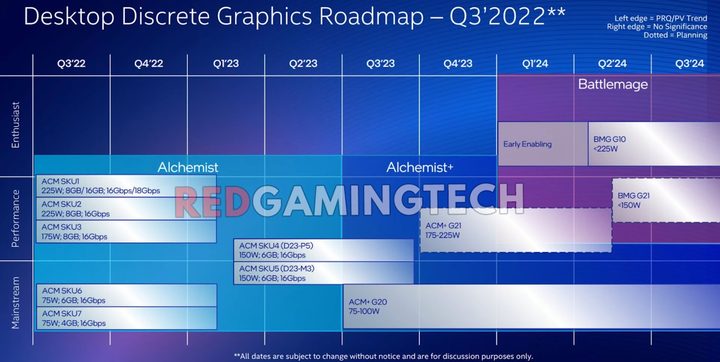
Interestingly, the road map seems to confirm previous rumors that Intel was looking to refresh its Arc Alchemist line-up in the coming months. That’s because it contains references to “Alchemist+” cards, including two distinct SKUs: ACM+ G20 and ACM+ G21.
According to the roadmap, ACM+ G21 looks to be a relatively high-end graphics card, with a TDP rating of 175-225W. Intel has placed it within the Performance bracket in the roadmap, wedged between the Mainstream and Enthusiast tiers. The ACM+ G20, meanwhile, is apparently rated at 75-100W TDP, placing it more at the entry-level end of the spectrum.
The ACM+ G21 is due to launch in the fourth quarter of 2023, according to the leaked slide. The ACM+ G20, on the other hand, is due out in the third quarter of 2023.
That’s not all Intel has planned for Alchemist, though. The roadmap also contains references to ACM SKU4 (D23-P5) and ACM SKU5 (D23-M3). Both are set to come with a 150W TDP rating and 6GB of memory. The former sits at the low end of Intel’s Performance bracket, while the latter is at the high end of its Mainstream tier.
The question is how well these cards will be able to compete against the best graphics cards from Nvidia and AMD. Will Intel be able to claw away market share when these cards release this year and next? Only time will tell.