Sometimes, people think it’s the big, headline features — like Apple Intelligence — that make an operating system great. But there’s one new feature in macOS Sequoia that shows the opposite is true — that a collection of less glamorous, yet meaningful changes can have a much bigger impact.
I’m talking about Apple’s new iPhone Mirroring feature. Or rather, one particular element of iPhone Mirroring: its new drag-and-drop ability. Even in the few short days it’s been available, it’s managed to improve my daily workflow and fix an issue that’s been bugging me for years.
Apple’s iPhone Mirroring was one of the best features announced at Apple’s Worldwide Developers Conference (WWDC) earlier this year. It lets you access a mock-up of your iPhone on your Mac’s desktop, and gives you the ability to open and interact with apps, type into your iPhone, and more.
But its most exciting element — drag-and-drop — has been absent from all macOS Sequoia and iOS 18 betas. Now, though, it’s available in the macOS 15.1 and iOS 18.1 developer beta 5, which means I’ve finally been able to try out something I’ve been looking forward to since June.
The long-awaited solution
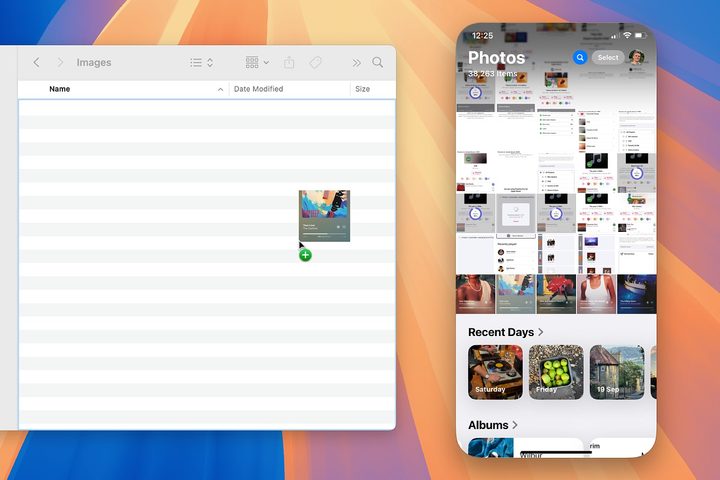
I take a lot of screenshots for work, whether they’re to create tutorials or to illustrate stories I’m writing. Day to day, I’ll often use either Dropbox or AirDrop when sharing work images from my iPhone to my Mac or PC, and that process functions well enough for the most part.
Yet these methods have their own issues, and neither one has ever really proved to be a satisfying solution. Dropbox is cumbersome and involves retrieving the file from my Dropbox folder before moving it to wherever it needs to go. AirDrop, meanwhile, opens the file that has been shared, which isn’t always what I want and means I have to take the extra step of repeatedly closing shared files. It’s a small annoyance that builds up over time.
I’ve been wanting a better solution for years, and iPhone Mirroring’s drag-and-drop could be just what I’ve been looking for.
With iPhone Mirroring’s new drag-and-drop functionality, I can simply drag screenshots from my iPhone’s Photos app right into my work folder. There’s no need for any extra steps or annoying workarounds. In Apple’s parlance, it just works.
And iPhone Mirroring has another trick up its sleeve compared to Dropbox and AirDrop: you can move images directly into an app you want to use. So, let’s say I want to adjust some of those work screenshots before publishing them — I can just transfer them directly from my iPhone into an Adobe Photoshop document, ready for editing. It doesn’t get much more seamless than that.
Not without its problems
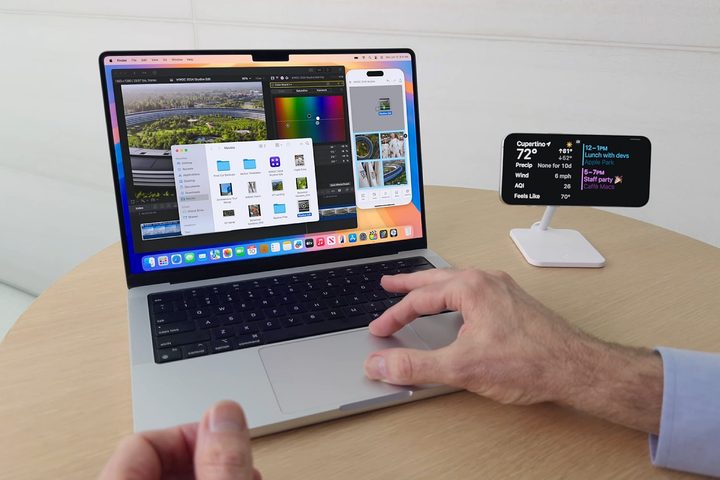
All that said, iPhone Mirroring isn’t perfect. The main problem is that your iPhone must be locked to be accessible from your Mac. That can be annoying if, say, I take a screenshot and want to instantly share it onto my Mac.
Instead, I need to take a screenshot, lock my iPhone, share the image, then repeat. While I could just move all the images in bulk once I’ve finished taking them, if I have to take lots of screenshots and move them all to different places on my Mac, the process gets a lot more tiresome. I get why my phone has to stay locked — the point of iPhone Mirroring is to use your phone when it’s not right next to you, so you want to ensure no one can sneakily access it when your back is turned — but that means it comes with a few hitches like the one I just described.
I haven’t really used iPhone Mirroring in the way Apple demonstrated at WWDC — that is, dropping a file from my Mac into an app on my iPhone. While I think this is a neat implementation, it doesn’t really fit my workflow. I do most of my serious work on my Mac or PC, not my iPhone, so I’m mostly moving files off my phone and onto my computer. Still, I can see how it will be a fantastic tool for a lot of people.
Regardless, iPhone Mirroring’s drag-and-drop feature has still managed to solve a long-standing issue I’ve had when it comes to shifting files between my Mac and my iPhone. In the end, it’s impressive that such a small addition to iPhone Mirroring can make such a large, positive difference to my day.