“The Asus RT-N16 has some great features, including one of the best user interfaces we’ve seen in a wireless router.”
- Extremely fast at close range
- Very good user interface
- External storage and printer-sharing capabilities
- Supports Wi-Fi Protected Setup
- Slower than competing routers when covering longer distance
- No guest network
- Two USB ports needed to power external hard drive
- Can’t share a multifunction printer’s scanner or fax functions over the network
- No UPnP media server
“Why you can trust Digital Trends – We have a 20-year history of testing, reviewing, and rating products, services and apps to help you make a sound buying decision. Find out more about how we test and score products.“
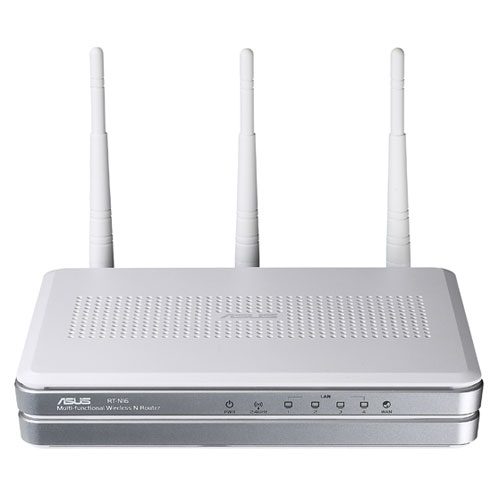
Introduction
Asus’ RT-N16 wireless router boasts a raft of advanced features, including USB storage and printer sharing, an integrated ftp server, and Quality of Service (QoS) settings for prioritizing your network’s traffic flow. And unlike with most routers, you don’t need to be a networking geek to make the most of all this: Asus has developed an excellent graphical user interface (GUI) that renders everything very easy for a novice (as long as you don’t mind fractured English translations). The RT-N16 is also incredibly fast, at least at close range; it’s much less impressive at a distance. However, this device also has a few shortcomings that temper our enthusiasm and hold us back from giving it a stronger recommendation. Click onward to find out more about its pros and cons.
Features
This is a single-band 802.11n router with a radio that operates on the 2.4GHz frequency band. That’s fairly typical for routers in this price range; unlike many of its competitors, though, the RT-N16 doesn’t offer the option of operating a guest wireless network. Having a guest network makes it easy to provide friends, family, and other visitors Internet access without opening the door to your entire network.
The router has two USB ports and firmware that renders it capable of sharing both a USB printer and an external storage device on the network. But we discovered two significant limitations during testing: When we plugged a multifunction printer into one of the router’s USB ports, we had no trouble printing from each of the computers on our network; we needed only to install the drivers on each machine and we were ready to go. But we couldn’t access the device’s scanner function from any of the PCs on our network.
We then plugged a Western Digital Passport USB hard drive into the router’s second USB port to test its network-attached storage functionality. The router supports NTFS-formatted drives, so it had no problem with this one’s 250GB capacity, but it could not deliver enough juice from one USB port to spin up the drive. A two-headed USB cable solved that problem, but only at the expense of the router’s printer-sharing feature. Although you can access media from an attached hard drive, there is no UPnP media-server support (don’t let the presence of a prominent UPnP button in the user interface fool you. We tested the router using Microsoft’s Internet Connectivity Evaluation Tool and then confirmed this with Asus).
Other than that, Asus’ GUI is very good. Most router manufacturers pay very little attention to their router’s configuration software. They’ll typically provide an installation wizard on the CD that simplifies the process of pairing the router to your DSL or cable modem and then helps you establish wireless security, but that’s about it. Delve into the router’s inner workings to tweak its advanced features and you’ll find yourself in a parallel universe of technobabble. Asus’ use of point-and-click icons makes it easy to configure this router’s advanced settings—although you’ll probably chuckle at garbled translations like this from the QoS menu: “Click the Internet application and make the application remain the high priority even the network is busy.”
Asus also makes it extremely easy to share files stored on USB hard drive over the Internet. Simply click the AiDisk icon, create a user account, set up a custom ftp address using Asus’ own DDNS (dynamic domain-service system), and you can make it easy for friends and family to download digital photographs and other files stored on your USB hard drive.
Performance
We set up the RT-N16 for maximum real-world performance by configuring it to serve only 802.11n clients, enabling channel bonding, and activating WPA2 security with AES encryption. We then installed an Asus USB-N13 Wi-Fi adapter in a notebook client and linked the two using WiFi Protected Setup (WPS). WPS enables you exchange passwords by running a software application on the client (some adapters have a dedicated button for this purpose) and pushing a button on the router. This enables you to create passwords that are nearly impossible to break, and you don’t have to memorize them or write them down.
The USB-N13 Wi-Fi adapter, incidentally, has some pretty slick features of its own, including the ability to operate as a soft wireless access point (AP). Establish a hardwired Internet connection on your notebook, and then you can Asus’ USB adapter to act as a wireless access point that other PC’s can connect to, allowing your to share your Internet connection with friends or colleagues. There’s one big catch, however: When acting as an AP, the USB-N13 supports only WEP (Wired Equivalent Privacy), a weak encryption scheme that is very easily cracked.
We used WiFi Protected Setup and the J/Perf benchmarking tool to measure TCP/IP throughput at three locations inside a custom-built 2,800 square-foot home and at three locations outside it. (You’ll find a more detailed description of our test environment in our Netgear’s WNDR3700 review.) With the client 20 feet from the router, we achieved extremely fast TCP/IP throughput of 120 megabits per second (Mb/sec). That’s faster than any router we’ve tested at that location to date, including the aforementioned Netgear and the Linksys WRT600N.
Throughput dropped off rapidly as we moved the client further away from the router. At our second indoor location, 60 feet from the router, TCP/IP throughput dropped to 27.8 Mb/sec. For the sake of comparison, Netgear’s WNDR3700 achieved throughput of 38.3Mb/sec here. The Asus router’s throughput sputtered along at just 8.8 Mb/sec when we moved into our heavily insulated media room, compared to 41.8Mb/sec for the WNDR3700. The RT-N16 achieved better performance when we moved to our outdoor patio, mustering TCP/IP throughput of 32Mb/sec, but the WNDR3700 managed a far superior 55.2Mb/sec in the same location. The Asus router, meanwhile, just barely managed to remain connected to the client when we moved further out into the yard, producing throughput of less than 1Mb/sec and dropping the connection altogether during our final outdoor test.
Conclusion
The Asus RT-N16 has some great features, including one of the best user interfaces we’ve seen in a wireless router. It’s a speed demon at close range, too—delivering the fastest TCP/IP throughput we’ve recorded with the wireless client located 20 feet from the router. Once we moved the client further from the router, though, it proved to be much slower than several competing routers we’ve tested. And even though the router has two USB ports, Asus effectively forces you to make an either/or choice when it comes to hosting a hard drive or printer, because you’ll need both ports to power a disk drive (a flash drive shouldn’t be a problem, but those offer much less capacity). Should you forgo the drive in favor of a printer, you’ll have to give up a multifunction printer’s scanning and faxing capabilities in order to share it on the network (unless the printer has networking capabilities of its own, of course). All told, it’s a promising sell, but does have its hiccups.
Pros:
• Extremely fast at close range
• Very good user interface
• External storage and printer-sharing capabilities
• Supports Wi-Fi Protected Setup
Cons:
• Slower than competing routers when covering longer distance
• No guest network
• Two USB ports needed to power external hard drive
• Can’t share a multifunction printer’s scanner or fax functions over the network
• No UPnP media server