  1. Home
  2. Mobile
  3. Legacy Archives

Motorola Citrus: Android, Eco-friendly, and $50 on Verizon Wireless

Add as a preferred source on Google

There might be a lot of people in the world willing to pay top dollar for an Android smartphone, but there are plenty of other people who…, well, aren’t. Verizon Wireless is reaching out to the cost-sensitive with the Motorola Citrus, what can be described as an entry-level Android phone that covers all the basics and costs just $49.99 after a $100 mail-in rebate with a two-year customer agreement. The price point doesn’t make the Citrus the least expensive Android-powered handset available—for the moment, that’s the Comet on T-Mobile—but it may ease the pain for users looking to upgrade from a simple feature phone into the world of apps.
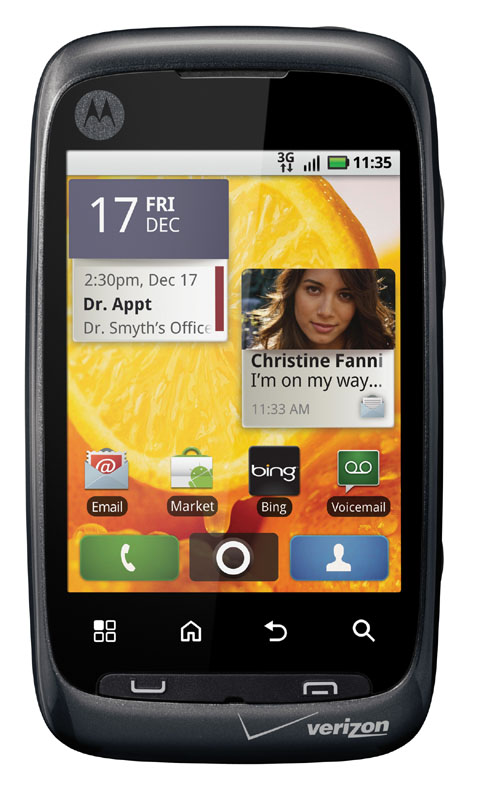
Image used with permission by copyright holder

The Motorola Citrus runs Android 2.1—no word on whether Android 2.2 is in the wings—with a 3-inch touchscreen display with a meager 320 by 240-pixel resolution. The Citrus also features a video-capable 3 megapixel camera, 802.11b/g and Bluetooth wireless networking, assisted GPS for location-aware applications, full HTML Web browsing and (of course) access to the Android Market, and a virtual QWERTY keyboard for messaging and mail. Motorola touts the Citrus as an eco-friendly phone: the case is made from 25 percent post-consumer plastics, free of BFRs and PVC, and the device is certified “CarbonFree” through an alliance with Carbonfund.org.

Recommended Videos

Of course, folks attracted by a $50 post-rebate price on the Citrus need to consider the cost of smartphone plans: even Citrus customers will need to subscribe to a Verizon calling plan (those start at $39.99 a month) and a data plan (starting at $14.99a month for 150 MB). Over two years, even Citrus customers will be paying Verizon Wireless over $1,300 for service, making that extra $100 or $150 saved up front on the phone seem a little inconsequential. The Citrus might be an ideal phone for some people, but consumers willing to set down that kind of money for a device ought to at least get one they can enjoy.


Geoff Duncan
Former Contributor
Geoff Duncan writes, programs, edits, plays music, and delights in making software misbehave. He's probably the only member…
The best note-taking apps for iOS and Android
I tested these apps for months so your notes never have to switch homes again.
iPhone showing note-taking apps

Choosing a note-taking app is not easy. What note-taking app you choose depends on your needs, the platform you use, and of course, the cost. The process becomes even more complicated as it seems that there’s a new shiny app released every other week. 

That’s why I always suggest choosing a note-taking app that has all the features you need and can last you for a long time. Also, don’t chase new apps. The real power of a note-taking app comes when all your notes live in one place, making it easy to spot connections between them.

Read more
The best phones in 2026: our 14 favorite smartphones right now
We tested phones across all price brackets so that you can make the best pick based on your needs and budget.
Google Pixel 10 Pro Fold vs Galaxy Z Fold 7 cameras

Choosing the right smartphone in 2026 is no easy task. Apple and Android manufacturers now have strong options at almost every price, while better cameras, longer battery life, improved software support, new AI features, and more refined foldable designs have made the market more competitive than ever. But picking one is not easy, especially if your budget is tight, or you are just legitimately concerned about getting the best value for your money and need a reliable daily driver for long-term usage.

We have tested and compared the leading smartphones available today, looking beyond the spec sheet to see how they actually perform in daily use. Camera quality, battery life, performance, display quality, software, design, and long-term value all play a part in our recommendations. Whether you are looking for a powerful flagship, a dependable budget phone, a compact device, or a foldable, this guide should help narrow down your choices.

Read more
Snapchat Planets Meaning: Order, Rankings, and How Friend Solar System Works
Snapchat Planets turns your best friends list into a solar system, and yes, your orbit says a lot
Snapchat Planets being shown on the Snapchat app on iPhone.

Snapchat+ includes several exclusive features, but few have generated as much curiosity as Snapchat Planets. Part of the app's Friend Solar System, it transforms your Best Friends list into a planetary ranking, assigning each of your top eight friends a planet based on how often you interact.

From Mercury, which represents your closest friend, to Neptune, which represents your eighth closest, the system offers a quick visual snapshot of your interactions. But what do the different planets actually mean, and how does Snapchat decide who gets which one?

Read more