

“The XO Tablet looks promising for a tablet in this price range, and seems like a decent first device for young kids.”
- Cheap $150 price
- Well-designed interface
- Parental controls
- Low-resolution display
- Only available at Walmart
“Why you can trust Digital Trends – We have a 20-year history of testing, reviewing, and rating products, services and apps to help you make a sound buying decision. Find out more about how we test and score products.“
The XO Tablet looks promising for a tablet in this price range, and seems like a decent first device for young kids.
At this year’s CES we got a look at the One Laptop Per Child organization’s first Android tablet, the XO Tablet. The unit we saw back in January was pre-production and very rough, and the company manufacturing it promised a smoother experience when the tablet actually launched. On July 15, the XO Tablet will go on sale at Walmart stores and Walmart.com for $150, so the little green slate is finally getting a coming out party. We took another look during CE Week and found this kids tablet much more enticing.
Look and feel
On the outside, the XO Tablet looks like most generic, low-cost, 7-inch slates, with the exception of the green rubberized case that comes with it. This case can protect from minor drops and has the ring on the edge – both a branding element and a nice place to slip a finger for better hold on the tablet. Since it’s small it doesn’t weigh much and fits comfortably in one adult hand, even with the case on. Small kids shouldn’t have any problem holding and carrying it.
Given that this is a low-cost tablet, the low 1024 x 600 pixel resolution isn’t that much of a surprise. The screen gets pretty bright but the colors and viewing angles definitely mark it as a budget item. While not stunning, the display is good enough that text isn’t fuzzy and the colorful UI is well represented.
The overall build isn’t high end, though this definitely does not feel like junk. Still, for $150, you’re not getting an advanced tablet. For the audience, this isn’t a huge deal.
Interface
The XO Tablet runs on Android 4.1 Jelly Bean with an extensive skin (new interface) on top. This is where the OLPC partnership comes in – they’re the ones who designed this interface. The interface asks kids how complicated they want things, and gives them multiple options to choose from. Careers ranging from artist to writer to programmer to astronaut, and many more dot the screen. When kids tap a career, they’ll see apps, books, and other content relating to that area of interest. Plus, each career has a “hero” that kids can learn about.
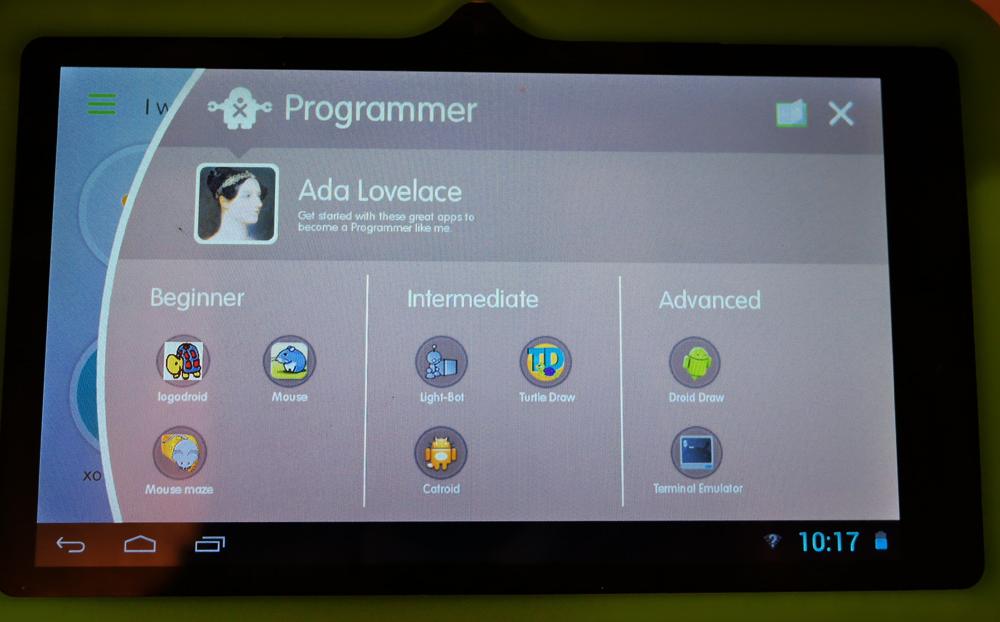
Kids can still get at all of the apps and books by looking at a list, so they don’t have to go through this interface. There are dozens available at launch. And if kids or parents want to load more apps, the XO Tablet is Google Certified, so the Play Store is available.
Vivitar is touting the XO Tablet as the first Google Certified bilingual Android tablet. Kids can easily switch between English and Spanish, a change that affects the entire interface. If kids are learning one or the other language, they can immerse themselves in it using the tablet to play games and even read books. 100 English and 100 Spanish books are pre-loaded on the device.
Parental Control
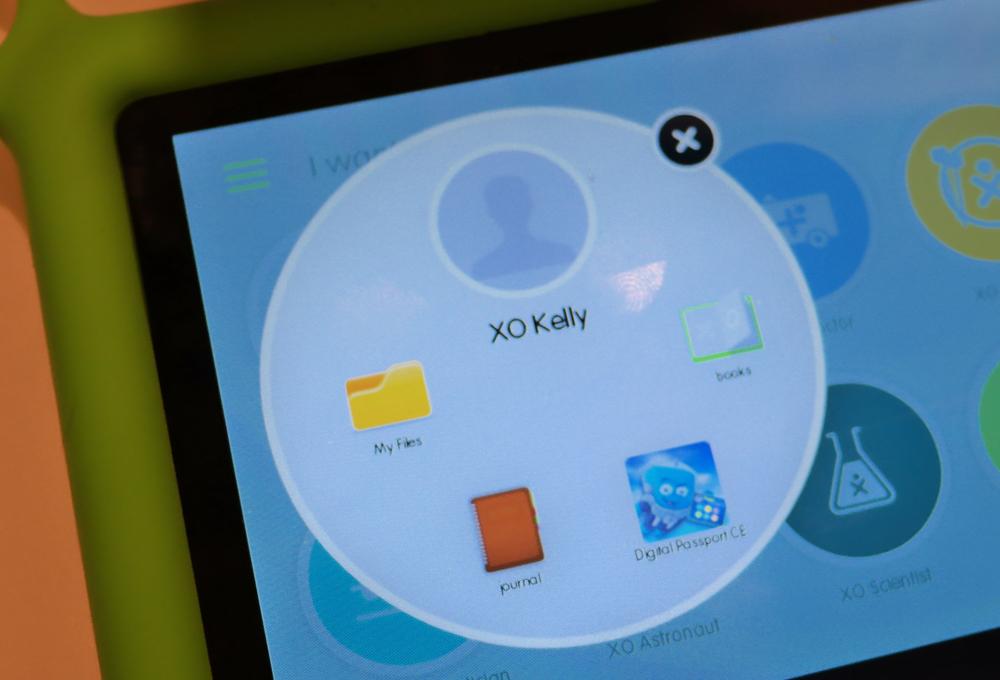
The XO interface includes support for three profiles, including an administrator level one. Using this, parents can limit the content kids can access on the XO Tablet plus Internet access and the ability to download things from Google Play. If you’re interested in seeing how your child uses the tablet and what interests them most, check out the XO Journal. This shows how much time, percentage-wise, kids spend in each of the sections and offers a snapshot over time as interests and usage changes.
Specs and Performance
A dual-core, 1.64GHz processor runs the show (no word on RAM) backed by 8GB of internal storage which you can expand using the microSD card slot. The XO Tablet can output the interface and content via an HDMI port and charges or connects to a computer using a Micro USB port. In our short time with the device we noted smooth performance. Apps opened in good time, swiping around the interface didn’t give us issues. And switching between apps was snappy. It’s not as smooth or as fast as more expensive tablets, but it was about the same as our experience with the HP Slate 7.
So Far, So Good
The XO Tablet looks promising for a tablet in this price range, and seems like a decent first slate for younger kids. At $150 it’s not going to set any records. It does appear to balance value and price well. Look for it at Walmart and Walmart.com on July 15 and other retail stores through the summer. We hope to get one in for a full review before it hits the street.


