
Want to be a rock star?
If the answer is yes, you’re in luck: There have never been more or more affordable tools available to help you pursue your dream. With today’s hardware and software, it’s possible to set up not just a high-quality recording studio, but a fully-fledged record label — all from the comfort of your own home!
Below, learn how to set up your own record label — from recording, to producing, to distribution and promotion.
Recording hardware: Turning ideas into sounds
No matter what kind of music you want to produce, it is likely that you will need a microphone to record some of it. Luckily, you will find plenty of affordable options for entry-level recording.
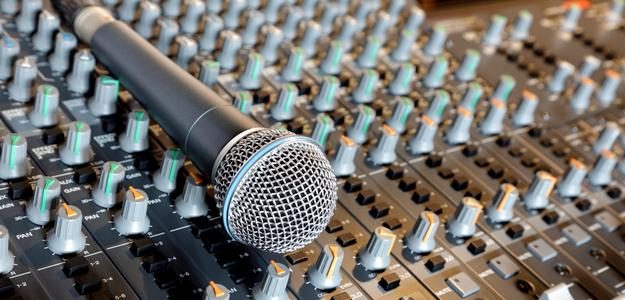 Built-in microphone – If you’re just getting started, or perhaps recording demos (rough songs that will later be re-recorded), then don’t overthink it! Your computer’s built-in microphone may be a surprisingly effective audio-capture tool, and can add a unique character to your sounds. Cinema Minimal’s excellent Week Ends is a terrific example of the quality of music that can be created even when working under this constraint.
USB microphone – Those desiring higher-fidelity audio may want to purchase a USB microphone for better-quality recordings. Not all USB microphones are created equally, however, so make sure you’re using one that was designed with music recording in mind.
The $149 Blue Microphones Yeti is one popular choice. The Yeti is a large-diaphragm condenser microphone, a type of mic well-suited to a variety of different recording applications. It’s also a multi-pattern microphone. A mic’s pattern is the way that it accepts or rejects sounds from different directions. As versatile as a large-diaphragm condenser already is, a multi-pattern condenser is even more so, because user-selectable pick-up-patterns make them suitable for more applications.
The Yeti also packs a headphone jack, mute switch, and volume dial, all built in to the unit. These features and Blue’s excellent reputation make the Yeti a great first microphone. If you’re even more flush, consider the Blue Microphones Yeti Pro, which, in addition to the Yeti’s features, offers higher-fidelity audio encoding and an analog XLR output.
USB mixer – You could consider a small desktop mixer like the Mackie Onyx Blackjack if you are feeling more daring. Mixers that pack USB-outputs serve as analog-to-digital interfaces, meaning you can use any traditional, analog-connecting microphone in your recordings. This greatly expands your microphone options, though at the cost of a more complicated recording chain.
Of course, you will have to purchase a microphone in addition to the USB mixer. A large-diaphragm condenser, like Rode’s NT1-A or the Audio Technica’s AT 2020, would be a good choice to begin your microphone collection.
Mixing software: Making sounds into music
You will need software to take the digital signals from your microphone or USB device and record them to your hard drive. Later, you will likely use that same application to combine multiple audio signals into songs. Choose this application well, because it is a window you will spend a lot of time with.
Audacity – If you want to spend your entire recording budget on hardware, you can — because the excellent, open-source Audacity can take care of all of your software needs.
Audacity is a Digital Audio Workstation (DAW). DAWs allow you to record, edit, modify, and combine audio files. In the computer recording environment, the DAW controls the way signal is captured from recording device to hard disk. It also maintains the arrangement of various audio files within each song, as shown in the image below.
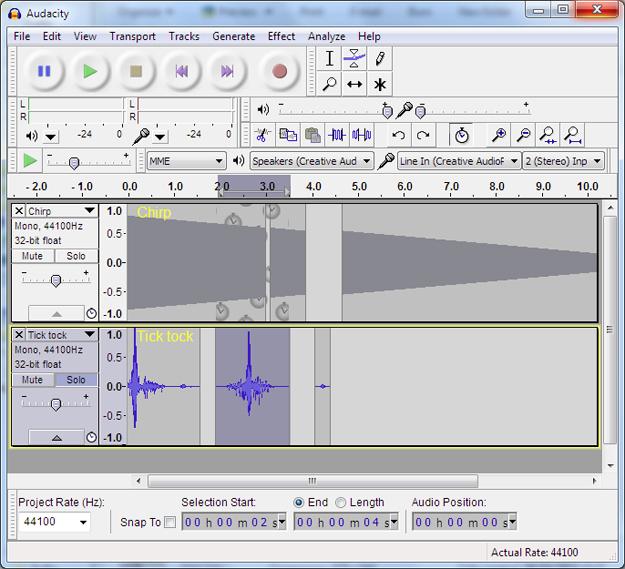 Further, the DAW performs various useful post-production operations. Audacity, for example, facilitates amplifying, equalizing, compressing, leveling, normalizing, and a variety of other functions. The effects and plugins found in different DAWs will be similar to each other, as they all attempt to recreate pieces of analog hardware that previously performed the work of each. They can, however, differ greatly in quality and in price.
Though Spartan compared to other options, Audacity is highly functional, and, as freeware, its price can’t be beat. It’s a great option for those on a budget or only wanting to experiment with recording.
GarageBand ’11 – At just $14.99 in the App Store, the OS-X-only GarageBand delivers massive functionality and a beautiful interface at a very affordable price point. Though, essentially, it does the same things as Audacity, it does so with Apple’s traditional polish. It also gives the user a lot more options when doing so, packing a ton of useful effect pre-sets and audio samples to punch up your recordings. Further, GarageBand offers templates for some of its most often-used projects (“Podcast,” for example), making it even easier to get going with the program.
OS X users with a bit of spare money should strongly consider GarageBand as their first DAW, if only because it is so easy to set up and use.
Other options – Though there is no direct corollary to GarageBand for Windows, though many speak highly of Reaper, which can be purchased for as little as $60. Other affordable options include Fruity Loops Express ($49), Acoustica Mixcraft ($75), Sony Sound Forge Audio Studio ($70), Steinberg Sequel 3 ($80), Cakewalk SONAR X1 Essential ($99), and Ableton Live Intro ($99). Some of these applications may be more suitable for some kinds of music than for others, so consider what you want to produce and do a bit of research before your purchase.
Publishing platforms: Turning music into products
Though MySpace is unfortunately (or, fortunately) a thing of the past, there have never been more ways for musicians, even those just starting out, to make their songs available to a wide audience.
Bandcamp – Bandcamp makes it stunningly easy to distribute digital music online. Feed it audio files, connect a PayPal account, and you can be up and running in moments. There is no set-up fee for Bandcamp. Instead, the service takes a 15% revenue share. After Paypal’s 2.9 percent take, plus a 30-cent transaction fee, your revenue share takes a considerable hit. However, many artists opt for Bandcamp after balking at the set-up fees charged by companies such as Catapult.
In addition to being great for music distribution, Bandcamp is incredibly important as a way to appreciate music. As MySpace has declined, Bandcamp has neatly stepped in as the service most-often-used by independent artists to distribute their work. That hip new local band you’ve been hearing about? Chances are they’re on Bandcamp. Now, go buy something from them! They could probably use your support.
Kunaki – Though it’s never been easier to distribute one’s music online, it can still be difficult for artists to produce materials and media to sell at their live shows. Many CD companies enforce a minimum production run of 100 units or more with a minimum cost often greater than $400 — a stark contrast to the $0 it costs to set up a Bandcamp account.
Don’t worry — a company called Kunaki has solved most of the problems associated with CD production. Where production at larger manufacturing companies (like Portland’s excellent Cravedog) is managed by humans, Kunaki’s system is complete automated. This leads to much easier setup and far lower prices for the end user.
 Kunaki provides a Windows application to configure your product for delivery to its production facility. Following a series of simple steps, your CD is uploaded to Kunaki’s servers, after which it can be ordered in quantities as small as one-at-a-time for around $1.75-each (plus shipping). Outside of burning them yourself, there may be no easier or more affordable way to produce CDs.
Licensing – Many artists miss an income and promotional opportunity by failing to make their music available for licensing. “People are starting to realize that licensing is the best way for the little guy to make money, and music supervisors for TV shows see that they can get decent music for much cheaper than they’d have to pay Lady Gaga,” said Alex Arrowsmith, who licenses his own catalog through Pump Audio (now the Getty Images stock music library).
Pump Audio allows anyone to upload tracks to its online catalog. Though the service only pays our twice-yearly, those payments can be substantial. Arrowsmith, whose work is most-often used in TV productions, derives more of his music income from licensing than from any other source, and has received checks totaling several thousand dollars on payout day.
Marketing media: Turning products into profit (though likely not)
You’ll need to connect with an audience to achieve your dreams of music stardom. Though they require some effort, there are tools available to everyone that can give you a massive head start when establishing your fan-base.
Social media – Social media is largely about self-promotion — just embrace it! Facebook, Twitter, Tumblr, and other services are an excellent, free way to engage with your audience over time. For best results, it’s important to post a variety of engaging content — both band-related and more personal. By doing so, you will increase your social media audience over time, allowing you to contact an ever-larger network with news about your events and releases.
AdWords and Facebook Ads – Self-serve online advertising provides a more-efficient marketing channel for musicians than has been available before. Savvy artists can, with a little work, target advertising to a very narrow audience, and follow-up with analytics to determine how those ads have performed. This data may also indicate how different pieces of content perform, offering an interesting new input in the band’s decision-making process.
Kickstarter – Kickstarter isn’t only a great fundraising tool, it’s a phenomenal marketing opportunity. Coordinating the campaign is a lot of work, but the best projects will engage their audience to share news of the project widely online. Even smaller kickstarters can garner hundreds of social media shares, each of which is an opportunity to connect with new fans.
Remember, it’s all on a spectrum
The products and services outlined in this column can provide a good start for your music efforts, but it’s only a start. Though you can create competent recordings with a $149 USB microphone, you can achieve much better results with better, more costly gear. Similarly, professional artists may use Pro Tools to record their music, produce costly vinyl records to distribute it, and pay any number of expensive firms to market and license their work.
No matter what, though, their careers began with that first step. So could yours. Get to it!


