


PC gamers shopping for the best mechanical keyboard packed with more features per dollar than high-priced models should look no further than Cooler Master’s CK552. Technically it launched on June 19, but Cooler Master held back the reviews until today so that Best Buy could stock its shelves full of CK552 keyboards you can purchase right now for $79.
The CK552 is a highly attractive, visually sturdy mechanical keyboard sporting a minimalistic, curved brushed aluminum design and raised, floating keys. The model we received for testing is pure black, but Cooler Master also sells a version with a Gunmetal color scheme, the CK550, for an additional $10. The company sells a silver model too for an unknown price, the CK551, relying on an entirely different switch than the CK552 and CK550 models.
Typing a lightshow
The CK552 (and CK550) relies on Gateron mechanical switches promising up to 50 million key presses in its lifetime. The red switches are your mainstream option, as they’re good for both gaming and typing. Brown switches build on the reds by providing tactile feedback while remaining somewhat quiet. Blue switches are the loudest of the trio and require more force than the red and brown versions.
If you want a lot of bling for $79, Cooler Master’s CK552 is your ticket to an on-desk lightshow.
In our hands-on, we chose the CK552 with red switches given it won’t be used solely for gaming. Typing isn’t exactly quiet, producing a dull “knock” with each key press, but that shouldn’t matter during your gaming experience unless you’re typing a research paper while sniping heads. The switches themselves feel highly responsive with each key press, and the caps provide clear, thick fonts for the backlighting to dazzle your eyeballs.
If you want a lot of bling for $79, Cooler Master’s CK552 is your ticket to an on-desk lightshow. Each key supports more than 16 million colors while the caps sit high above the aluminum faceplate, spilling colorful light all across the keyboard. You can change this backlighting in two ways: Downloading Cooler Master’s free desktop software or by using on-the-fly controls built into the peripheral.
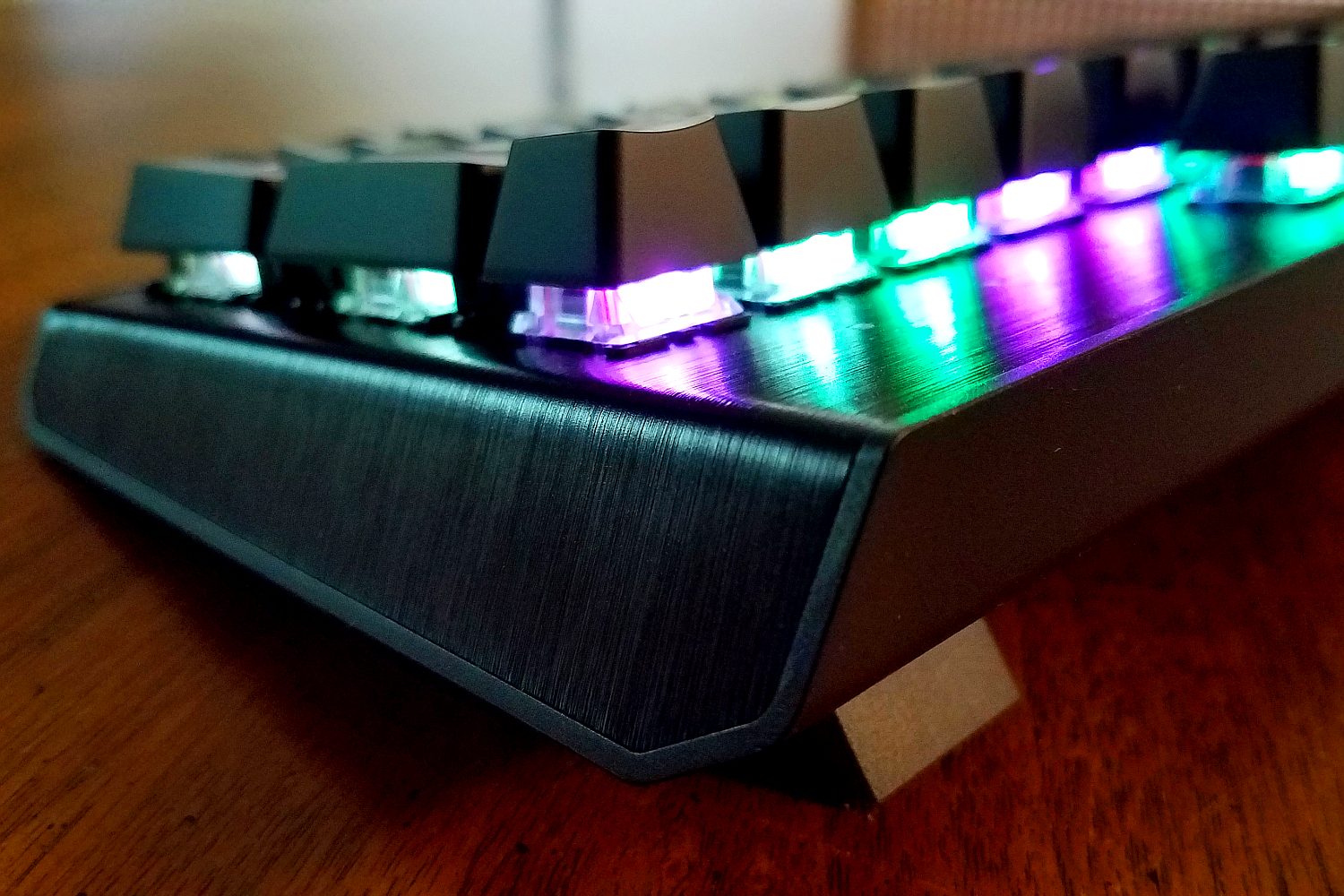 This latter aspect is the meat and potatoes of Cooler Master’s keyboard: Customizable settings without the need for software. For instance, by pressing the dedicated FN key along with any key between F1 and F8, you can cycle through eight set colors, create your own custom color, cycle through lighting effects, and more. These function keys sport icons defining their on-the-fly function, such as F2 increases the LEDs’ red hue — and so on.
You can assign these colors and lighting effects to four profiles stored on the keyboard. Other settings you can save include macro assignments: F11 is used for recording, F12 to delete, and more. The FN key itself dons the Cooler Master logo outline rather than the typical “FN” on the key cap. That said, on-the-fly controls are great if you need to customize the keyboard during gaming tournaments where software isn’t allowed.
If you want a more hands-on approach to customizing the peripheral, Cooler Master’s free software is your best bet. Here you’ll see the features split into four categories: LED, Macro, Key Map, and Profiles. Everything you configure with this software is saved directly to the keyboard.
For gamers wanting a feature-packed, high-performance mechanical keyboard for $79, this is it.
With the software, you should have an easier time configuring the keyboard’s light show. By the end of our testing, we had the CK552 lit up like a Christmas tree by layering four effects: Stars, Rain, Circle Spectrum and Water Ripple. All effects are customizable, enabling you to set the desired colors and effect direction. We actually spent quite a while testing and combining these effects to get the desired lighting because the process (and end result) was simply a blast.
Outside the lighting, the software is a bit more thorough than the on-board controls regarding profiles, key mapping, and macros. For instance, you can import and export up to four profiles, or nuke all four and start from scratch. Key mapping is as simple as clicking on a specific key in the software’s keyboard map and pressing a physical key to reassign its function to the target key. For macros, simply create, record, and assign it to your desired key.
For gamers wanting a feature-packed, high-performance mechanical keyboard for $79, this is it. It’s sturdy but lightweight, and its compact enough to be an easy carry to tournaments. It’s a wired peripheral, so the input during Destiny 2 and Prey‘s new DLC felt crisp and on cue. It doesn’t come with a wrist rest, but the WR530 is a perfect complement to Cooler Master’s new keyboard.


