The third generation of the Surface Laptop 3 brings a couple of impressive new features with it, making it an alternative for those looking for a portable, all-purpose laptop. It has stiff competition though, in the form of the Dell XPS 13, which maintains its class-leading form factor and updates to Intel’s latest 11th-gen CPUs — and sits atop our best laptops list, among others. Which of these two premium laptops is worth your hard-earned cash?
Design
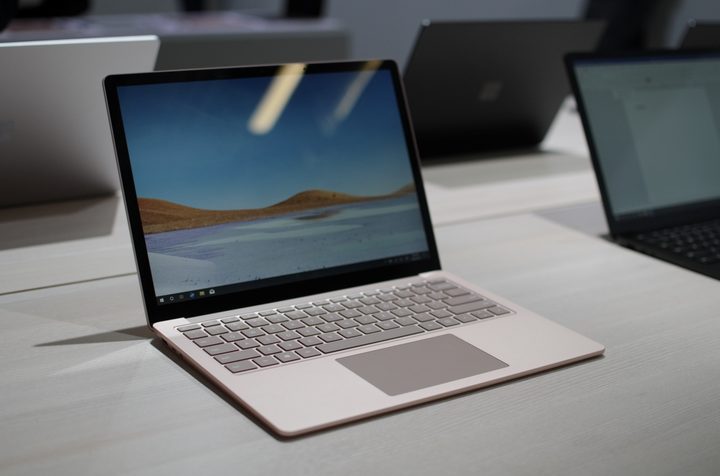
The XPS 13 received a significant upgrade to its design in the last iteration, gaining a taller 16:10 display that stretched the laptop vertically and gave it an even better-proportioned look. It’s an attractive laptop that sports its trademark tiny bezels — even smaller this time around — and diminutive chassis built around a 13.4-inch panel. The Surface Laptop 3 is similar to its predecessor, being the same size — with the same larger bezels surrounding the 13.5-inch 3:2 display — but with some minor aesthetic changes.
For example, the red color from the previous model is no longer available and there are four color options including black, gold, silver, and blue. The black and gold models skip the Alcantara fabric that was the laptop’s trademark and instead have aluminum keyboard decks.
You won’t find fault with either of these laptops’ build quality. The XPS 13 has the same metal and carbon or glass fiber materials (carbon fiber on the black keyboard deck, glass fiber on the white), while the Surface Laptop 3 is all aluminum except for the models with Alcantara fabric. Microsoft has answered one complaint from the previous versions, specifically that the laptop was impossible to repair or upgrade. Now, service centers (not users) can remove the keyboard tray and access the components inside, including the solid-state drive (SSD). The XPS 13 is similarly expandable and more accessible to users.
The XPS 13 has the same snappy keyboard that was in its most recent versions, including sufficient travel and a precise mechanism. The Surface Laptop 3’s keyboard was updated from the previous models, now with 13mm of travel, 19mm of pitch between keys, and sculpted keycaps.
Both laptops have well-sized Microsoft Precision touchpads — the Surface Laptop 3’s is 20 percent larger — with support for the full gamut of Windows 10 multitouch gestures. Like all Surface devices, the display is touch-enabled and supports the Surface Pen, while the XPS 13 has both touch and non-touch display options.
Both laptops also offer excellent displays. The XPS 13 offers more choice, including touch and non-touch 16:10 Full HD+ (1920 x 1200) resolution displays which our reviews have found offer excellent color accuracy, and a superior 16:10 UHD+ (3840 x 2400) touch display. The Surface Laptop 3 benefits from a slightly larger 13.5-inch display in the productivity-friendly 3:2 aspect ratio, and has a high resolution of 2256 x 1504.
The XPS 13 comes with two USB-C with Thunderbolt 4 ports to go with a microSD card reader and 3.5mm audio jack. The Surface Laptop 3 finally added in a USB-C 3.1 port, which unfortunately doesn’t support Thunderbolt, along with a USB-A 3.1 port and the Surface Connect port for charging and a 3.5mm audio jack. Microsoft did not build in an SD card reader. Both laptops support the latest Wi-Fi 6 standard but the Surface Laptop 3 sticks with Bluetooth 5.0 while the newest XPS 13 bumps that up to Bluetooth 5.1.
Performance

Dell is quick to equip the XPS 13 with the latest Intel chips, which gives the latest model an advantage. It comes with the newest 11th-gen, Tiger Lake processors, starting with the Intel Core 13-1115G4 (3.0GHz base clock speed). These chips offer improved speeds, and updated Intel Iris Xe integrated graphics for better visuals, making it a worthy upgrade for all users.
The Surface Laptop 3, on the other hand, uses Intel’s 10th-gen Ice Lake 10nm processors. These CPUs focused on providing increased IPC (instructions per core) via some new instructions that leverage parallel operations to run legacy programs faster. Ice Lake also uses Intel’s Iris Plus integrated graphics — around Nvidia MX150-level graphical performance. They’re good, but they can’t really compare to the improvements that Intel has made for the 11th generation of laptop chips.
We didn’t review the 13.5-inch Surface Laptop 3 and so can’t provide a direct objective comparison. But it’s virtually guaranteed that the XPS 13 will be the faster laptop, in both CPU- and GPU-intensive tasks.
Portability
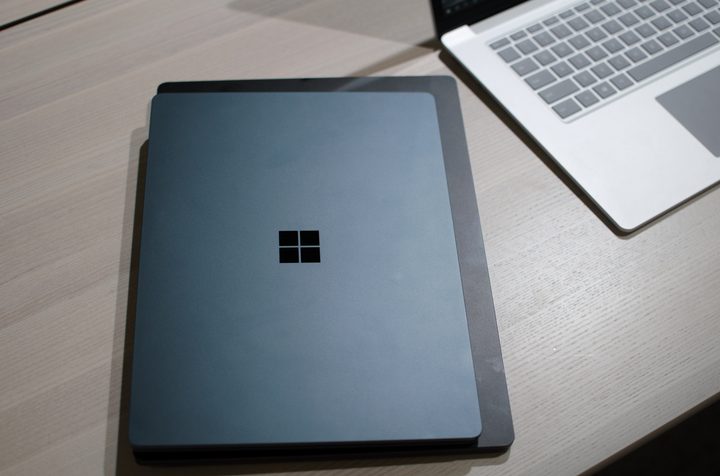
In terms of size and weight, the XPS 13 comes in at 0.58 inches thick and 2.64 pounds compared to the 13-inch Surface Laptop 3 at 0.57 inches and 2.84 pounds. That means the XPS 13 is lighter and roughly the same thickness, but the Surface Laptop 3 is, in practice, a bit easy enough to carry around.
As with performance, we didn’t review the 13.5-inch Surface Laptop 3 and so can’t attest to its battery life. Given the efficiency improvements in the 11th-gen Intel CPUs, though, we’re guessing that the XPS 13 will last longer on a charge.
The Surface Laptop 3 puts up a fight, but the XPS 13 wins out

The Surface Laptop 3 starts at $1,000 for a Core i5, 8GB of RAM and a 128GB SSD. The 13.5-inch model maxes out at $2,400 for a Core i7, 16GB of RAM, and a 1TB SSD.
The XPS 13 is also a premium laptop, starting at $1,020 for an 11th-gen Core i3, 8GB of RAM, a 256GB PCIe NVMe SSD, and a Full HD+ non-touch display. You can spend more upgrading to a more powerful processor, more storage, more RAM, and more storage, but as with the Surface, you are stuck with the integrated GPU.
Ultimately, the XPS 13 is smaller, lighter, offers a power-saving Full HD option, and remains our favorite 13-inch laptop. The 13.5-inch Surface Laptop 3 is a great machine, but it can’t quite win out over the industry leader.