1. Home
  2. Computing
  3. Emerging Tech
  4. Gaming
  5. Mobile
  6. Legacy Archives

Sharp’s 3D Touchscreen LCD Doesn’t Need Glasses

Add as a preferred source on Google

Japanese electronics giant Sharp has unveiled its latest 3D display technology: a touchscreen LCD that can display 3D images users can perceive without awkward 3D glasses. The downside? The technology only works well when a user’s eyes are a fixed distance from the screen—for the 3-inch displays Sharp was showing, that’s about 30 cm (or one foot). The displays can switch between 2D and 3D modes, and Sharp is pitching the technology as ideal for smartphones and other portable devices—especially since the display is about the same as a conventional 2D LCD.
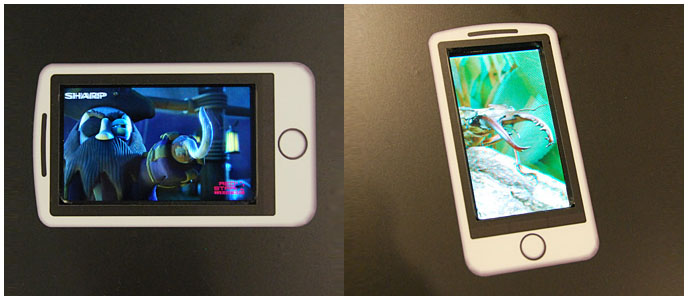
Image used with permission by copyright holder

The technology works by sending different images to viewers’ right and left eyes, the same way traditional 3D glasses work but building the separation into the display itself. Sharp says the technology may be applied to larger devices like televisions in the future; however, applications may be limited since the effect works best with a fixed distance between the viewer and the display. However, aside from televisions, the technology may have numerous applications in mobile devices, cameras, virtual reality gear, and arcade games.

Recommended Videos

The displays Sharp demonstrated measured 3.4 inches, offered a 854 by 480-pixel resolution, brightness of 500 cd/m², and 1,000:1 contrast ratios. The displays could switch between landscape and portrait modes. Sharp said it applied advances in CG-Silicon technology to reduce the wiring width in the LCD panel while simultaneously enabling more light to pass through the panel while reducing crosstalk.

Sharp has tried to sell 3D gear before, but the efforts largely fell flat due to poor image quality, but the company is confident its new efforts are far brighter and clearer than its competitors’. Sharp plans to begin mass production of the 3D-capable LCDs in the next six months.
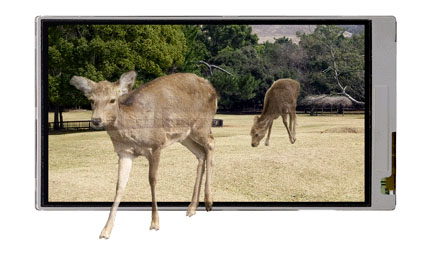
Image used with permission by copyright holder
Geoff Duncan
Former Contributor
Geoff Duncan writes, programs, edits, plays music, and delights in making software misbehave. He's probably the only member…
This free Mac app lets you lock individual apps with Face Unlock and Touch ID
Someone finally built the app locker every Mac user has been asking for.
FaceGate in action on Mac

If you have ever handed your Mac to a friend, family member, or coworker for "just a minute," you know the mild panic that follows. Sure, your Mac has a lock screen, but once someone is past it, they can open Messages, Photos, Notes, Mail, WhatsApp, and your browser.

iPhones had the same issue, but Apple solved it by adding an app lock feature with the iOS 18 update. Sadly, no such feature exists for macOS. That’s where the new FaceGate app for Mac can help you. It’s a free and open-source app that lets you lock apps on your Mac and even has some novel tricks up its sleeve. So, let’s talk about it, shall we?

Read more
The charm of a tiny Windows tablet is apparently at Microsoft. Long live the Surface Go!
Microsoft’s budget Surface era may be over
Microsoft Surface Go 3 stand.

Microsoft might be cleaning up its Surface lineup. According to Windows Central, Microsoft has stopped manufacturing the Surface Go and Surface Laptop Go lines, with no successors currently planned. Surface Go 4 and Surface Laptop Go 3 are reportedly out of stock in most places, and once remaining retail stock is gone, that may be it.

If this is true, then we are looking at the end of the brand's budget Surface PCs as Microsoft has plenty of premium Windows hardware.

Read more
Gemini Spark lands on the Mac, and it wants to tackle your chores while you relax
From messy downloads to date night reservations, Spark is here to lighten your load.
Gemini Spark mac app

Google has just announced a big batch of updates for Gemini Spark, making the assistant far more useful than before. Gemini Spark is finally coming to the Mac desktop app, bringing deeper app connections and a new way to keep tabs on what you care about. Let us break it down.

What can Spark do on your Mac now?

Read more