  1. Home
  2. Computing
  3. News

Android apps come to the Microsoft Store in Windows 11 via the Amazon App Store

Add as a preferred source on Google

At the June 24 Microsoft event, Microsoft confirmed what was long believed to be true. Windows 11 will support Android apps via the Amazon App Store. The apps have the ability to be locally installed and will function without the need for a smartphone, appearing native in your Taskbar and Start Menu.

Microsoft didn’t share many details, but rumors had indicated that the feature could be powered by the Windows Subsystem for Linux. All Android apps that are compatible with Windows 11 will show up in a special section in the Microsoft Store.
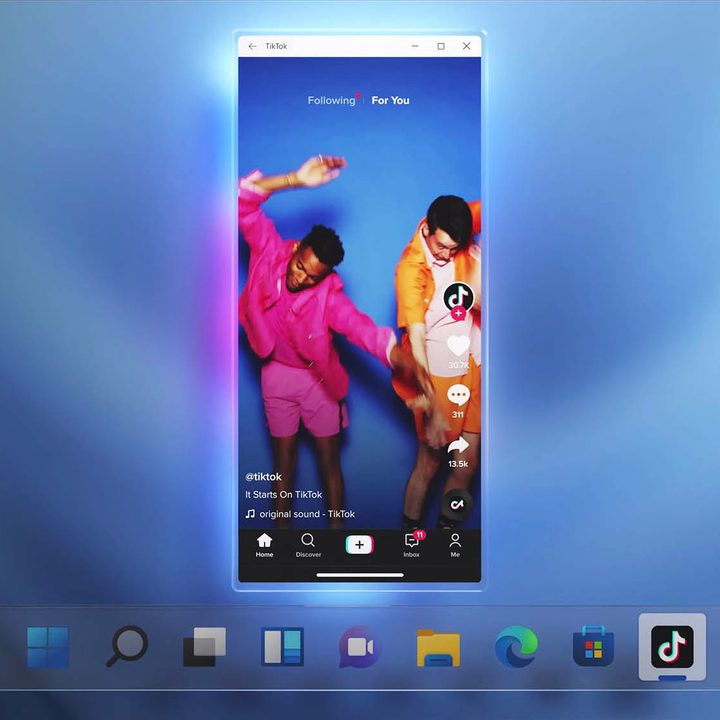
android apps in app store on windows 11 - Tiktok
Image used with permission by copyright holder

Microsoft showcased a screenshot showing apps that can run on Windows 11, and the TikTok app is one of them. The app is able to resize, can be dragged around to a mobile view, and doesn’t appear to run full-screen.

Recommended Videos

This is similar to the behavior in the Your Phone app, where you are able to sync apps from select Samsung phones through Wi-Fi and the local network. The difference here is that things are now running natively, independent of phones and other devices.

Image used with permission by copyright holder

Other than support for Android apps, Microsoft mentioned that the new Microsoft Store on Windows 11 will be more of an open storefront. The store will support all kinds of different apps, including Win32, UWP, and PWA. This means that you’ll be able to find apps like Google Chrome in the Microsoft Store and won’t have to depend on going on the internet to download Win32 apps from other sources.

Microsoft even showcased some new apps in the Microsoft Store in Windows 11. The list includes Disney+, as well as Adobe Creative Cloud. Intel worked together with Microsoft on the technology, and Intel’s bridge technology will bring the apps to life to create a more seamless experience.

As a shot at Apple, Microsoft even announced that apps can have their own commerce engine where developers can take home all the revenue without a cut for Microsoft.

It’s not clear when this feature will come to everyone for testing, but it’s likely to be available once Windows 11 hits general availability in the fall. Microsoft will need to test the feature via the Windows Insider program before launching it to the general public. So be on the lookout for more updates soon.


Arif Bacchus
Arif Bacchus is a native New Yorker and a fan of all things technology. Arif works as a freelance writer at Digital Trends…
The refurbished MacBook Neo may be your best way around Apple’s price hike
MacBook Neo has hit Apple’s refurbished store after its price increase
Student using MacBook Neo in classroom.

The MacBook Neo launched in March as Apple’s most affordable notebook, but it has already been caught in the company’s recent price hike. The base model with 8GB of RAM and 256GB of storage now costs $699, while the 512GB version with Touch ID is priced at $799.

Just days later, Apple has already listed refurbished MacBook Neo models on its online store, giving buyers a cheaper official option, though the savings are not as generous as you might expect.

Read more
This cross-device clipboard app solves the copy-paste problem I keep running into on my Mac
ClipboardAI keeps a searchable history of everything you copy
Text, Electronics, Mobile Phone

I have lost count of how many times I have copied something important, copied another thing before pasting it, and then realized the first item was gone. It is a small frustration, but it happens often enough to become annoying. I recently came across ClipboardAI, which caught my attention because it goes beyond Apple’s built-in clipboard by saving copied items into a searchable history.

Instead of replacing the last thing you copied every time, ClipboardAI keeps a searchable record of copied text, links, codes, email addresses, phone numbers, addresses, and images across iPhone, iPad, and Mac. That means an older clip does not disappear just because you copied something new.

Read more
If you miss the feel of paper in the digital age, this app gives your Mac’s screen a textured look
A paper-like screen overlay could make long work sessions feel less harsh.
Advertisement, Poster, Electronics

Most screen-comfort tools work by changing color temperature. Apple’s Night Shift makes the screen warmer, often giving everything an orange tint. Paperman is an interesting alternative because it adds a subtle paper-like texture over the display instead.

The app is available for Mac and Windows, and it is designed to make a screen look closer to paper, matte glass, or an e-ink display. It softens the harsh contrast and reduces the glossy look of modern screens during long reading or writing sessions.

Read more

