  1. Home
  2. Computing
  3. News

Windows 11 teases a cleaner and modern File Explorer app

Add as a preferred source on Google

Windows 11 is official, and there are lots of big visual changes in the new operating system. One of those changes coming soon could be a new File Explorer app, which looks to be a bit more modern and more focused on touch.

Though it wasn’t specifically mentioned during Microsoft’s June 24 event, a separate video about the design process of Windows 11 teased the new File Explorer. You can see it at around the 2 minute and 12-second mark, where a person is running their hands along the top of the screen. We included the screenshot for you below in case you missed it.
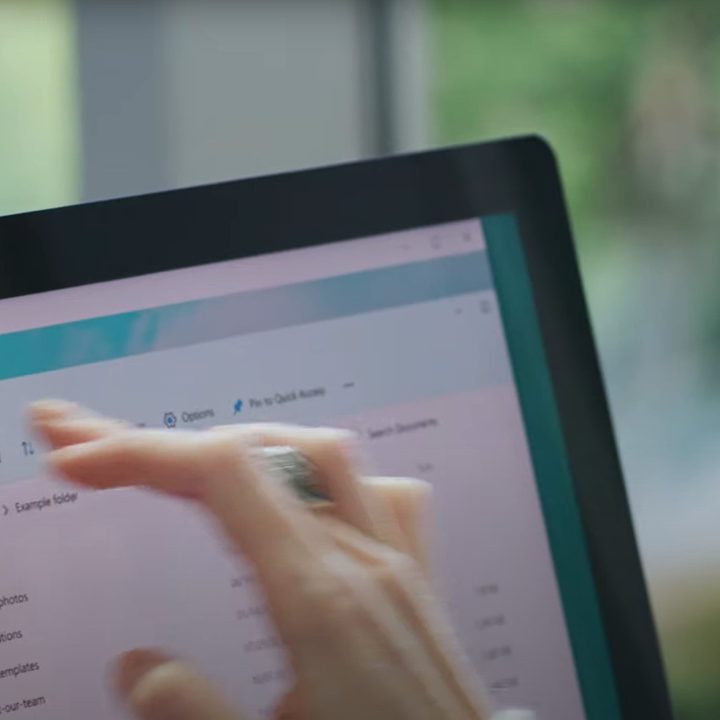
New File Explorer app teased in Windows 11.
Image used with permission by copyright holder

While not the clearest view, it looks as though this new File Explorer app is largely based on the one in Windows 10. It still has a sidebar to access the most frequented locations, but it also has some new touch controls up top. Instead of sporting a ribbon and large buttons and icons, you can see new simplified and slimmer buttons for creating a new folder, copying and pasting files, deleting files, and changing the view option. Presumably, you’ll see this when touching the screen, as the video teases.

Recommended Videos

We’ll need to wait for Microsoft to talk more about this File Explorer, but for now, it offers an interesting little tease. As usual, Windows 11 will evolve based on feedback from fans and and those testing it in the Windows Insider Program, so don’t take this design as final just yet. It could come in a future build of the operating system once Microsoft beings official testing latest next week.

The new File Explorer would just be one change in Windows 11. Along with a visual redesign with more rounded corners, Microsoft is also improving the Start Menu, as well as the Action Center. Even the Tablet Mode is seeing changes, too. Now, when you use a device as a tablet, buttons and other areas of the user interface will be easier for you to touch. There’s even a new inking menu and touch keyboard. The changes help bring Windows out of its desktop-based past and into a modern era dominated by the simplicity of iPads and Chromebooks.

Arif Bacchus
Arif Bacchus is a native New Yorker and a fan of all things technology. Arif works as a freelance writer at Digital Trends…
I hope Apple keeps the MacBook Neo away from the AI hype and preserves its true identity
The cheapest MacBook beats the cheapest AI MacBook.
Computer, Electronics, Laptop

If there's one thing that has disrupted consumer tech economics over the last year while changing how we understand and recommend products, it's the ever-rising cost of memory and chips. 

The desperate need to scale up AI infrastructure has pushed major manufacturers to prioritize enterprise demand, leaving everyday consumers with far fewer choices. Those available cost significantly more than they did a year ago.

Read more
I let Radial menu take over my Mac, and I’m never going back
One mouse jiggle, endless shortcuts. My Mac has never felt this fast.
Radial app running on Mac

I have been testing Radial for the past week, and it's quickly become one of those apps I didn’t know how I could live without. It's a radial menu for macOS that puts your shortcuts, scripts, and automations right where your cursor is, so you never have to go hunting through menus to find what you need.

The app just received its 5.0 update, adding AI actions powered by Claude, window layouts, variables, a redesigned settings interface, a new Atmosphere background effect, and a squircle menu shape. I got to try most of these, and here's what I found.

Read more
Android desktop mode made me miss my laptop in record time
I tried writing and publishing from Google’s phone-to-monitor setup, and the future of mobile computing immediately started sweating.
Computer, Electronics, Laptop

Android 17 desktop mode has a very simple pitch. Plug your phone into a monitor, add a keyboard and mouse, and watch the slab in your pocket pretend to be a computer. I wanted to give that pitch a fair shot, so I tried using it for an actual workday instead of a cute demo.

The goal was boring on purpose: write an article, edit it, build the page in WordPress, upload whatever needed uploading, and publish the thing without running back to my laptop like a coward.

Read more
