1. Home
  2. Phones
  3. Android
  4. Mobile
  5. News

WhatsApp just solved the biggest problem for mobile platform hoppers

Add as a preferred source on Google

Starting with Samsung’s newly-launched foldable smartphones, WhatsApp will now let you securely transfer your chat history should you jump from iOS to Android. While it’s not something most people will want to do most of the time, it’s nice to know that now you can.

The new feature was announced today at Samsung’s launch event, and leading the way are transfers from iOS to Android on the newly launched Galaxy Z Fold 3 and Galaxy Z Flip 3. The new transfer capabilities include conversations, photos, and voice memos. The company says that other Samsung phones running Android 10 will come on board in a matter of weeks, but did not supply a specific timetable. Eventually, the feature will cover all transfers between iOS and Android phones, regardless of brand, but no other details were released.
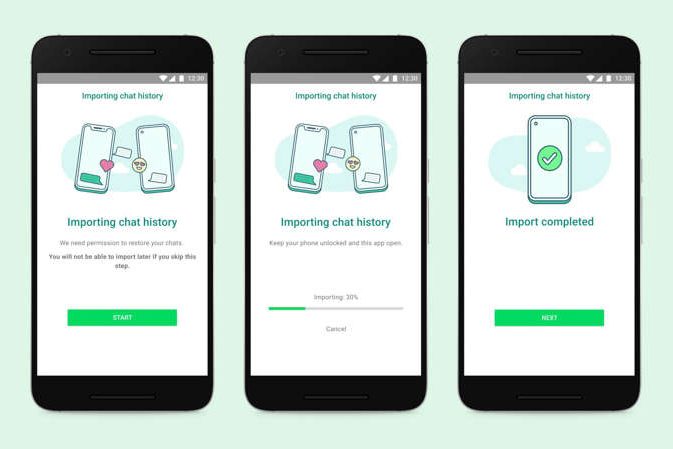
WhatsApp chat transfer with Lightning to USB-C cable.
WhatsApp

The new feature solves a longstanding issue for users: That it’s never been officially possible to transfer chat history between mobile operating systems. If you reside in the Apple ecosystem, WhatsApp’s cloud backups are stored in iCloud; if you’re on an Android device, your backups go to Google Drive, and never before have the two been able to share a common ground. That’s about to change, and you’ll need a Lightning to USB-C cable to get it done. Even then, all may not be perfect. If you’re a historical platform hopper and have separate cloud backups, the new transfer feature won’t merge them into a single chat history.

Recommended Videos

The new WhatsApp feature works with Samsung’s Smart Switch transfer tool. Smart Switch already works to transfer contacts, photos, music, messages, notes, and calendars to Samsung Galaxy devices. It will now add WhatsApp chat history to that roster. But according to WhatsApp, the new operation needed to be — and was — a team effort. Because messages are end-to-end encrypted and stored on users’ devices, a tool that moves chat history between operating systems required cooperation between WhatsApp and operating system and device vendors to ensure proper security.

Allowing WhatsApp users to transfer their communications cross-platform is also seen as a way to lower the barrier for iOS users who wish to jump on to Android, and especially Samsung’s brand new offerings. However, it will also be useful for current Android users who may have an eye on an upcoming iPhone 13. Either way that customers move, pretty soon no WhatsApp user will have to worry about losing track of a critical conversation because of their smartphone platform of the moment.

Jackie Dove
Former Contributor
Jackie is an obsessive, insomniac tech writer and editor in northern California. A wildlife advocate, cat fan, and photo app…
Android desktop mode made me miss my laptop in record time
I tried writing and publishing from Google’s phone-to-monitor setup, and the future of mobile computing immediately started sweating.
Computer, Electronics, Laptop

Android 17 desktop mode has a very simple pitch. Plug your phone into a monitor, add a keyboard and mouse, and watch the slab in your pocket pretend to be a computer. I wanted to give that pitch a fair shot, so I tried using it for an actual workday instead of a cute demo.

The goal was boring on purpose: write an article, edit it, build the page in WordPress, upload whatever needed uploading, and publish the thing without running back to my laptop like a coward.

Read more
After test-driving iOS 27, my iPhone still doesn’t feel like it has made a substantial leap
Siri learned new tricks. Safari got smarter tabs. My morning routine didn't change at all.
iOS 27 new star rating feature in Photos

Every June, after Apple wraps up its annual WWDC keynote, I install the latest iOS beta on my iPhone, watch the progress bar crawl to completion, and wait for the inevitable restart. For years, picking up my phone afterward felt almost identical to how it did before the update. 

I saw the same grid of icons, the same Control Center, and the same version of Siri until iOS 26 finally broke that pattern in 2025.

Read more
Android 17 makes a strong case for ignoring Android version numbers entirely
When the most noticeable change is a better Quick Settings button, the annual update cycle starts looking more like branding than progress.
Android 17 logo.

Android 17 finally separated the Wi-Fi and mobile data buttons, and I hate how much that improved my mood. For years, Android treated internet access like one mysterious blob, as if Wi-Fi and cellular data were emotionally codependent. In Android 17 Beta 3, Google split the old combined Internet button into separate Wi-Fi and mobile data tiles, making each connection easier to switch off with a single tap.

That’s a good change, which is also why it’s a little damning. When one of the cleanest wins in a major OS update is “the buttons make sense again,” the celebration gets awkward fast.

Read more