

When you buy a digital device at launch, you’re always taking a risk. It’s one of the many taxes of staying on the bleeding edge. Even the best new devices have their share of quirks at first. Apple, though one of the more diligent manufacturers, is not immune to this trend. Though its March 11 iPad 2 launch has gone off a lot smoother than the iPhone 4 last year, many users are reporting screen, Wi-Fi, microphone, and speaker issues with their new tablets. Curious to see if your iPad 2 is suffering from a debilitating launch issue? Read ahead.
Backlight bleedin’
The most widely reported issue with the iPad 2 is probably its backlight bleeding. Many users (some with YouTube accounts) have experienced a problem with the edges of their LCD screen showing a lot of extra light from sides of the screen. This problem is seen most when watching a video with a dark background. Usually it appears as one or more blotches of light appearing down near the Home button of the tablet. A few users have reported “speckles” of light away from the edges as well. This may be a more serious problem.
Unfortunately, there is no good solution to this problem. Turning down the brightness or changing viewing angles may help those with minor issues. The original iPad suffered from backlight bleeding as well. Cult of Mac documents this problem well, advising users to contact a local Apple Store with issues, but to hold off a bit if you have an iPad 2 that is usable. After all, the warranty does last a year.
Bonding blotches
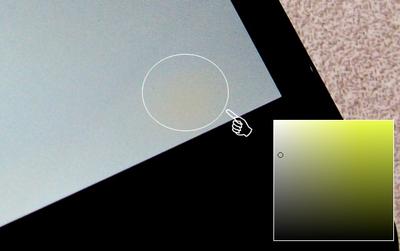 Right alongside the famous backlight bleeding is another recurring issue. Many users have documented yellow blotches on their iPad 2 screens. MacRumors reports that this problem likely results from Apple shipping iPad 2 units before their internal bonding glue has time to dry. The iPhone 4 experienced the same problem at launch. The solution: wait. In many cases, the yellow blotches disappear in a few days.
“Apple is using a bonding agent called Organofunctional Silane Z-6011 to bond the layers of glass,” said MacRumors of the iPhone 4. “Apparently, Apple (or more likely Foxconn) is shipping these products so quickly that the evaporation process is not complete. However, one or two days of use, especially with the screen on, will complete the evaporation process and the yellow “blotches” will disappear.”
Pixel problems
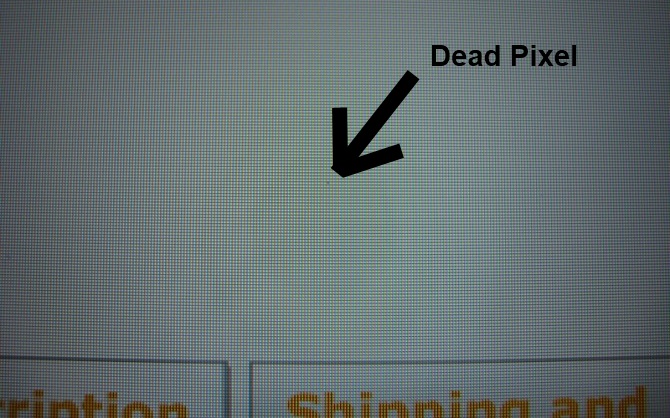
The dreaded dead pixel is back. Yes, some iPad 2s have a dead pixel (or two). Shocked? Well, you shouldn’t be. Dead pixels are one of the most common problems on newly shipped units. In some cases a defective pixel can be fixed, but the problems affecting iPads seem to be permanent. 9to5 Mac reports that some users have gone through as many as four iPads and still had problems like dead pixels. A good number of Apple’s initial units may be affected by one of the three screen problems we’ve reported here. For a guide on how to find a dead pixel, click here.
Wi-Fi woes
The Wi-Fi-only iPad 2 16GB model is one of the most popular units because it is the cheapest available ($499), but some who have chosen to rely on Wi-Fi are having a difficult time finding a hotspot, and keeping one. Hundreds of users have reported odd behavior by the Wi-Fi radio in the tablet. Sometimes the Wi-Fi will cut out for little to no reason. Two iPads could be right next to one another and have completely different success rates at obtaining a net connection. As of yet, there is no known solution to this problem.
Muffled microphones
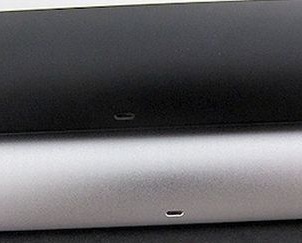 While this is more of a comparison than a bug, iLounge has discovered that the microphone performance of the Wi-Fi iPad 2 is remarkably better than that of the 3G iPad 2. This, the site speculates, is likely due to the difference in casing. To enable the 3G models to connect to mobile networks, Apple added an antenna and replaced a portion of metal casing along the top of the iPad with a black plastic material. Aside from dirtying up the clean look of the iPad, this plastic also appears to create a slightly more muffled and echo-ey microphone. The CDMA Verizon iPad 2 appears to be the worse than the GSM AT&T 3G version.
This problem will likely be fixed in manufacturing, but until then, 3G iPad 2 users may want to make sure their mic is facing the intended target.
Speaker shenanigans
One of the changes to the iPad 2 was its speaker, which is now a wide range speaker and located on the back of the unit. A few users have taken to the net to point out that the iPad 2 is a bit quieter than the original iPad. Much of this can be explained by the fact that the speaker now faces away from those using the device.
However, in some cases the iPad 2 speaker seems to get stuck in headphone mode, despite the fact that no headphones are plugged into the stereo jack. The solution: try unplugging and replugging in the headphones a few times. If that doesn’t work, a hard reset may fix the problem (hold down the sleep and home buttons until the Apple logo appears) or you can back up your information and try the restore function. If these steps don’t solve your problem, pack your bags and head to an Apple Store. It’s time to get a new iPad 2.
Conclusion
While these problems sound bad, most are relatively minor and affect a minute percent of users. However, if you’ve purchased an iPad 2, it might be smart to do a spot check for any of these problems. Your warranty covers manufacturing defects like these, so take advantage of it. If you have an Apple Store in your area, head there first. Usually, they are highly responsive to customer problems. You might even get a free Smart Cover out of the deal.
If you’ve experienced any of these issues, or others, please let us know in the comments below!


