


“The Apple iPad 2 right now is cheaper and easier to use, but not necessarily better endowed than competing tablets – but that doesn't matter.”
- Dual core processor
- 10-hour-plus battery life
- Bright 9.7-inch IPS LCD screen
- A third thinner than the original
- Front and rear cameras
- Highly reflective screen
- Slippery
- No expandable memory
- Poor visibility outdoors
- Poor still image quality
“Why you can trust Digital Trends – We have a 20-year history of testing, reviewing, and rating products, services and apps to help you make a sound buying decision. Find out more about how we test and score products.“
Judging by the lines at stores, the Apple iPad 2 is a phenomenon. It’s been rumored for so long, and with so much talk about tablet PCs in general in the past year, it’s as if the pent-up demand just exploded this weekend. But despite the long lines and sold out stores, two questions remain: Is the iPad 2 better than any other tablet and, two, if you want an iPad is getting the original at a deep discount actually a better deal? We answer those questions and more in the full review below, so continue on to find out.
Features and design
Three major improvements raise the iPad 2 above the original.
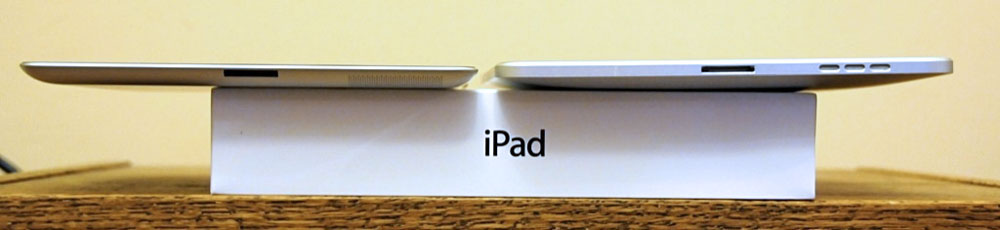
1. It’s thinner by a third, and has a slightly smaller surface area thanks to a thinner bezel, with a sloped iPhone-3G-style edge, instead of the original iPad’s squared-off perimeter. It’s also about 25 percent lighter – and you can feel both improvements.
2. The iPad 2 has front and back facing cameras which will enable a bunch of new applications, most importantly FaceTime video chatting.
3. It now has a dual-core 1GHz processor, which, according to Apple, doubles the speed and juices graphics up by nine times.
Where the iPad 2 doesn’t improve are items Apple has notoriously eschewed – external memory expansion and a removable battery, so these are understandable limitations. Apple, however, failed to correct the iPad’s most literally glaring shortfall – its screen is nearly useless in daylight. E-book reader manufacturers like Amazon will continue to have a field day exploiting this weakness.
Aside from a few other minor changes (such as the speaker now being in the rear) the iPad 2 is essentially an original iPad in a tighter dress.
Ports and connectors
As per the original, the iPad 2 has just two connectors – the 3.5mm headphone jack and the 30-pin Apple connector.
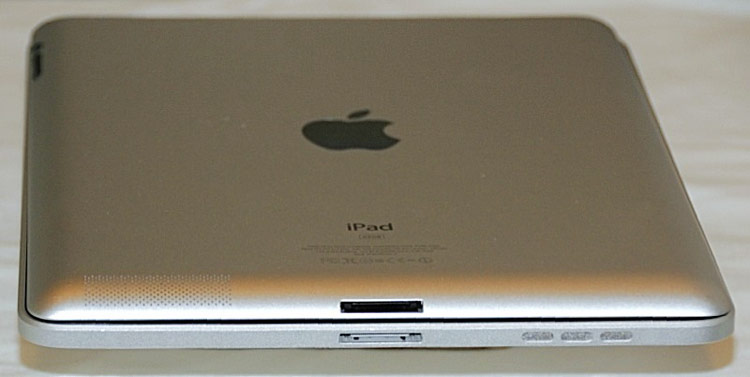
But with the iPad 2’s sloping edges, the jacks themselves are slanted, which places them behind (instead of perpendicular to) the screen. This makes each jack a little more difficult to locate. Your instinct is to angle the connector before pushing it, but you don’t have to. And the connection doesn’t feel as solid as it does on the original iPad – but it is. These jacks just look and feel a bit…off.
Multimedia capabilities
Obviously, video and gaming are two major reasons why you buy an iPad. As advertised, the second iPad is faster on all accounts – app booting, Web page and video loading – but it was rarely twice as fast as the original iPad, as you’ll see in the comparison videos.
Even though it’s still pretty useless in sunlight, the iPad 2’s screen is as brilliant as the original for indoor usage. The screen on our original iPad seems to have faded quite a bit, which is barely detectable in the videos but far more obvious in person.
Sound quality
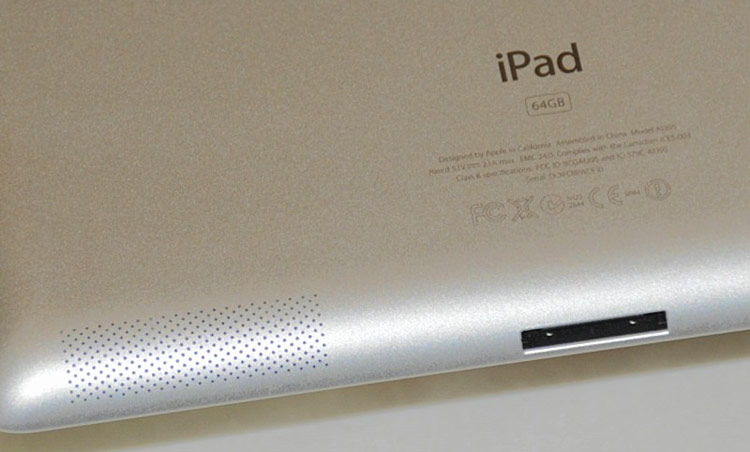
Instead of a speaker behind a grille on the flat perimeter, the iPad 2 has the speaker behind a perforated part of the solid rear casing. The first iPad had enough bass to physically feel the beat of a song when you held it, which the iPad 2 lacks. It also sounds thicker, hollower, and warbles as you move it around. It’s definitely not an improvement, but you’re more likely to use it with earphones, where you’ll detect no major differences between new and old.
Web usage
As noted – and as you can see from the video – all Web pages load visibly faster than on the original iPad (although without the side-by-side comparisons, no one was complaining about the original’s speed). How much faster depends heavily on your wireless connection, Wi-Fi or 3G.
More importantly, it seems as if the iPad 2 was able to pull in a stronger Wi-Fi signal, consistently offering more Wi-Fi connectivity bars than the iPad. You may be able to spot in the comparison videos, and it may have slowed down the original iPad. Whether due to connectivity or processing power, the iPad 2 loads pages and content from connected apps much faster.
 Cameras

First off, all tablet PCs make lousy cameras. Not because of their usually inferior imaging sensors but because of their ergonomics. Tablet PCs are the wrong size and shape to be used as a camera. It’s like putting wings on a boat – the ungainly thing might get in the air, but it clearly doesn’t belong there.
Even so, it’s a puzzle why Apple didn’t put the iPhone 4’s 5-megapixel camera into the iPad 2. Apple has even neglected to list the pixel resolution specification for the iPad 2 still photos (for the record, the rear camera is .69 MP – 960 x 720 pixels – barely better than the VGA-quality front camera), and for good reason – still pictures shot with the iPad 2’s rear camera are disappointing, bordering on sucking. Indoor shots are impossibly grainy and drained of detail and color, and outdoor shots aren’t much of an improvement.
Video is a different story. The iPad 2 shoots 1280 x 720 HD video at 30 frames a second with impressive results, as long as you hold the iPad 2 still – which you won’t be able to do. While video results are solid, the footage is too shaky.
We don’t think Apple intended the iPad 2 to be used as a still camera; it’s for FaceTime, and the rear camera is designed to show callers what’s around them. But we will use the iPad 2 to take stills, and it’s a shame it doesn’t take good ones.
Battery Life
We haven’t had time to perform a side-by-side comparison, but it does look as if the iPad 2 drains power a bit faster than the original, but not enough to impact Apple’s 10 hour battery life claims.
Conclusion
To answer our original question, the iPad 2 right now is cheaper than any other tablet, easier to use than any other tablet, but not necessarily better endowed than other tablets – but that doesn’t matter. The lines at the box office make the iPad 2 the de facto market leader by a wide margin. But unless you plan on using FaceTime, the original iPad bought new at a discount – as long as supplies last – may actually be a better deal.
Highs:
- Dual core processor
- 10-hour-plus battery life
- Bright 9.7-inch IPS LCD screen
- A third thinner than the original
- Front and rear cameras
Lows:
- Highly reflective screen
- Slippery
- No expandable memory
- Poor visibility outdoors
- Poor still image quality


