  1. Home
  2. Mobile
  3. Legacy Archives

Windows Phone 7 Mango to include turn-by-turn Nav, Bing Vision & Audio

Add as a preferred source on Google
windows-phone-7-mango-maps-bing-audio-bing-vision-sms-dictation
Image used with permission by copyright holder

Free, built-in turn-by-turn navigation is one of the features that gives Android a leg up on Apple and most other smartphone competitors. However, the Windows Phone Mango update could level the playing field for Microsoft’s fledgling OS. WPCentral‘s Paul Thurrott reports that Microsoft unveiled four new consumer features coming to WP7 on the Windows Phone Dev Podcast. We’ve got the list below.

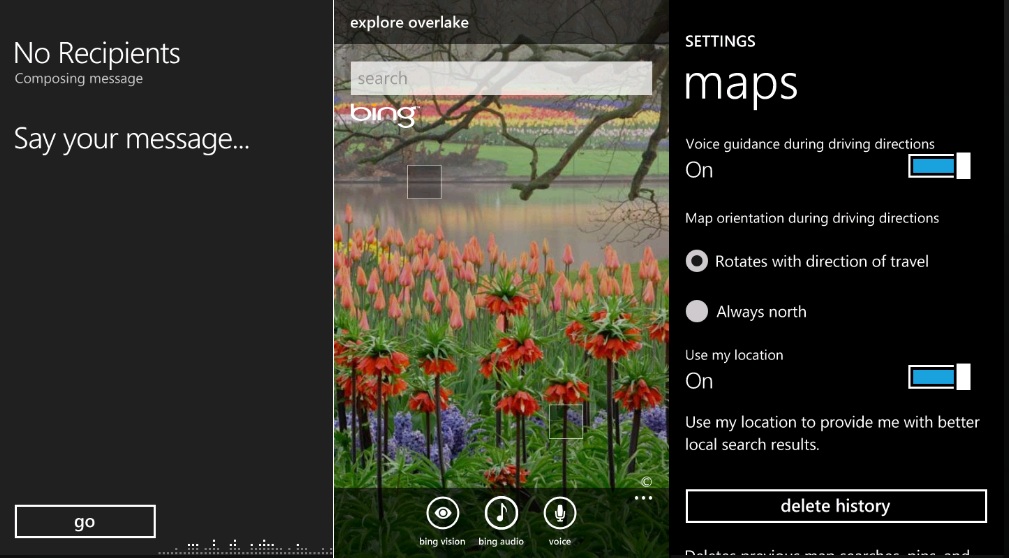
  • Turn-by-turn navigation: We heard rumblings of this in early April at Mix 2011, but it’s good to have it confirmed. We’re guessing that this feature makes use of Nokia’s expertise in navigation. The Finnish phone maker already includes Ovi Maps and navigation with its Symbian phones. When Nokia and Microsoft announced their partnership, Nokia CEO Stephen Elop stated several times that Maps/Navigation were features that Nokia intended to share.
  • Bing Vision: This app sounds similar to Google Goggles. It will have a barcode and QR code scanner, can pick up Microsoft Tags, and can detect CDs, DVDs, Books, and text using OCR (Optical Character Recognition).
  • Bing Audio: This is an app like SoundHound or Shazam. If you hold your phone up to a song, it will detect which song is playing and provide you links to download it in the Windows Marketplace for music. Initially, it will only launch in the U.S. and some major European countries like the United Kingdom, France, Italy, Spain, and Germany.
  • SMS dictation: A voice-to-text service for SMS messages. It will be very cool, if it works.

Is turn-by-turn navigation a big deal to you? It was a deciding factor for some of the Android users on our staff. To learn about more features coming to Windows Phone 7, check out our recap from Mix 2011.

Jeffrey Van Camp
As DT's Deputy Editor, Jeff helps oversee editorial operations at Digital Trends. Previously, he ran the site's…
The best note-taking apps for iOS and Android
I tested these apps for months so your notes never have to switch homes again.
iPhone showing note-taking apps

Choosing a note-taking app is not easy. What note-taking app you choose depends on your needs, the platform you use, and of course, the cost. The process becomes even more complicated as it seems that there’s a new shiny app released every other week. 

That’s why I always suggest choosing a note-taking app that has all the features you need and can last you for a long time. Also, don’t chase new apps. The real power of a note-taking app comes when all your notes live in one place, making it easy to spot connections between them.

Read more
The best phones in 2026: our 14 favorite smartphones right now
We tested phones across all price brackets so that you can make the best pick based on your needs and budget.
Google Pixel 10 Pro Fold vs Galaxy Z Fold 7 cameras

Choosing the right smartphone in 2026 is no easy task. Apple and Android manufacturers now have strong options at almost every price, while better cameras, longer battery life, improved software support, new AI features, and more refined foldable designs have made the market more competitive than ever. But picking one is not easy, especially if your budget is tight, or you are just legitimately concerned about getting the best value for your money and need a reliable daily driver for long-term usage.

We have tested and compared the leading smartphones available today, looking beyond the spec sheet to see how they actually perform in daily use. Camera quality, battery life, performance, display quality, software, design, and long-term value all play a part in our recommendations. Whether you are looking for a powerful flagship, a dependable budget phone, a compact device, or a foldable, this guide should help narrow down your choices.

Read more
Snapchat Planets Meaning: Order, Rankings, and How Friend Solar System Works
Snapchat Planets turns your best friends list into a solar system, and yes, your orbit says a lot
Snapchat Planets being shown on the Snapchat app on iPhone.

Snapchat+ includes several exclusive features, but few have generated as much curiosity as Snapchat Planets. Part of the app's Friend Solar System, it transforms your Best Friends list into a planetary ranking, assigning each of your top eight friends a planet based on how often you interact.

From Mercury, which represents your closest friend, to Neptune, which represents your eighth closest, the system offers a quick visual snapshot of your interactions. But what do the different planets actually mean, and how does Snapchat decide who gets which one?

Read more
