
  1. Home
  2. Computing
  3. Legacy Archives

IOGear 4-Port USB Sharing Station takes USB peripherals wireless

Add as a preferred source on Google
IOGear 4-Port USB Sharing Station
Image used with permission by copyright holder

The technology world is literally littered with USB peripherals: tens of thousands of printers, scanners, cameras, hard drives, speakers, video cameras, memory card readers and more all sport USB ports. Of course, while many printers and multi-function devices often come with built-in Wi-Fi these days, versions with Wi-Fi often cost more, and enormous numbers of USB peripherals offer no wireless option. IOGear aims to help solve that with its new 4-Port USB Sharing Station. The device looks like a Wi-Fi router, and sports both Wi-Fi and Ethernet (100Base-T) connectivity, along with four USB 2.0 ports for peripherals. Pop the USB Sharing Station onto your network, then plug your USB peripherals into the Sharing Station—and suddenly you can connect to your USB peripherals from anywhere in Wi-Fi range. And the peripherals aren’t available to just one computer: any user on the network can access them as well.

“Sharing USB peripherals is an easy way to stretch resources while improving the computing efficiency of a home or office setting,”said IOGear senior marketing manager Bill Nguyen, in a statement. “Our work and productivity spaces are cluttered enough, utilizing a Wi-Fi network for device sharing can help de-clutter, while providing many other useful applications.”

Recommended Videos

Not all USB devices make sense for wireless sharing: Internet-connected TVs aren’t going to be very practical, and sharing a trackball, mouse, keyboard or game controller wirelessly probably doesn’t make too much sense. But printers, copiers, fax machines, scanners, USB storage (think backups or media streaming), and cameras all make sense—using the wireless hub to extend the range of a USB camera might make a quick way to check to see who’s at the delivery entrance without having to leave the desk. If you have a ton of USB peripherals, IOGear offers a USB 2.0 hub extension that can add four more ports to the configuration, bringing the total number of sharable devices to seven. Users configure the station using a Web-based interface or a Windows utility app; the hub works with WIndows XP/Vista/7 and Mac OS X 10.6 or newer.

The 4-Port USB Sharing Station is available now for a suggested price of $99.95.
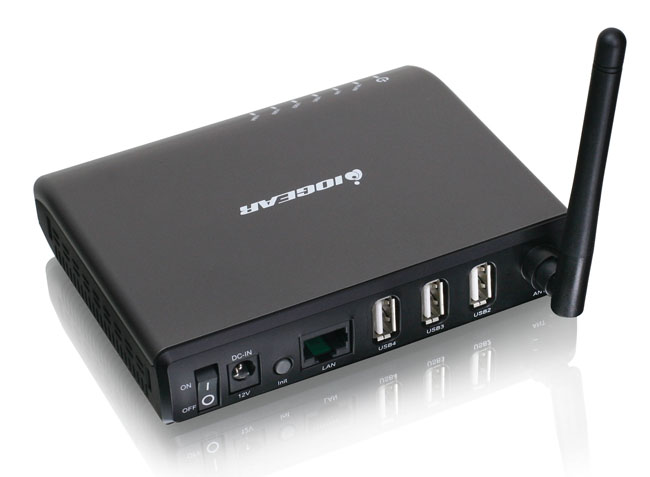
IOGear 4-Port USB Sharing Station
Image used with permission by copyright holder
Geoff Duncan
Former Contributor
Geoff Duncan writes, programs, edits, plays music, and delights in making software misbehave. He's probably the only member…
Apple’s maxed-out M5 Ultra Mac Studio is here, and it costs as much as a Chevy Bolt EV
Apple’s most powerful Mac ever is finally here, and your wallet might want to sit down for this one.
2025 Mac Studio

When Apple launched the M5 Max and M5 Ultra Mac Studio in August, it quietly mentioned that one configuration would arrive later. Apple listed 512GB of RAM as an option, but you couldn’t actually buy it. That changes today, as Apple has opened pre-orders for the fully loaded M5 Ultra Mac Studio, which might just be the most powerful Mac ever made.

How much does the maxed-out Mac Studio cost?

Read more
Google’s Gemini can now make complex topics more fun with new interactive learning feature
Google wants to make learning more fun with interactive Gemini lessons that let you explore complex topics visually.
google-gemini-immersive-exploration

Reading about complicated subjects can get a little dry, especially when diagrams and textbook explanations leave you scratching your head. Google wants to make that experience more fun and engaging with Immersive Explorations, a new Gemini feature that turns complex topics into interactive visual experiences. You can explore everything from ancient trade routes to jet engines, uncovering details layer by layer.

https://twitter.com/GeminiApp/status/2115507092660289631

Read more
OpenAI now lets you text your ChatGPT Dot agent to get things done
ChatGPT Dot can now keep an eye on tasks and send you updates through your regular messaging app.
chatgpt-dot-agent-imessage-rcs

OpenAI is bringing its Dot agent into your regular messaging app, so you can assign tasks without opening ChatGPT. The texting feature is rolling out in beta to ChatGPT Pro users in the US, with support for Apple's iMessage and Android's RCS. You can send your Dot text, photos, and voice messages, and also receive proactive texts when it has relevant updates.

https://twitter.com/ChatGPT/status/2115496387613786374?s=19

Read more