  1. Home
  2. Phones
  3. Mobile
  4. News

Google Chrome on iOS gets 6 new features to take on Safari

Add as a preferred source on Google

While Apple is strengthening privacy and giving new capabilities to tabs in Safari with iOS 16, Google is updating Chrome for iOS with six new features. Some of these features are already available on Android, and others will be available later. Regardless, iPhone and iPad owners who use Chrome have a lot to look forward to.

The new update brings enhanced protection to iOS, which protects you from phishing attacks and malware by alerting you about password breaches and warning you about potentially risky sites. When entering these credentials in Chrome on Android or your desktop, you might receive a warning if your username or password is compromised. That feature — called Enhanced Safe Browsing — is now making its way to iOS. You can turn on Enhanced Safe Browsing on your iPhone or iPad by going to Chrome > More > Settings > Enhanced Safe Browsing.
The Google Chrome logo on a smartphone.
Deepanker Verma/Pexels / Pexels

Google is also rolling out a better password manager experience so you can ditch your separate password manager app. You can choose the Google Password Manager on iOS to allow Chrome to create, store, and fill in your passwords on any website or app you’d like. Why you should ditch the built-in password manager on iOS and go for the Google service is debatable, but if you prefer having Google handle your passwords, you now have that option.

Recommended Videos

If you have been away from Chrome for a while, a new feature will allow you to discover new content or start a fresh search in Chrome for iOS at such times. The change will also soon roll out for Android. Google is also using on-device machine learning to make those websites available in your preferred language by updating its language identification model.
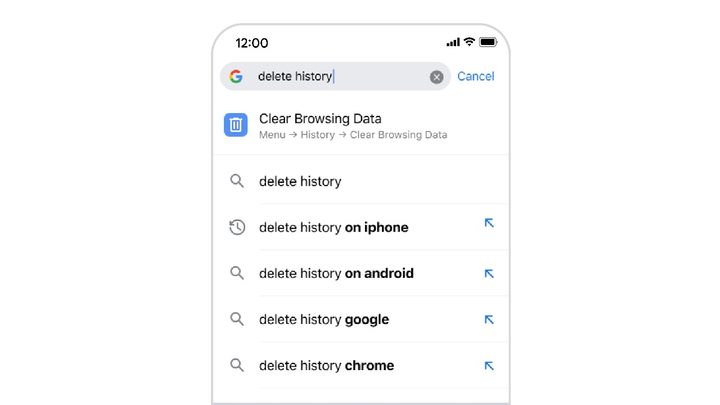
Chrome for iOS address bar.
Image used with permission by copyright holder

Out of the six updates, this next feature seems the most useful to me. With this Chrome iOS update, you’ll now be able to type action titles into the address bar. For instance, if you want to open clear browsing data, you can quickly type “delete history,” and Chrome will show an action to jump directly into the setting. For now, it is limited to three actions: clear browsing data, open the Incognito tab, and set Chrome as the default browser.

Google is also making the Chrome three-dot menu easier to use by modifying the current look based on user feedback. The Bookmarks tab or Reading List options will now be higher up in the vertical menu. Google will be rolling out more updates to Chrome for iOS in the coming weeks.

Prakhar Khanna
Prakhar Khanna is an independent consumer tech journalist. He contributes to Digital Trends' Mobile section with features and…
Google starts testing Gmail Live, its new voice search tool for your inbox
The feature lets you ask questions about your inbox with your voice and is set to roll out later this summer.
Gmail Live screenshot on gradient background

At I/O this year, Google showcased Gmail Live, a new Gemini-powered feature that lets users search their inbox using their voice instead of typing. The feature has now moved into testing, with 9to5Google reporting that it's rolling out to a small group of Android and iOS users this week.

How Gmail Live works

Read more
Apple and Google sat for discussions to unlock 50W wireless charging for smartphones
Wireless Charger

The next major leap in wireless charging may not come from a flashy smartphone launch, but from behind closed doors where some of the biggest names in the tech industry are working together, according to an ITHome report.

Apple, Google, Xiaomi, and several other leading technology companies recently gathered in Beijing for the Wireless Power Consortium's (WPC) Qi Off-cycle Meeting, where discussions centered around the upcoming Qi 50W wireless charging standard. The four-day event, hosted by Xiaomi, focused on refining technical specifications, testing prototype hardware, and ensuring devices from different brands can work seamlessly together.

Read more
Minimal Phone 2 looks like a deliberate antidote to doomscrolling
The coming phone leans on a keyboard, calmer software, and a smaller body to fight smartphone overload.
Electronics, Phone, Mobile Phone

Minimal Phone 2 has entered waitlist mode with a clear promise. Minimal says its next phone is coming soon with a smaller, more refined design, a better keyboard, an aluminum body, and improved software.

The first Minimal Phone already tested whether people wanted an Android device that slowed phone use down without cutting off everyday tools. Its e-paper screen and physical keyboard made endless feeds less comfortable, while keeping apps, messaging, payments, and other basics within reach.

Read more