
Intel Raptor Lake is finally here, and although there’s a handful of CPUs in this first wave of 13th-generation CPUs, it’s hard not to focus on the flagship, the Intel Core i9-13900K. Equipped with a seemingly endless number of cores, capable of hitting those ultra-high clock speeds, and socket-compatible with Alder Lake, it checks most of the boxes as far as the top-shelf CPUs are concerned.
But the 13900K is mostly just a refinement of the 12900K with extra cores. Is getting a Core i9-13900K worth the splurge, or should you keep things more budget-friendly with a 12th-gen CPU? Below, we’ll compare the two Intel flagships and help you choose a winner.
Pricing and availability

At the time of writing, the price of the 12900K has dropped from its initial $589 MSRP to anywhere between $500 and $550, such as on , where you can find it for just about $500. Still, it’s not cheap, and there are some AMD and Intel processors that offer better value, but it is what it is. These flagships are not meant to be cheap, anyway — they’re enthusiast-grade processors meant to deliver.
Despite rumors to the contrary, the Core i9-13900K is the same price as the Core i9-12900K — at least at launch, anyway. Given that the new CPU will become the de facto option at around $600, we expect the Core i9-12900K to slowly drop in price over the coming months. That could make a big difference in which processor you buy, especially if you can score a deal on a last-gen part.
The Core i9-12900K is available at most retailers now, while the Core i9-13900K will likely sell out close to launch and remain out of stock for a couple of weeks. That said, we don’t suspect any major shortages of the processor, so expect pricing to return to normal shortly after launch.
Specs
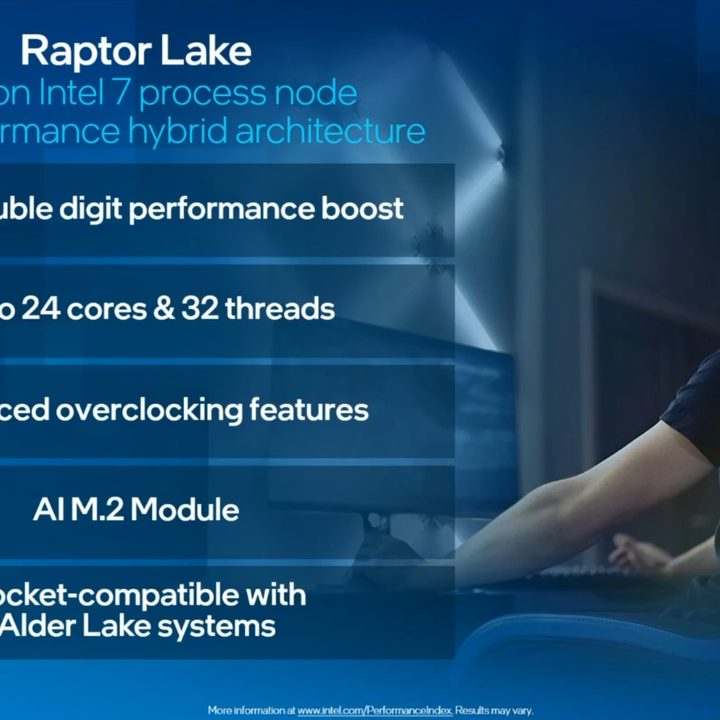
The Intel Core i9-13900K processor offers some very straightforward upgrades over the Core i9-12900K. With a higher core count, faster clock speeds, and a much larger cache, it has what it takes to deliver significantly better performance than the Alder Lake part. Let’s take a look at all the most important specs.
| Intel Core i9-13900K | Intel Core i9-12900K | |
| Cores | 24 (8P+16E) | 16 (8P+8E) |
| Threads | 32 | 24 |
| Base clock | 3.0 | 3.2GHz |
| Boost clock | 5.8Ghz | 5.2GHz |
| Max memory speed | DDR5: 5600MTps; DDR4: 3200MTps | DDR5: 4800MTps; DDR4: 3200MTps |
| TDP (base/turbo) | 125W/253W | 125W/241W |
| Intel Smart Cache (L3) | 36MB | 30MB |
| L2 Cache | 32MB | 14MB |
One thing to note about Raptor Lake’s eight extra cores is that these are efficiency cores, not performance cores. Otherwise, things are pretty straightforward because these two CPUs are almost identical architecturally.
Architecture

In terms of architecture, these two Intel processors are more siblings than they are cousins. They’re both compatible with the same LGA1700 socket and are, all in all, similar in many ways, although the 13th-gen CPU does bring a slew of upgrades. The real boost is not expected until the next generation, dubbed the Intel Meteor Lake, which will, in all likelihood, not be backward compatible the way Intel Raptor Lake is.
Intel decided to stick to the winning hybrid core technology, meaning that Raptor Lake continues what Alder Lake has started, and it features a mix of cores. Intel Core i9-13900K, therefore, features a mix of performance (P) cores and efficiency (E) cores. The E cores stayed mostly the same from the previous generation, but the P cores got a boost and are now referred to as “Raptor Cove” instead of Alder Lake’s “Golden Cove.”
Intel Core i9-13900K and Core i9-12900K were both made based on the same “Intel 7” 10nm process. Both CPUs simultaneously offer support for DDR5 and DDR4 RAM, although the new CPU has a higher cap on memory speed. In addition, both these generations grant access to PCIe Gen 5.0, and they can be used on the same motherboard, so if you currently own an Alder Lake CPU, upgrading will be seamless. However, Intel Raptor Lake will be accompanied by many new 700-series motherboards. This includes the high-end Z790, followed by the more affordable H770 and B760 models from various manufacturers, such as Asus, MSI, and Gigabyte.
As is the norm, the Core i9-13900K will also be available in a KF variant, which won’t include integrated graphics.
Performance

If you looked at the spec sheet and thought that the 13900K would be a big improvement in multithreaded performance but not so much in single-threaded performance, you’d be correct. In our review, we found that the 13900K was usually 30% to 50% faster than the 12900K in multithreaded applications like Handbrake and Cinebench R23.
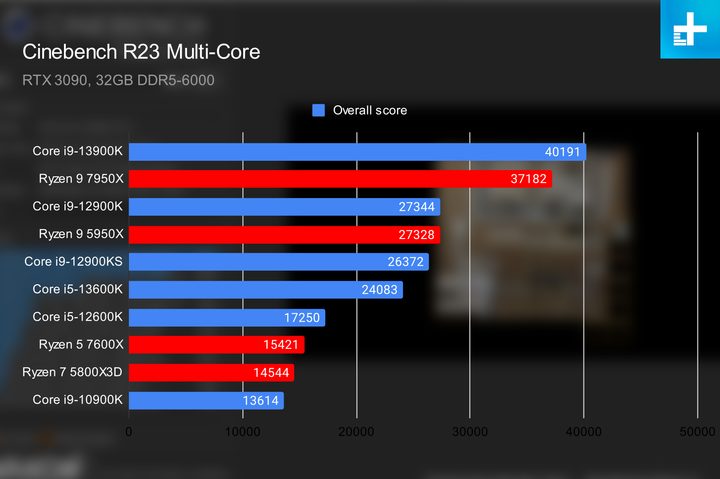
Cinebench R23 was the best result for the 13900K, as it beat the 12900K by 47%, thanks to a combination of more cores and higher frequencies. However, when you take those extra cores out of the equation in a single-threaded benchmark, the performance gains are significantly reduced.
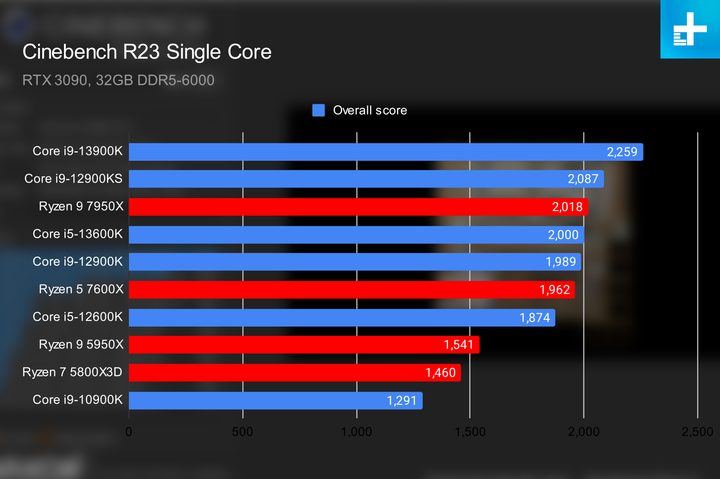
In Cinebench R23’s single-core benchmark, the 13900K was only 14% faster than the 2900K and just 8% faster than the Core i9-12900KS. To Intel’s credit, increasing single-threaded performance is quite difficult, especially when there are no significant architectural improvements, so 8% to 14% is quite good.
Although Intel promised the 13900K would deliver the “world’s best gaming experience,” it’s not much of an improvement over the 12900K as far as we can tell. In Far Cry 6, Red Dead Redemption II, and Cyberpunk 2077, the 13900K only improved the frame rate by single digits, which is unnoticeable. This is pretty surprising, given the 13900K has way more cache than the 12900K, and adding more cache is a great way to improve gaming performance. Additional clock speed (which Raptor Lake also has) is good for gaming as well, so it’s a bit strange that the 13900K isn’t performing much better.
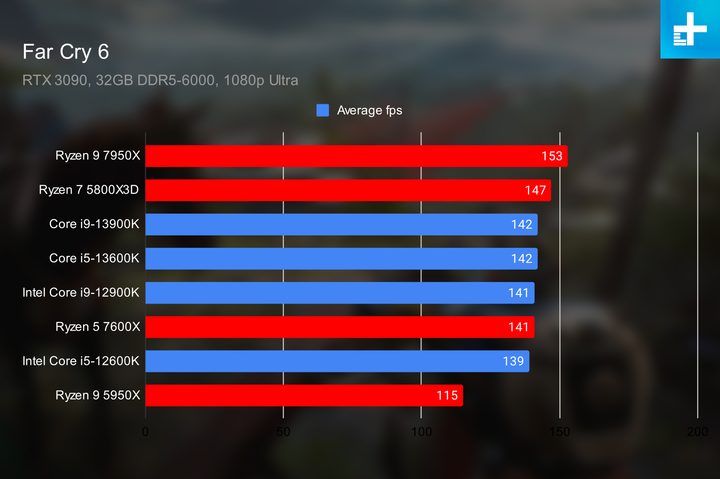
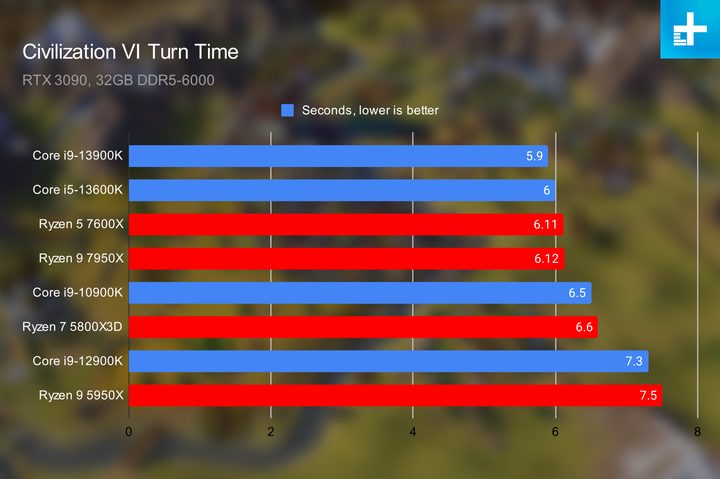
However, there are some games that benefit from Raptor Lake’s big cache and high clock speeds. We saw a decent improvement in Assassin’s Creed: Valhalla, which ran with an 11% higher frame rate on the 13900K. Turn times in Civilization VI were also reduced from 7.3 seconds on the 12900K to 5.9, which may not seem like much, but having 24% faster turn times is a big deal in Civilization VI, especially as turns get progressively longer as the game goes on.
Intel also touts the CPU’s overclocking capabilities, and indeed, we’ve already seen a Raptor Lake CPU hitting the mythical 6.0GHz mark in leaked benchmarks. That kind of frequency would be hard to achieve for the Core i9-12900K with its maximum boost clock of 5.2GHz. It’s worth noting that the CPU that managed to reach 6GHz was not even the flagship — it was the Core i7-13700K, so undoubtedly, the Core i9-13900K will be able to reach it too. Using liquid nitrogen for extreme cooling, Intel was able to push the P-cores on the Core i9-13900K beyond 8GHz. While not quite a world record, it’s a tremendous achievement that bodes well for the processor’s overclocking ability.
Raptor Lake has also made overclocking easier, with new per-core tuning visualizations and one-click overclocking built into the CPU.
Faster, but only if you need more cores

The 13900K is definitely an upgrade over the 12900K, but not a particularly large one unless you want those eight additional cores for workloads that can use them. Applications that are less reliant on threads or cache won’t see particularly large gains in performance, and games didn’t really run much faster on the 13900K either.
Then there’s also the question of price. The Core i9-13900K is about $100 more than the Core i9-12900K, which might be a better option if you’re not hunting for the best performance available. If you are, there’s no denying that the new Core i9-13900K will make a better pick, and $100 extra seems like a fair trade if you need those extra cores. However, 12900K prices might continue to fall, so it could be worth waiting a little while to see what happens.
If you’re gaming or not working with software that uses lots of cores, though, you’re probably fine with a 12900K.



