If you’re researching VR headsets, you’ll probably come across a mention of the screen door effect. Since the display of a VR headset is so close to your eye, it’s sometimes possible to see the gaps between pixels, similar to looking through a screen door or the mesh that covers a window to the world beyond.
This visual phenomenon shows up on VR headsets, from the cheapest to the most expensive, and although there’s not a clear solution to completely eliminate screen door effect, there are several headsets trying to tackle the problem in different ways.
Packing pixels tighter
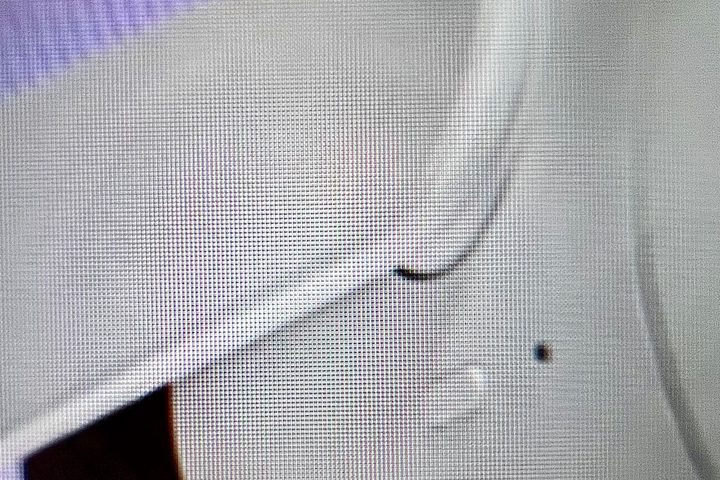
Manufacturers can solve the screen door effect by packing pixels closer. A smaller gap is less noticeable. Even a midrange smartphone has a pixel density greater than 300 pixels per inch (PPI), which is considered better than the resolution of your retina.
Unfortunately, even a 460 PPI retina-resolution display, like that of an iPhone 14 Pro, would suffer from screen door effect in a VR headset. The budget-priced Meta Quest 2 has a display resolution of 773 PPI, yet it’s possible to see the gaps between pixels on a Quest 2 and many other VR headsets if you have a sharp eye and look closely.
Since a VR headset rests upon your face, the screen is less than two inches from your eyes, significantly increasing the amount of visible detail, including the pixels and the space between them.
It would be challenging to see objects clearly at that range; however, the lenses inside a VR headset are designed to allow the eyes to focus closely. Unfortunately, this can result in screen door effect, which requires a remarkably dense and very expensive display to make the pixels disappear.
Thankfully, there are more affordable solutions.
Better subpixel arrangement
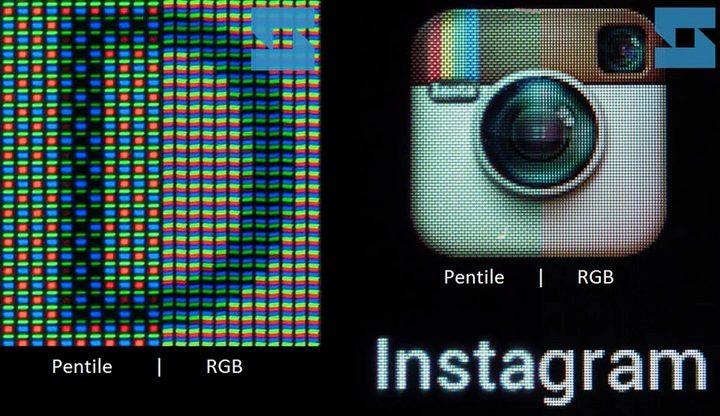
Even if pixels can’t be packed tighter in a low-cost VR headset, the red, green, and blue components can be arranged to minimize this effect. Subpixels are tiny electronic elements combined within a display to create a wide range of colors for each pixel.
You can see the paper and ink equivalent in full-color prints with a magnifying glass. The tiny dot patterns used in printing are called halftones, and they allow a printer to use four colors to recreate photographic prints. With a display, these tiny dots are made up of light instead of ink or toner. Still, the result is the same — our eyes blend multiple subpixel colors into one larger pixel.
The subpixel arrangement that’s used can affect how apparent screen door effect is. There are several varieties, with PenTile and RGB stripe among the most common.
PenTile is generally considered by display experts to have a lower effective resolution due to the grouping of its subpixels. RGB stripe uses the traditional arrangement where each pixel includes red, green, and blue, which is usually less susceptible to screen door effect.
The reason to pick PenTile is for cost savings, an important factor if a headset is loaded with advanced tracking, sensors, and chips. That’s why cheaper VR headsets may show screen door effect, even if they have a decent resolution. The new PlayStation VR2 uses PenTile OLED displays, for example, so Sony had to take other steps to reduce the screen door effect.
Diffusers and coatings
The lowest-cost solution to eliminate SDE is to make pixels appear larger, effectively closing the gap. This can be done with diffusers or coatings.
Both end with the same result. Bigger, softer pixels hide SDE, but can also make the display look slightly blurred. The blur occurs at the pixel level and should only be visible in high-contrast areas, such as within text.
Which VR headsets suffer from SDE?
Some people notice screen door effect more than others. If it’s apparent and annoying in one VR headset, it’s likely you’ll see it in most others as well.
Most VR headsets have displays with a resolution of roughly 2,000 x 2,000 pixels per eye and RGB stripe subpixels. That includes the Quest 2, Quest Pro, Pico 4, HTC Vive XR Elite, and HP Reverb G2.
The display of the PSVR2 is slightly denser in pixels, but uses PenTile subpixels, increasing the potential for screen door effect. By adding a coating, Sony mitigated screen door effect at the expense of some sharpness.
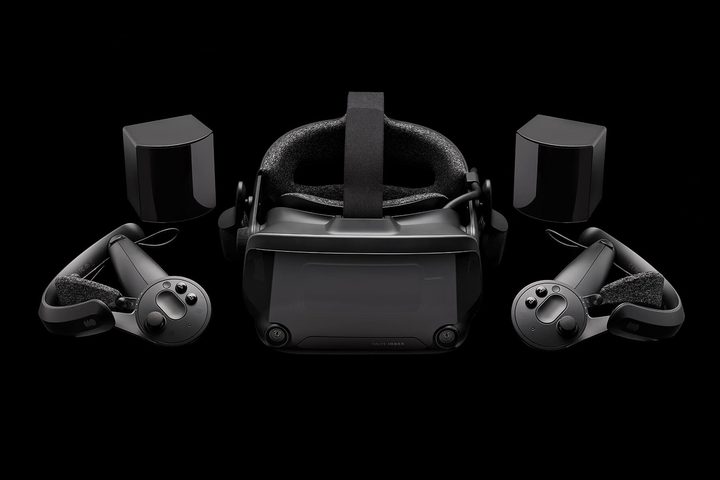
The venerable Valve Index has a relatively low-resolution display with just 1,440 by 1,600 pixels per eye, making screen door effect more visible if one is sensitive to that effect. Some people notice screen door effect in all headsets, while others don’t. It’s a very personal aspect of VR, like motion sickness.
The Varjo Aero is an ultra-premium VR headset and one of the few currently available with a high-enough pixel count to eliminate screen door effect. At 2,880 x 2,720 per eye, the image is super sharp and dense. Such a beautiful display comes at a cost. A powerful PC with a high-performance GPU will be needed to drive such a high-resolution display at a good frame rate.
No perfect solution
There really isn’t a perfect VR headset that solves every problem at an affordable price. Instead, there are several different approaches to the issues that arise with this emerging technology. The screen door effect is just one of many concerns.
If you’re new to VR, do some research. Our guide to the best VR headsets is regularly updated and can help you make an informed choice. Ultimately, you need to try out some VR headsets to get an idea of your needs.