Sick of attending all those work meetings every day? Slack could soon take care of them for you by sending its own chatbot to summarize what happened. That’s because Slack owner Salesforce has just introduced its own artificial intelligence (AI) tool called Slack GPT, and it could help make your workload a little easier to manage.
According to Slack and Salesforce, Slack GPT aims to bring AI to your day-to-day tasks. That might mean helping you adjust the tone of your messages to suit a certain audience, or automatically drafting emails to send to prospective clients.
This news follows the announcement that Microsoft is bringing ChatGPT to its Teams chat app, and means Slack is joining the deluge of apps racing to integrate AI into their feature sets. So how exactly will Slack GPT work, and what will you be able to do with it?
What will Slack GPT do and how will it work?
According to Slack, you’ll be able to do a range of different things with Slack GPT. For one thing, it will summarize message threads that you may have missed, saving you the hassle of having to read through every comment. Salesforce says it will even be able to attend huddles on your behalf and then create a quick recap with all the key points. That could save you the time of manually catching up if you can’t attend in person.
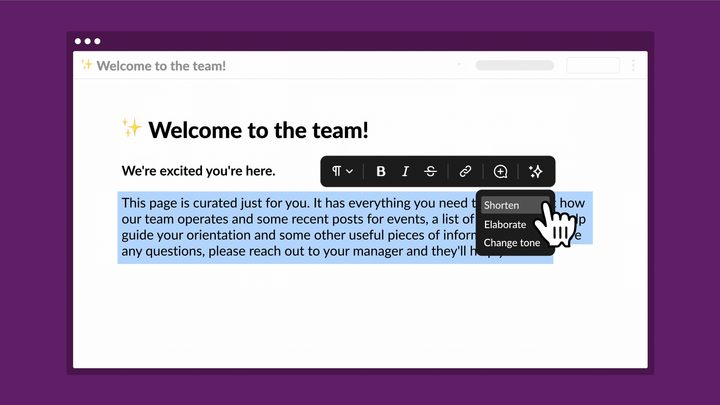
Slack GPT will also help you send the perfect message without having to overthink what you need to say. A quick demo in Slack’s press release shows a user highlighting a paragraph, then choosing from three options: “shorten,” “elaborate,” and “change tone.” After clicking the first option, the message is truncated and still perfectly readable.
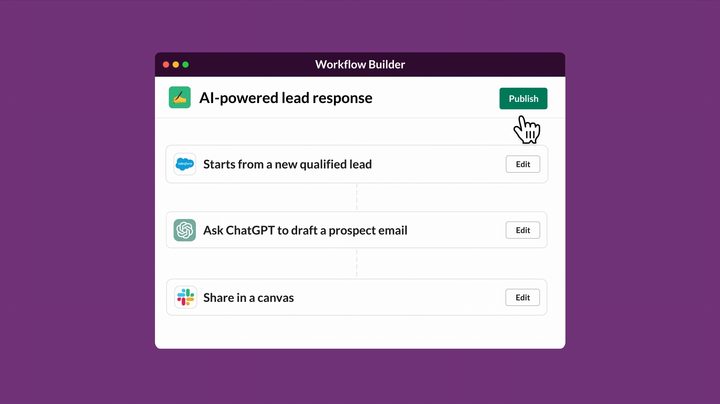
If you want to create your own AI prompts, you’ll be able to do that with a tool called Workflow Builder. According to Slack: “Later this year, you’ll be able to instantly bring generative AI into your automated processes in Slack, without a single line of code. With Workflow Builder, our built-in no-code automation tool, you’ll be able to add generative AI prompts as one of the steps in your workflow.”
Finally, Salesforce is aiming to integrate Slack GPT with its own products and features. One idea is to take data about a new lead provided by Salesforce’s Sales Cloud, then automatically create a draft message to send to that lead using Slack GPT.
Slack GPT will let you integrate a large language model (LLM) chatbot from a third party, such as OpenAI’s ChatGPT or Anthropic’s Claude. Salesforce says these chatbots will not be trained on any data fed to them while using Slack. Alternatively, you can import your own custom LLM.
What else is in the pipeline?


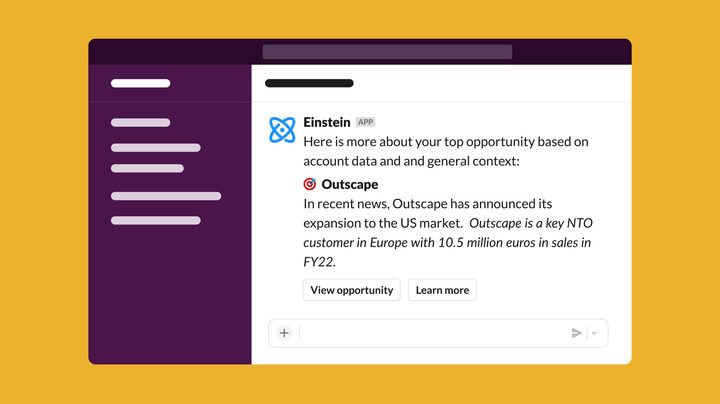
Slack can integrate with various apps, and it’ll soon be getting a new one called Einstein GPT. This “lets you surface AI-powered customer insights from trusted Salesforce Customer 360 data and Data Cloud,” according to Slack.
In the future, Einstein GPT might be able to “auto-generate case summaries using relevant data from Service Cloud and your Slack channel,” Slack’s press release states. “Now, case summaries could not only capture data from service tickets, but knowledge from the team who resolved the case too.”
When will Slack GPT be available?
Slack GPT’s features are rolling out piece by piece. Claude is available in Slack right now, while ChatGPT for Slack is in beta. Workflow Builder is coming this summer.
“Slack GPT native AI capabilities and the Einstein GPT app for Slack are in development,” Slack says, and there are no launch dates yet for those features.