Monitors are getting cheaper, and that’s particularly true for 4K gaming monitors. Over the past couple of years, multiple brands have launched their own stripped-back 4K gaming displays, with each driving prices down, and proper 4K gaming displays are cheaper now than they’ve ever been.
The price drops aren’t insignificant, either. The go-to 4K gaming display over the past several years has been the LG 27GN950-B, which launched for $800. Now, you’d be overpaying if you pick one up for more than $650. Samsung’s market-defining Odyssey Neo G8 launched just last year for $1,500. Now? You can buy it for $1,000 on sale.
That’s just for high-end 4K gaming monitors. You can pick up displays like the Lenovo Y32p-30 for $600 now, $150 less than what it launched at. And if you shop around on Newegg and Best Buy, you can find 4K gaming monitors like the Gigabyte M28U for around $500. It’s a far cry from just a few years ago, when you’d be lucky to find a proper 4K gaming monitor for under $1,000.
These days, 4K is in the reach of gamers who don’t have an infinite budget, but I’m still not upgrading. While 4K may been the final destination for many people, it’s mostly wasted space if you’re a PC gamer.
Let’s talk pixel density

There’s a joke among my friends that I’m the “pixel density guy,” and it’s a title I wear proudly. The reason 4K is such a destination on monitors is because it has an extremely high pixel density. That’s the number of pixels squeezed into the size of your display, measured in pixels per inch (ppi).
I won’t pretend like a high pixel density isn’t important. But the pixel density you’re offered at 4K (or higher, like on creator displays offering a 5K resolution) makes more sense on the desktop than it does in games.
High pixel density is most apparent with fine details, like text, and a lot of the benefits of an extremely high pixel density start to fade away while playing games. Techniques like anti-aliasing can make up for fine details further away, and upscaling tools like AMD’s FidelityFX Super Resolution 2 (FSR 2) can negate some of the benefits of a higher resolution display, especially if you’re not running powerful hardware.
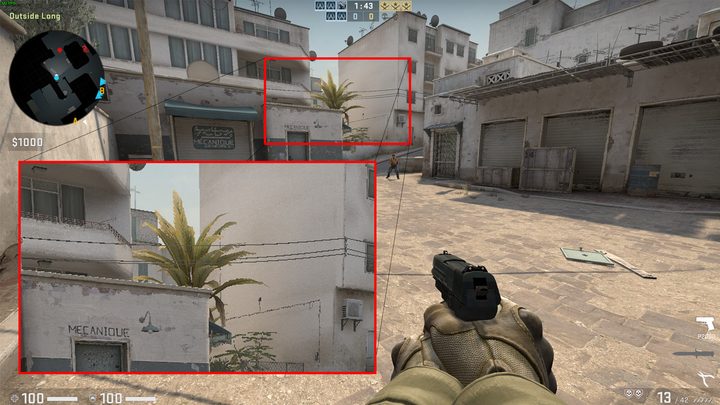
There is a benefit in games, but it’s not as pronounced as the benefit you see on desktop. For games, you just need a high enough pixel density, and that’s where 1440p comes into play. This resolution of 2,560 x 1,440 is the sweet spot for PC gaming, not only due to the pixel density, but also due to the hardware required to push that resolution.
With a 27-inch, 1440p monitor such as the LG UltraGear OLED 27, you’re getting just shy of a 110 ppi. That’s right where you want to be for a monitor. For context, a larger 4K display like the Asus ROG Swift PG42UQ has a lower pixel density despite having a much higher resolution. It will look less sharp at the same viewing distance (though not by much).
This is an extreme example, but it’s a good illustration of the role 4K serves. It’s for larger displays, mainly TVs, and the benefits of the resolution start to fade with smaller monitors.
Demanding games
For PC gamers, 4K also has issues on the hardware front. A few years ago, the RTX 3080 launched as a 4K champion that was able to tear through the most demanding games at 60 frames per second (fps). And before that, the RTX 2080 Ti did the same. And before that, the GTX 1080 Ti … I hope you see where I’m going here.
The bar for games is constantly moving up, and you need to continue to invest in high-end hardware to drive 4K displays. The RTX 3080 that was a 4K star child a few years ago can’t maintain 60 fps in new games like Starfield at that resolution.
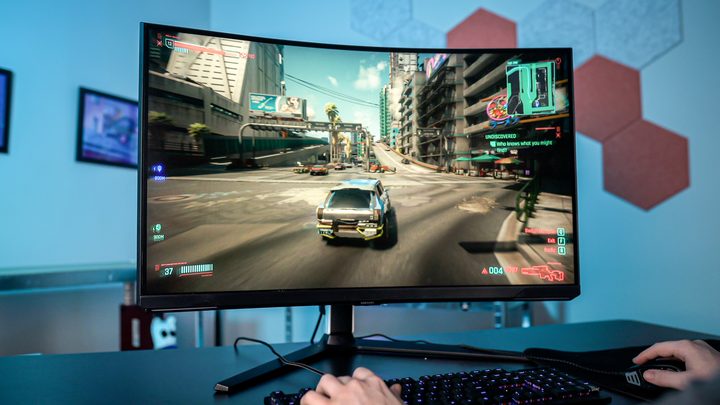
On top of that, we’re seeing more games implement ray tracing than ever before, with some titles, such as Cyberpunk 2077, moving onto full-on path tracing. Ray tracing techniques are incredibly demanding regardless, but the performance hit is multiplied at higher resolutions.
Ultrawide in the wings

Down at 1440p, you have a lot more options, particularly when it comes to aspect ratio. Instead of buying a solid 4K gaming display, something like the Alienware 34 QD-OLED offers a premium panel with the immersive 21:9 aspect ratio.
For gaming, it’s tough beating an ultrawide display. The wider field of view is more immersive in massive games like Cyberpunk 2077 and Starfield, and it can give you a slight edge in competitive titles like Overwatch 2. When using the full display, an ultrawide monitor fills your peripheral vision in a way a 16:9 monitor can’t (assuming you don’t buy a massive display like the LG C2 OLED).
It’s great for productivity, too. In apps like Premiere Pro and Photoshop, the wider view gives you more room to spread out your toolbars and fit everything on your screen. For my purposes, I like using Windows 11’s Snap feature to orient several windows on my screen at once, giving me access to multiple windows that would look cramped on a 16:9 display.
I pointed out the Alienware 34 QD-OLED as a premium option, but there are dozens of other, much cheaper ultrawide monitors available. The Gigabyte GS34WQC is around $330, and it comes with a solid 120Hz refresh rate. And if you’re on a strict budget, the MSI MAG342QPV is a mere $260 for a 100Hz, 34-inch ultrawide display.
1440p is even cheaper
The effect of 4K gaming monitors getting cheaper is that you can pick up 1440p displays for even less. A couple of years ago, you would expect to spend between $400 and $600 for a solid 1440p monitor, and although you can still spend that much, you can get a lot of monitor for much less.
For instance, the Samsung Odyssey Neo G7 launched at $600 and features a 27-inch curved panel with a 240Hz refresh rate. Now, Samsung offers its Odyssey G6, which comes with the same specs, for $400. If you shop open box models, you can find one as cheap as $320.
That’s definitely on the higher end for 1440p gaming displays, too. LG's UltraGear 27GL83A-B clocks in at $300 with a 144Hz refresh rate, and Gigabyte’s G27Q comes in at a mere $230 for the same resolution and refresh rate. You can even find some great deals, like the Asus TUF Gaming VG27AQA1A , which is a 27-inch, 170Hz display that’s on sale for $200 at the time of writing. Even a lot of 1080p gaming monitors clock in at $150 to $200.
For the past few years, there’s been a rising tide of gamers choosing 1440p as a sweet spot resolution. According to the Steam Hardware Survey, 1080p still makes up the overwhelming majority of gaming displays, but 1440p gains more users month over month. Monitor brands clearly see that trend, and 1440p displays have dropped drastically in price as a result.
No need for 4K

There’s a small subset of ultra-premium gamers who should use a 4K gaming monitor. If your rig is packing an RTX 4090 and one of the latest high-core CPUs from Intel or AMD; yeah, you should probably pair that beefy rig with a 4K display. For everyone else, which is most of the PC gaming population out there, 4K isn’t the place to be.
For years, 4K has been built up as the premium PC gaming experience. It offers that when paired with the right hardware, but 1440p really isn’t far behind. In some cases, like the QD-OLED utlrawide displays we’ve seen, the lower resolution can even beat what a lot of 4K displays can offer.
Things may not always be this way. In the future, when we start seeing 8K TVs commonly in living rooms, a 4K monitor might be more practical. For now, 1440p remains the go-to resolution for its balance of pixel density and how demanding it is on your hardware. The falling prices definitely don’t hurt, either.