In hindsight, the skepticism over Telly — a 55-inch LCD TV that the company is giving away for “free” — was understandable. Warranted, even. After all, there’s a reason I put “free” in quotes like that. Telly isn’t just any old 55-incher that you can find in any store. It’s a 55-incher with a built in soundbar, webcam, far-field microphone array — and a 10-inch-tall “Smart Screen” that lives under the main panel and shows (among many other things) advertising.
And it’s “free,” as in you don’t really pay cash. You’ll sign up for one on Telly’s website, and pay with your eyeballs and attention.
When Telly emerged from a two-year stealth mode in May 2023, it initially aimed to have a half-million of these things in homes by the end of the year. That strategy has changed, the company told me at a demo at CES 2024 in Las Vegas. It’s shipped “thousands” — nobody would get more specific than that, no matter how hard I tried. And out of those “thousands” (I’m going to stick with the air quotes theme here), Telly said only four had been returned, and that was just because the abnormally shaped TV didn’t fit in the home. Understandable given the secondary screen and soundbar being built in.
That all brings us to now. Inside a suite at the Aria Hotel, I got my first look at Telly in action. I’m still a little skeptical. I’m not 100% sure I’d want one in my home. But I get it now. It’s a trade-off, sure. You get a “free” TV in exchange for seeing ads and giving Telly all sorts of data on what you watch and how you watch it.
And it’s done really well.

I recognized a couple things as I stepped into the living room of the Aria suite. One was the Telly television itself. It looks normal enough in person. Not that there are a lot of two-screened televisions out there, with displays sandwiching a soundbar. But if you’ve seen the press pictures already, so you know what to expect.
The other thing I recognized wasn’t a thing at all. It was a person — specifically, Sascha Prueter, who was the product head for Android TV back in the days when I was running an Android-based blog. That’s important not just for the niche star factor here, but because it means Telly isn’t just some pie-in-the-sky idea, hacked together in terms of hardware and software — and with the ethical concerns that come with an advertising- and data-based product like this.
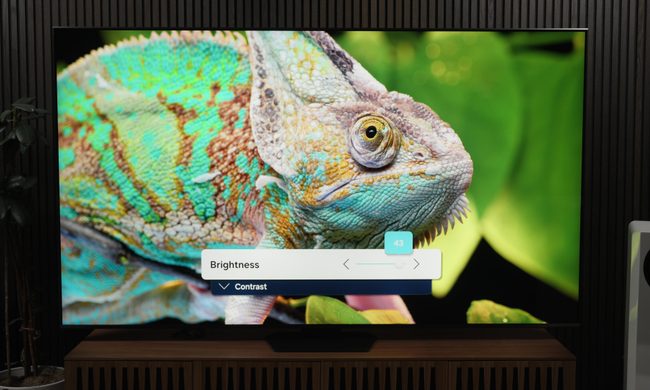
And the more we got into the demo, the more that bore out. That starts from the moment the Telly TV is turned on. Anything you’re used to seeing on-screen that isn’t content (i.e., the show or movie or game you actually want to watch) is shunted over onto the Smart Screen, leaving the Theater Display unsullied. Want to change apps? It’s done down there. Want to change inputs? Down there. Volume indicator? Down there. Picture settings? Down there. (OK, not everything lives down there, but still. You get the point.)
So the top part of Telly — the Theater Display — is pretty typical. It’s a 4K LCD panel that looked good enough considering the cost. (By the way, the black bar you’ll see at the top of some of our images was the hotel TV sitting unused behind the Telly.)

Between the Theater Display and Smart Screen is the soundbar, which holds a half-dozen speakers. It’s tough to get a great read on it in a noisy hotel suite, but it had some decent volume and more heft to the audio than you get from traditional TV speakers. It probably could use some extra bass, though, and to that end, there is an output for a subwoofer. Adding that definitely improved the dynamic, though it’s certainly not required.
And below that, you get to the Smart Screen. Basic display ads live, as we’ve seen in product shots for the better part of a year now, in the bottom-right corner. I can’t decide if it’s a good or bad thing how quickly my brain seemed to start tuning them out. Maybe we’re finally living in the Back to the Future 2015 era, where sponsorships are just a way of life (even more than they are now). But you’d also see instances where promos would take over the entire Smart Screen. It felt pretty organic, however, because what you’re trying to watch — a basketball game, or the news, or whatever — is untouched up top on the Theater Display.
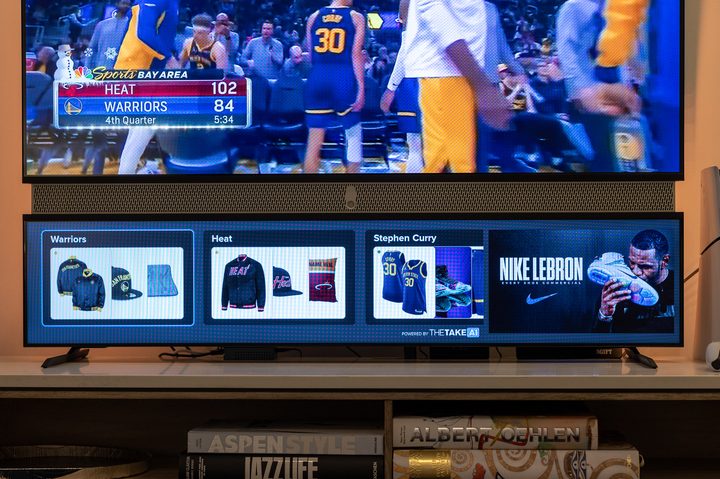
Where things get really interesting is with interactivity. The Pizza Hut example was a fairly obvious one. You see an ad in the corner and click on it, which launches a web browser. From there, you order your pizza. (If this really takes off, let’s hope Telly gets paid per pie, and not just for the display ad.)
That’s all simple stuff, though. Basic Web 101, right? But Telly has another trick up its sleeve in ACR. That stands for Automatic Content Recognition, and it’s exactly what it sounds like. Telly can recognize anything you’re watching — from any source input because it’s literally just looking at what’s on the screen and doesn’t care where it’s coming from — and adjust things accordingly. In our example, we were watching an NBA game and were given the opportunity to explore and purchase shoes from one of the star players. And also shoes like those shoes. There are almost limitless possibilities there. (And presumably there will be some guardrails in place to prevent advertising suggestions from appearing alongside less wholesome content like an NBA game.)

The Smart Screen isn’t only for ads, though. Telly also is using it for features within apps. It just announced native support for video calls over Zoom, and it’s smartly done, with the Smart Screen able to show multiple callers’ video streams. And that’s where things really get fun, because you can use that to hold a Zoom watch party, whereeveryone is watching the same thing, with their video feeds tucked down on the Smart Screen. There’s also some smart handling of audio in that case, with a fader made available so you can have more emphasis on the show or movie — or what your friends are saying about it.
Telly also has a smattering of workouts built into a fitness app, which uses the same onboard camera to actually track what you’re doing. If it gives three minutes for push-ups, it can count how many you’ve actually done. That sort of thing.
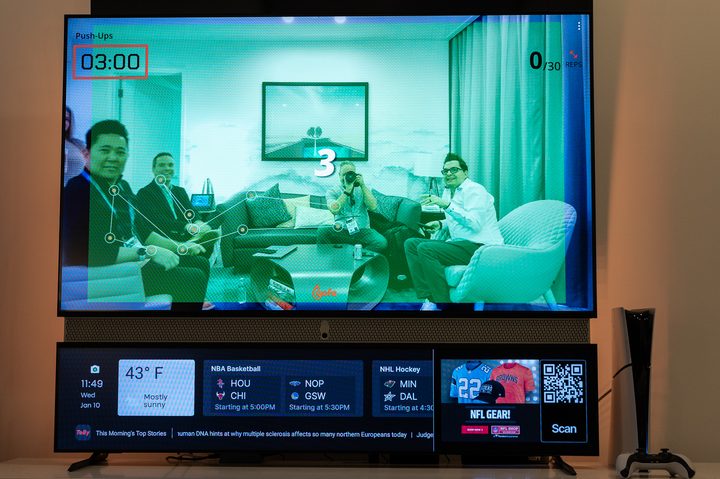
And a quick word on that camera: It lives in the middle of the soundbar. But it’s also kept hidden behind a physical shutter when the TV isn’t actively using it, which is smart.
At this point, given that you’ve actively accepted a free television knowing it’s going to come with dedicated display advertising, you’re probably OK with other monetization efforts. And before you get too upset about the idea of ACR, it’s worth remembering that it’s hardly unique to Telly, and that Amazon and Roku use it as well. That’s actually a pretty good argument for just using the Android TV stick that comes with Telly — no reason to give more than one company all that data, right? But if you do want to use Roku or Fire TV or Apple TV or anything else with Telly, you can do so, just like on any other TV. The Telly TV itself has its own operating system based on the Android Open Source Project that handles the actual TV side of things, and there’s an ATSC 1.0 tuner on board if you want to watch anything over-the-air.
Telly isn’t going to be for everyone. It’s not going to be the best display or sound experience you can get, though it’s certainly not awful on either front. There are some real things to think about when it comes to having advertising in front of you all the time. Though Telly says it’s more than happy with the amount of time folks are spending in front of both screens, and that it’s found users have actually been leaving the Smart Screen on while turning the Theater Display off. (If you’re looking for a use case for a transparent display, there you go, because otherwise it’s just a black, unused mass.)


But even after just a brief look at Telly, this much is clear: A little skepticism is fine. Caution with your data is important. But don’t discount what Telly is trying to do here — get a good TV with a great experience into your home.
And that great experience extends to one more place — at the rear of TV. It’s not uncommon to find a strip of LED lights affixed to the back of a TV, with varying degrees of integration. Maybe you have to turn them off and on automatically. Maybe you have some other piece of hardware to look at the screen and control the color and brightness. The Telly TV has LEDs built in. Currently, you can manually change color, and at some point it might be possible for Telly to adjust things on its own, depending on what’s on the screen.
So, yeah. That’s a lot. And it’s put together really well, even in this relatively early beta-testing form. A good television. A good soundbar. An intriguing secondary Smart Display that, yes, shows advertising, but also allow for a number of other uses.
All for free.