

When I heard that the new Nvidia App could reduce performance by up to 15%, I was shocked. If this is the first you’re hearing about it, I’m sure you’re shocked, too. The news stems from Sebastian Castellanos, who posted on X about a big performance drop with the Nvidia App installed in both Black Myth: Wukong and The Talos Principle 2. Some news outlets ran with the claim, including Tom’s Hardware and Dark Side of Gaming, showing original testing that backed up the performance loss.
The only problem? The Nvidia App isn’t to blame.
Still, there have already been plenty of Reddit posts, fist-shaking on social media, and news posts amplifying this story, so I went ahead and tested out four games to see if the Nvidia App was really causing a performance loss with some of Nvidia’s best graphics cards. At first glance, there is a measurable difference with the app uninstalled, and that difference shows up across games. It just has nothing to do with the Nvidia App being installed. It’s the Nvidia overlay.
Before getting to some more opinionated bits, let’s look at the data. Below, you can see the games I tested. The original testing speculated that Unreal Engine 5 games saw a significant hit in performance, so I tested Black Myth: Wukong, Stalker 2, and Silent Hill 2. I also included a pass of Indiana Jones and the Great Circle to see if change was specific to UE5 games, or if it could impact titles using other engines, as well.

You can see the results for yourself. There is a clear, measurable increase in performance with the Nvidia App uninstalled. It’s not going to make a significant difference in your gameplay experience, but when an extra 5% to 10% performance is on the table, it’s hard to argue with that. All of the coverage of this story I’ve seen so far ends here. Uninstall the Nvidia App, performance improves, and therefore there must be a problem with the Nvidia app.

But when you keep the Nvidia App installed and disable the Nvidia overlay, something magical happens. Performance goes right back up to where it was with the app uninstalled. With Silent Hill 2, I actually saw slightly higher performance — though, I’m willing to pin that on variation in testing rather than the app doing some behind-the-scenes wizardry.
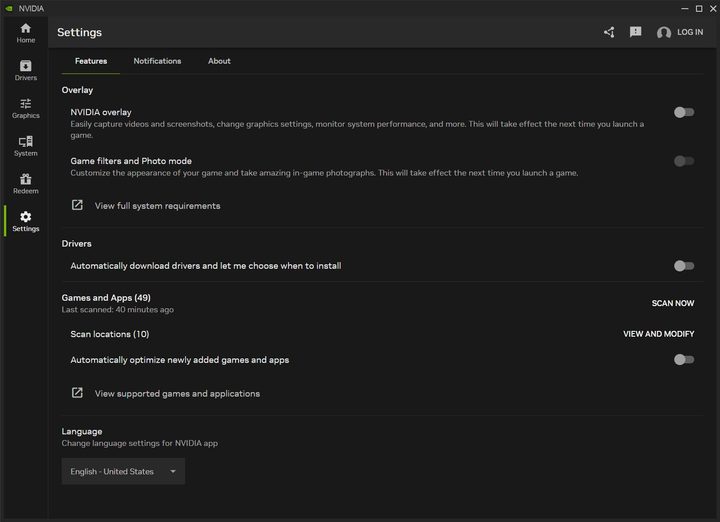
If you enable the Nvidia overlay the first time you install the Nvidia App, it stays enabled, even if you never pull it up. That includes the overlay’s game filters and Photo Mode, along with all of the game recording, system monitoring, and graphics settings available in the overlay proper. All you need to do to disable it is open the Nvidia App, head to Settings and uncheck the box next to Nvidia overlay.
When stories like this break, there’s a mad dash to verify (or refute) claims that are circulating online, and the testing during that dash is generally limited, and sometimes, short-sighted. It seems that’s what’s going on here. As you’ve probably heard before, correlation does not equal causation. Performance improves with the Nvidia App uninstalled, but the Nvidia App itself is not causing the performance loss. The overlay is, which isn’t surprising at all.
The built-in Xbox Game Bar can cause a performance loss, as can a Discord window or a few tabs in Chrome. That’s not to mention whatever utilities you might have running in the background on your PC, from Asus Armoury Crate to Corsair iCue to Razer Synapse. The drop in performance can vary depending on app version, Windows version, driver version, and of course your PC hardware itself, but there’s some general understanding that additional apps running on your PC will take some of your system resources. So, why the outcry over the Nvidia App? It doesn’t make sense to me, especially when the app doesn’t seem to be causing the performance loss in the first place.
The advice coming out of this story has been to just uninstall the Nvidia App if you aren’t using the additional features available in it. The recommendation doesn’t come out of malice, but I think you should leave it installed. Even if you disable the Nvidia overlay, having the Nvidia App installed will let you know when new drivers come out. And new drivers will improve your performance, particularly in new games. That much I can say with certainty.



