Every day at 4 p.m., I have a ritual. And not a fun one. I go through all my browser tabs (usually numbering in the dozens), update Asana, and spend a groggy hour digging through Slack, Teams, shared docs, and email threads trying to reconstruct the day. If you work in digital media, or any fast-moving industry, you know the real work happens in the margins: decisions made in a flurry of DMs, files dropped without context, or action items buried beneath emoji reactions.
This past week, I tried something different. I spent it inside Everyday, the self-styled “AI-Work Browser” that just opened to the public after a private beta run. As the COO of a digital media company constantly toggling between strategy, sales, creative, and operations, I was an ideal test subject. The verdict? Everyday might not be perfect, but it’s already indispensable.
Taming the App Hydra
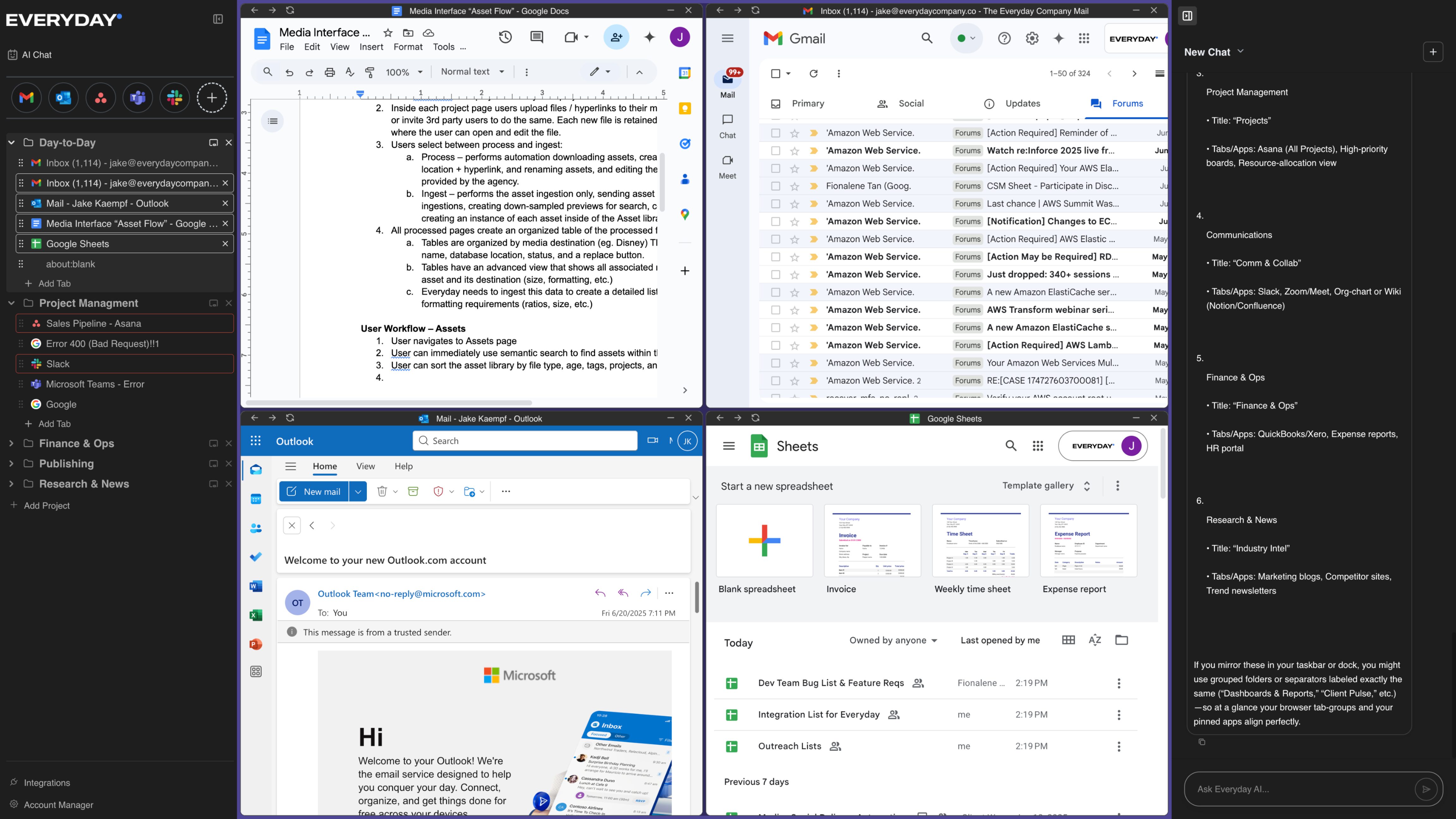
Let’s get the basics out of the way: Everyday is a browser built specifically for work (check out the video here). That means it’s designed to integrate with your existing work stack (Slack, Notion, Google Drive, Figma, Asana, you name it) without forcing you to rip and replace. The centerpiece is an AI agent that can search, summarize, plan, and even act across tools. Split-screen and canvas modes let you pin multiple views at once, so you’re not bouncing between tabs a like a caffeine-addled kangaroo.
But that’s not what sold me. What sold me was what happened on Wednesday afternoon.
Our partnerships team had a deck to review before a pitch. Normally, I’d scroll through email threads to find the latest version, ping someone to clarify changes, then hunt for the corresponding performance data buried in a spreadsheet. Instead, I opened Everyday’s AI-DAM (Digital Asset Manager), typed the prompt “final deck and Q2 campaign data,” and then got a tagged, ranked, and summarized list of every relevant file. I clicked one, and the AI agent offered a Tl;dr and surfaced related comments from the team. I had what I needed in three minutes. THREE MINUTES, PEOPLE!!
Setup is not for the faint of heart
Getting Everyday up and running takes about 5 minutes. You need to link your apps and authenticate them. The good news? You only do it once, and the payoff is worth it.
I then took about 20 minutes on a Sunday evening to link Everyday to our internal tools and guide the AI through some common tasks like, “pull the latest design reviews,” or “summarize sales activity this week.” It’s a labor of love and like with any other AI tool, the more you put into it the more you will get out. By Tuesday, my work day was changed forever. The interface is sleek, but the magic is in what you don’t see: the AI agent can search, plan, and take actions for you.
The real game-changer: delegation
Everyday let me delegate multi-step workflows. I tested this with a campaign post-mortem: gather data, find feedback, draft summary, circulate to stakeholders. I outlined the task once, and the AI agent pulled relevant performance data, scanned Slack for feedback, and assembled a doc that was 80% done before I even touched it.
This isn’t about replacing people, it’s about reclaiming hours. I still edit, approve, and lead. I’m no longer stuck in the mud of low-leverage tasks that zap momentum. That’s the dream, right?
Is it worth it?
In short, absolutely. Everyday isn’t magic. It’s early days, and occasionally, like all AI tools, you get a hiccup here and there. However, it learns fast. And more importantly, it reshapes your relationship to work. You stop thinking in terms of “apps” and start thinking in terms of “outcomes.”
For creative professionals, marketing teams, or media orgs juggling dozens of tools and touch points, Everyday delivers something rare: clarity.
I caught up with Founder and CEO Jake Kaempf to give him some feedback, but also to thank him for the product. This is what he said, “We’re fighting a war against busy work and tab-switching. We believe that creativity and critical thinking are the core pillars of humanity, yet today’s tech stacks waste people’s time, passion, and money. Everyday flips the paradigm — freeing people to focus on what matters.”
My days at 4 p.m. look different. No chaos, no retroactive detective work. Just a clean summary of the day or week, already waiting for me. And today? I can enjoy getting home at a decent hour to hang with my family and enjoy an at-home happy hour. Cheers to reclaiming my afternoons.