
 If you own a Galaxy Note 10.1 tablet, then Samsung has a pleasant surprise for you, as an update to Android 4.1 Jelly Bean should be ready to download very soon. What’s more, the update doesn’t only include Project Butter, an improved interface, faster performance and all the other Jelly Bean features, but Samsung’s Premium Suite, too.
Premium Suite elevates the Android 4.1 update from being vaguely interesting to truly intriguing, as it adds a clutch of new features to devices on which it appears. Premium Suite has been added to the Galaxy Note in the past, and should be arriving on the Galaxy S3 soon. As for the Galaxy Note 10.1, here’s a breakdown of all the new features you’ll discover after applying the update.
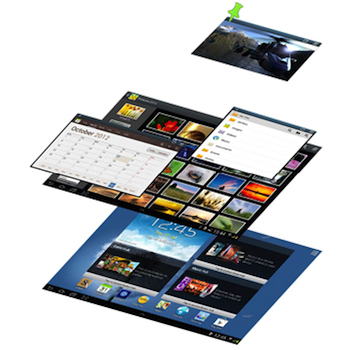
First up are three enhancements based around the Note 10.1’s ability to run two apps, side-by-side, at the same time. Using Cascade View, certain apps can be pinned to the screen, resized, and moved around, while still allowing them to run at the same time or for users to play around on the home screen. It sounds a lot like Pop-Up Play, only not just for video playback.
 With Quick Command, scribbling a shortcut on screen using the S-Pen stylus provides fast access to often used apps, while Air View lets you hover the S-Pen over a gallery or video to show a preview of its content. Both of these features can be seen in use on the Galaxy Note 2. The same is also true of Paper Artist, an app which turns photos into pencil sketches using the stylus, now added to the Galaxy Note 10.1 as well.
Premium Suite makes the S-Pen an even more integral part of the Note 10.1, as it adds several new features based on how we would use a normal pen. For example, notes can be written on the “back” of saved pictures with Photo Note (another feature culled from the Galaxy Note 2), while Easy Clip adds a fast copy/paste and share menu to its repertoire. The S-Pen has been integrated into S Planner – the device’s built-in, multiple source, calendar app – and notes written using the stylus can easily be sent through email. Finally, removing the S-Pen from its holder now wakes the tablet up.
The Android 4.1 with Premium Suite update should be available very soon on all Wi-Fi versions of the Galaxy Note 10.1. The Galaxy Tab 2 7.0 and Galaxy Tab 2 10.1 should also start to receive an Android 4.1 update, though Premium Suite won’t be included.


