
  1. Home
  2. Computing
  3. Legacy Archives

Windows 8.1 could let you skip the Metro Start screen and go straight to desktop

Add as a preferred source on Google
twitter windows 8
Image used with permission by copyright holder

Unless you have a touchscreen on your Windows 8 device, the colorful tiles on the home screen is not the most intuitive to navigate with just your touchpad or mouse, especially if you just want to jump right into Desktop Mode to use your computer beyond the latest social media updates. But with the Windows 8 Start screen as it is currently designed, you have to take that extra step of tapping on the Desktop tile to access the rest of your device.

If the beta code found in a recent build of Windows 8.1 is any indication, the upcoming update to Windows 8 will allow users to boot right to the desktop, while keeping the tiled interface as an alternative home screen for touch devices. (In case you’re confused, Windows 8.1 is expected to be the official name for the next iteration of Windows 8; you might be more familiar with its code name Blue.)
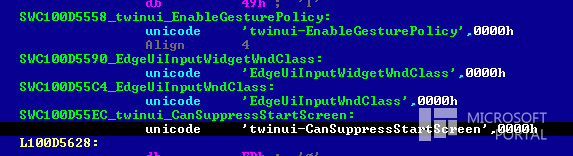
leaked win8.1 code_microsoft portal
Image used with permission by copyright holder

According to the Russian tech site Microsoft Portal, there is apparently a line of beta code in a build of Windows 8.1’s “twinui.dll” file that is “responsible for disabling the Start Screen,” and after disabling or modifying the code, it makes the system “go to the desktop automatically,” as reported by WinBeta. We tried visiting its source but it seems the page no longer exists. That said, the above photo of the code seems to back up what the Russian site initially published.

Recommended Videos

Who knows if this code will make it to the final release of Windows 8.1, but at least you know Microsoft is certainly aware of your gripes and it is working on ways to better cater to how you actually use the operating system, rather than force you to make extra clicks to get to your desktop. Besides letting you boot directly to desktop mode, what other navigation improvements would you like to see in Windows 8.1?

[Image originally posted Microsoft Portal, via WinBeta]

Gloria Sin
Former Contributor
Gloria’s tech journey really began when she was studying user centered design in university, and developed a love for…
Gemini Notebook’s new Collections arrive just as Google turns it into a bigger workspace
Google is cleaning up notebook organization as the former NotebookLM expands across Gemini and Search
Gemini Notebook branding on a MacBook

Google has barely finished renaming NotebookLM, and it’s already addressing one of the headaches that comes with building a large research library.

Collections are rolling out to all Gemini Notebook users, giving them a way to group related notebooks while keeping everything visible under My Notebooks. The dashboard gets some structure without asking users to rearrange the library they’ve already built.

Read more
Samsung’s humanoid robot ambitions are real, but factories come first
Samsung’s new robotics division has humanoids in its sights, although its immediate business is far more practical factory automation
Robot Touch Human Finger

Samsung wants a place in the humanoid race, but its new robotics push begins with machines built for factories rather than homes.

The CEO-led RX robotics division will initially focus on manufacturing robots. Samsung has separately identified humanoids as a priority, although it hasn’t announced a commercial model or explained where one fits into the division’s immediate plans.

Read more
WhatsApp’s Liquid Glass redesign is finally coming to Mac after months of waiting
WhatsApp's Mac app is getting Apple's Liquid Glass-inspired makeover
WhatsApp

WhatsApp has been steadily adopting Apple's new design language across its apps, but Mac users have largely been left watching from the sidelines. That is finally beginning to change.

The messaging platform has started rolling out its Liquid Glass redesign for the WhatsApp Mac app, bringing the desktop experience much closer to what iPhone and iPad users have been seeing over the past few months. The update introduces a refreshed interface with redesigned navigation elements, updated menus, and a cleaner layout that aligns with Apple's latest software aesthetic. According to WABetaInfo, the rollout has begun through the latest Mac App Store update and is currently reaching a limited number of users.

Read more