

Here’s some extra motivation to update your Chrome Web browser to version 27: the voice-activated Google Search that the company showed off at Google I/O last week is now live with this update. This means you should be able to ask Google questions with your voice and it’ll speak back to you with answers, like with the computer in Star Trek – if you’re lucky.
Before you start firing random questions at Google to see whether its voice-activated “conversational search” is really as smart as it looked during the company’s keynote presentation, you need to update or download version 27 of the Chrome browser for this feature to work. (To manually update your browser, simply go to Settings, then Help to let Chrome figure out if it needs to be updated.) You’ll also need a microphone in your laptop or desktop so that Google can “hear” your searches. (You can make sure the browser sees your mic by checking under Settings, “Show Advance Settings”, click on the “Content Settings” under Privacy, and giving Chrome permission to access your microphone and camera under “Media”.)

According to Johanna Wright, Google’s vice president of search and assist for mobile, before you ask the search engine anything, you should be able to just say “Okay, Google” without having to click on the microphone icon in the search box to activate voice search. That hasn’t been our experience with voice search on Chrome 27 so far. From our experience, you need to click on the microphone icon to give the browser permission to use your computer’s microphone with every single search, even after checking that the browser recognizes our mic.
To make the experience even more frustrating, we got the “No Internet Connection” error message more times than we were able to ask Google questions. You need to see the “Speak Now” and “Listening” animation before you can communicate with the search engine. Otherwise your “Okay, Google” queries will not initiate any searches.
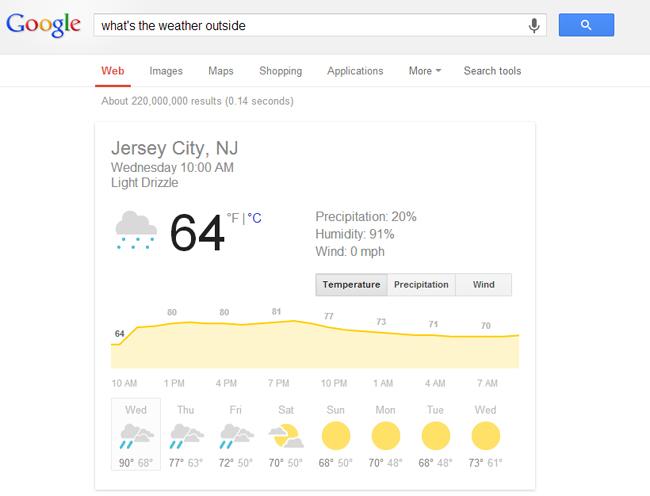
One of the few times we were able to ask Google a couple of back-to-back questions, we were impressed by its ability to pick up on the nuances of our queries that is closer to the way we speak to other human beings. For example, we asked Google “What’s the weather like outside?” but did not specify where we’re physically located prior to our question. The search engine was able to determine that we’re currently in Jersey City and told us that it’s drizzling lightly outside. We then asked Google about the weather forecast on Thursday, and it immediately knew we wanted to know the forecast for the same location in New Jersey. Just to throw Google Search a bit of a curve ball, we then asked Google what’s the temperature in Celsius, and it figured out that we’re interested in the current temperature and from the same location, referring back to answers it provided a couple of questions ago. Search Engine Land was able to test out Google’s conversational search even more thoroughly at Google I/O, asking the search engine more complex questions than we were able today now that the feature is live.
While the voice search experience is not consistent enough at the moment for us to completely replace typing our searches, we hope Google can take care of the server issues that is making voice search so finicky so we can start having a real conversation with the search engine soon.


