
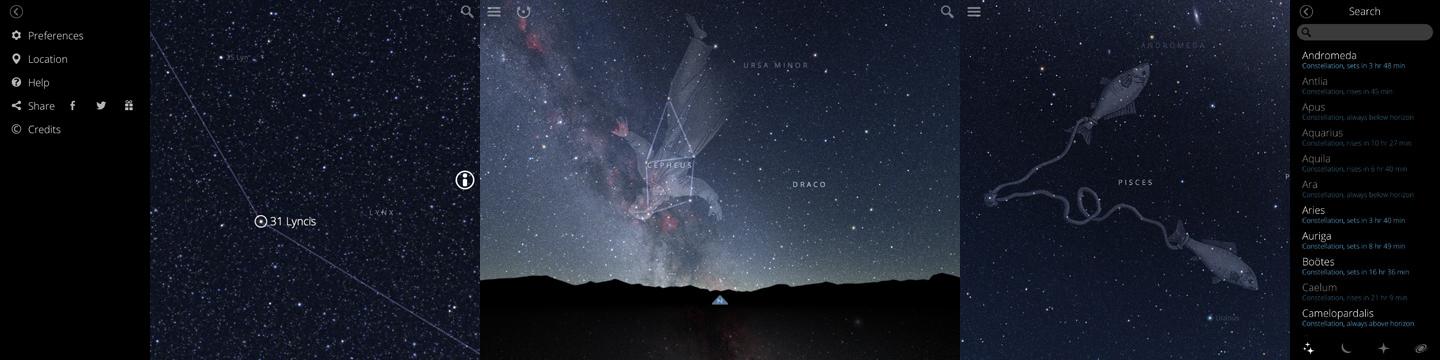
Anyone able to get outside of the city lights can get a good view of what lies in the great above, but for many of us, the night sky is more mystery than magic. Unless you’ve taken astronomy classes, anything beyond Ursa Major or the North Star is likely just a beautiful series of space dots. Sky Guide hopes to take your reverence for the night and turn it into knowledge. It’s an interactive atlas that will inform you about everything you see in the sky. And it’s gorgeous.
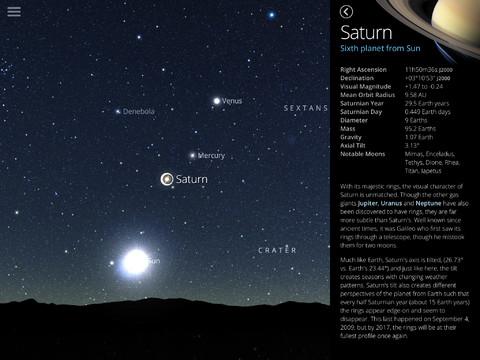 Astronomy isn’t an easy amateur field to get in to because of the sheer quantity of information out there about the stars. There are charts galore, and a lot of wondering if you’ve found the right star. It’s a little overwhelming for a beginner, and there can be a lack of clarity of exactly what you’re looking at.
Sky Guide fixes this problem. It’s populated with 37,000 unique night images snapped by photographer Nick Risinger. Those images are pieced together in a continuous mosaic that makes browsing space a breeze and a joy. Sliding across the sky and running in to another beautifully presented constellation feels delightful. You can even dim the lights of the sky with a swipe of two fingers to match what you see outside and it also lowers the overwhelming amount of stars on screen.
Of course, you’re not using this app to just for the imagery — you can just look up for that. You’re here to learn about what exactly you’re looking at. Sky Guide provides that, opting to move away from the cut-and-paste Wiki entry info that many apps offer and instead providing in-depth entries on some of the more prominent features of the sky. You probably won’t find the obscure sets of stars that an experienced astronomer may be looking for, but all of the big constellations are covered. If there is something that you don’t see but does have an entry that you want to read, you can use a search option that reveals more than is visible on screen. The entries are rich on information and simple enough for anyone to understand.
The team behind Sky Guide have done an amazing job making the entire time you are in the app an engulfing experience. As you browse through the stars and planets, a pleasant and celestially inspired soundtrack plays, giving a calming effect and engaging your senses beyond just looking at and tapping sparkly dots. When you hit upon something clickable on screen, a tone will play that offers indication as to what you’ve found. The hotter a star is, the higher the pitch is when you tap it. A more luminous star will also have be louder than a smaller one, providing audible cues along with the visualization.
Sky Guide isn’t going to be an app that will replace the tools of a hardcore astronomer. But for the beginning or intermediate stargazer, or for a person that is out on the country side to watch a meteor shower and wants to have a little more information about what rests above, Sky Guide is a great option. It’s full of information and stunning visuals that do an excellent job of engrossing you. Just don’t forget to look up every once in awhile.
Sky Guide is available in the iTunes App Store for $1.


