

At a cosy breakfast meeting at its headquarters in San Francisco, Google has announced Android 4.3, the latest revision to Android Jelly Bean. It has been a long time coming, too. It was initially expected at Google I/O in May, but despite many subsequent leaks, hasn’t been officially detailed until today.
Whether it was worth the wait is debatable. It doesn’t include any breakthrough new features, only small upgrades to the existing system. Introduced by Google’s VP of Android Product Management, Hugo Barra, we were treated to short demonstrations of four key features.
New Features
Better Multi-User Profiles: The first is a revised version of the multi-user profiles introduced on Android 4.2. Now, in addition to generating different user accounts for several users, access can be controlled at a user level. It’s perfect for parents who let their kids use the tablet, as not only can you restrict which apps can be opened in an account, but they also behave differently depending on the settings. For example, if you block in-app purchases, the levels or features which are unlocked after paying don’t even show up, so it even removes temptation.
Better 3D Gaming: Moving on to gaming, Android 4.3 is the first platform to support Open GL ES 3.0 graphics, which improves 3D performance, and gives developers lots of new graphical toys to enhance their games. A pair of demos showed off some very impressive shading, colors and textures, plus complex realtime shadows on character’s faces, and JJ Abrams style lens flare, all rendered in 1080p.
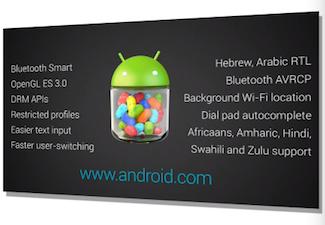 Bluetooth for fitness bands: Bluetooth Smart, better known as Bluetooth Low Energy, which allows improved connectivity to power efficient Bluetooth hardware – which are designed to operate for some time on a small battery – such as health and heart rate monitors, smart watches, and fitness wristbands. Finally, Android 4.3 has a new set of video-related DRM APIs. The first example of how these will benefit users comes from Netflix, as the latest version of its app will stream 1080p movies and TV shows, all thanks to the new APIs.
Other features: Other new features in Android 4.3 not demonstrated at the event include background Wi-Fi location, easier text input, faster switching between user profiles, plus a wide variety of newly supported languages.
Android 4.3 is launching on the new Nexus 7 tablet, which is the first device to support those new DRM APIs, and will also be coming to the old Nexus 7, the Nexus 4, the Nexus 10, and the Galaxy Nexus smartphone. Happily, the new Google Edition Galaxy S4 and Google Edition HTC One will also be getting Android 4.3, but no time frame other than, “soon” was provided.



