
Back when UpTo launched, it was aiming to make your calendar into a social network. With version 2.0 of the app UpTo has shifted its focus to being a calendar first while shifting the social networking to a secondary – but still worthwhile – service. By making the calendar come first, UpTo legitimizes itself as an app that can help you organize your life. But maintaining the ability to scatter events from others onto your calendar will keep you in the loop more than ever before. It’ll make your planner more dense with happenings, but they will all be ones that you want.
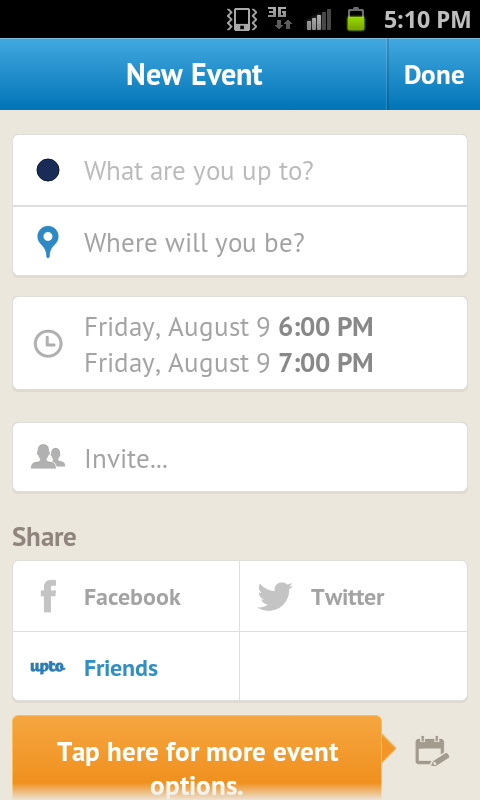 Version 2.0 of UpTo acts as a relaunch for the app. After seeing how everyone is using its feature set, UpTo has made your own life the main focus. The first step you will take when setting up the app is to sync the events of your existing accounts like Google Calendar, Outlook, or Apple. Those items populate your UpTo calendar and once in place, the app adds its own unique features to your events. You can add more events in app and though UpTo’s event editor isn’t as rich on context as some of the other options out there, it still offers more than enough for you to give a good indication of what the event is about.
UpTo differentiates itself from the other calendar apps and digital planners on the market when it starts to layer in its social features. No longer aimed at just trying to show you what all your friends and family are doing, you can now subscribe to streams of events added by those closest to you. You probably don’t care what a friend from high school who lives in a different state is doing on Saturday night, but you definitely care what your significant other has planned for the weekend. UpTo encourages sharing between users who want or need to be in the loop with one another, so you can see all shared events from streams you subscribe to at a glance. If it’s an event you’re going to attend, you can tap the “I’m In” button to confirm your presence. The event is then added to your calendar.
Beyond just your friends and family, you’re able to follow streams that matter to you. If you’re a sports fanatic and want to make sure you never miss your favorite team’s games, you can add a stream from the club and have all their games added to your calendar. The same goes for events that take place at your favorite theater or music venue, or even the happenings within your city. There are currently more than 5,000 streams from companies and groups that you can subscribe to and populate your calendar with at any time.

UpTo isn’t reinventing itself with version 2.0 of the app, but it has shifted its focus. Looking back at the old version, it’s easy to imagine how knowing what everyone you’ve ever known was doing at any given time would be a bit overwhelming. UpTo has done a service itself and its users by pivoting into a position that focuses on your own calendar but populates it with items from others that still are relevant. It’s easy to imagine a scenario in which an event from a friend pops up in your stream and you suddenly have plans for a day that you otherwise wouldn’t. Dropping the “being social for the sake of being social” idea and adopting a “being social with those that matter to you” motto will make UpTo a legitimate option as a go-to calendar app in a heavily populated market.
You can download UpTo for free from the iTunes App Store for iOS devices or from the Google Play Store for Android devices.


