1. Home
  2. Computing
  3. News

Gmail gets an AI secretary to schedule meetings for you in Calendar

Think of it as an assistant that fixes meetings for you autonomously.

Add as a preferred source on Google
Help me schedule feature for Gmail.
Google

I often find myself involved in lengthy email chains where both parties are struggling to find an appropriate meeting slot. Working across different time zones certainly doesn’t help the cause. Google is, finally, addressing the conundrum for all cross-continent teams, like mine, with a new AI-powered scheduling system in Gmail.

What’s new?

Say hello to Help me schedule. This is a new Gemini-powered feature that automatically goes through the conversation in an email chain, and then looks at the calendar entries, to automatically surface an appropriate time slot for a meeting. In a nutshell, you don’t have to go do the logistical gymnastics of going back and forth between the previous emails and checking your calendar entries to find the space for a call.

Recommended Videos

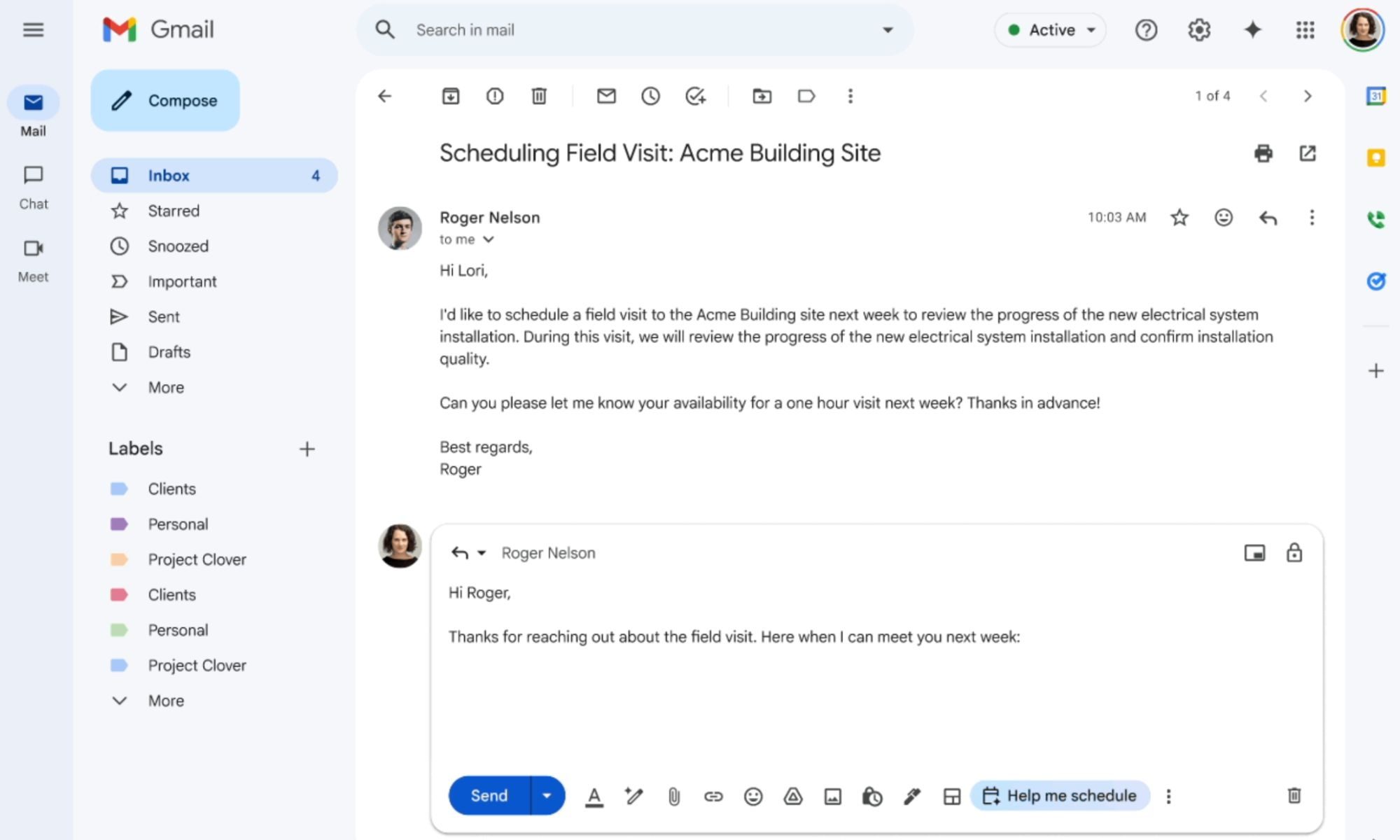
“Gmail with Gemini will detect when you’re trying to coordinate a time within an email and will surface a Help me schedule button in the toolbar,” says Google. Based on the meeting length and the appropriate window — details of which are pulled contextually from the email conversation — the AI will automatically suggest a slot.
How does it work?

When you are replying to an email, the AI senses when you are about to discuss the scheduling details, the AI automatically extracts the context in the background. Once there, users can simply click on the Calendar icon appearing at the bottom of the composer, which then expands to show the pill-shaped “Help me Schedule” button.

This is such a sigh of relief

As soon as you click on it, Gemini analyses the email chain and the calendar entries, and then finds a slot. The schedule details appear as a card with actionable buttons. On this card, users will find multiple options for a meeting slot, where they simply have to click on the one that works best for them.

As soon as they click on the pill-shaped slot button, the meeting is scheduled, an invite is created, and the details are automatically added to the Google Calendar. For now, this feature only works for one-on-one conversations and doesn’t support email conversations with multiple senders and recipients.


Nadeem Sarwar
Nadeem is the Managing Editor at Digital Trends.
DuckDuckGo’s browser now blocks the YouTube ads everyone hates
DuckDuckGo adds a Brave-like YouTube ad blocking feature
Text, Aircraft, Airplane

DuckDuckGo has spent the past few months gaining fresh attention as more users look for alternatives to Google’s increasingly AI-heavy Search experience. Now, the privacy-focused company is adding a feature that could make its browser even more tempting for everyday use. DuckDuckGo says its browser can now block most video ads, including those on YouTube, when a video is playing inside the browser.

What’s happening?

Read more
ChatGPT Live could make talking to AI feel straight out of the movies
We might finally get the AI sidekick sci-fi movies promised
Elderly women using ChatGPT live on a smartphone

AI voice assistants have been chasing the sci-fi dream for years, but they still have a hard time holding a conversation with humans. Most voice systems still need clear turns, clean pauses, and a few seconds before they respond. OpenAI is now rolling out GPT-Live, a new voice model for ChatGPT Voice that is designed to make those exchanges feel faster and less scripted.

The main upgrade is what OpenAI calls a full-duplex architecture. In simpler terms, GPT-Live can listen and speak at the same time. It continuously processes what the user is saying while also generating its own response, allowing it to decide when to talk, when to pause, when to keep listening, and when to use a tool.

Read more
A broken Galaxy Fold 5 just became the Pixel desktop future I want Google to steal
A broken Galaxy Fold 5 became a tiny PC because Samsung already built the desktop mode Google keeps treating like a side quest.
Desktop mode within Android 16.

A broken Galaxy Fold 5 should be a sad little monument to modern gadget math. One busted outer display, one repair bill nobody wants to inspect too closely, and suddenly a powerful foldable starts heading toward a drawer. Instead, a Redditor turned one into a glowing acrylic DeX box with spare parts, fans, a USB hub, and the kind of LED lighting that makes every homebrew computer look mildly illegal.

https://www.reddit.com/r/SamsungDex/comments/1upica7/fold_5_dexbox/

Read more