1. Home
  2. Phones
  3. News

iOS 26.4 puts your iPhone in anti-theft mode by default

With iOS 26.4, Apple automatically activates Stolen Device Protection, strengthening iPhone security while adding encrypted RCS messaging, video podcasts, and AI-powered playlist creation tools.

Add as a preferred source on Google
Stolen device protection feature on iPhone.
Digital Trends

The first developer beta of iOS 26.4 is rolling out, and with it, Apple is flipping a major security switch for buyers. A security feature that was previously optional is now enabled by default for everyone, making it harder for thieves to change your iPhone’s critical settings.

We’re talking about Stolen Device Protection (first released with iOS 17.3), the feature that is designed to protect your Apple ID, saved passwords, payment methods, and other sensitive information, even if someone knows your iPhone’s passcode.

Changing critical security settings requires more than just a passcode

The feature asks for more credentials than your iPhone’s passcode (such as Face ID or Touch ID) for actions like viewing or using passwords or passkeys saved in iCloud, viewing an existing Apple card or applying for a new one, turning off the Lost Mode, and erasing all the content and settings.

Recommended Videos

Further, the feature also delays changing critical security settings, such as the Apple ID password, adding or removing trusted devices, changing the iPhone’s passcode, and adding/removing Face ID or Touch ID, for an hour.

It also requires biometric authentication, followed by a one-hour security delay and a second biometric confirmation before changes can be made.

Why this matters

Basically, by enabling Stolen Device Protection in iOS 26.4, Apple is making it harder for bad actors to exploit the critical information stored on your phone or to reset it and sell it for quick cash.

In other words, your iPhone will be more paranoid than usual, even when you’re using it, but it is better to have the feature and not need it than to need it and realize that you didn’t turn it on (which is the entire point of making it a non-optional feature).

Elsewhere, the iOS 26.4 developer beta also includes encrypted RCS messaging support, native video support in Apple Podcasts, and a new Playlist Playground feature in Apple Music. A full public release of iOS 26.4 is expected this spring.


Shikhar Mehrotra
For more than five years, Shikhar has consistently simplified developments in the field of consumer tech and presented them…
Android desktop mode made me miss my laptop in record time
I tried writing and publishing from Google’s phone-to-monitor setup, and the future of mobile computing immediately started sweating.
Computer, Electronics, Laptop

Android 17 desktop mode has a very simple pitch. Plug your phone into a monitor, add a keyboard and mouse, and watch the slab in your pocket pretend to be a computer. I wanted to give that pitch a fair shot, so I tried using it for an actual workday instead of a cute demo.

The goal was boring on purpose: write an article, edit it, build the page in WordPress, upload whatever needed uploading, and publish the thing without running back to my laptop like a coward.

Read more
After test-driving iOS 27, my iPhone still doesn’t feel like it has made a substantial leap
Siri learned new tricks. Safari got smarter tabs. My morning routine didn't change at all.
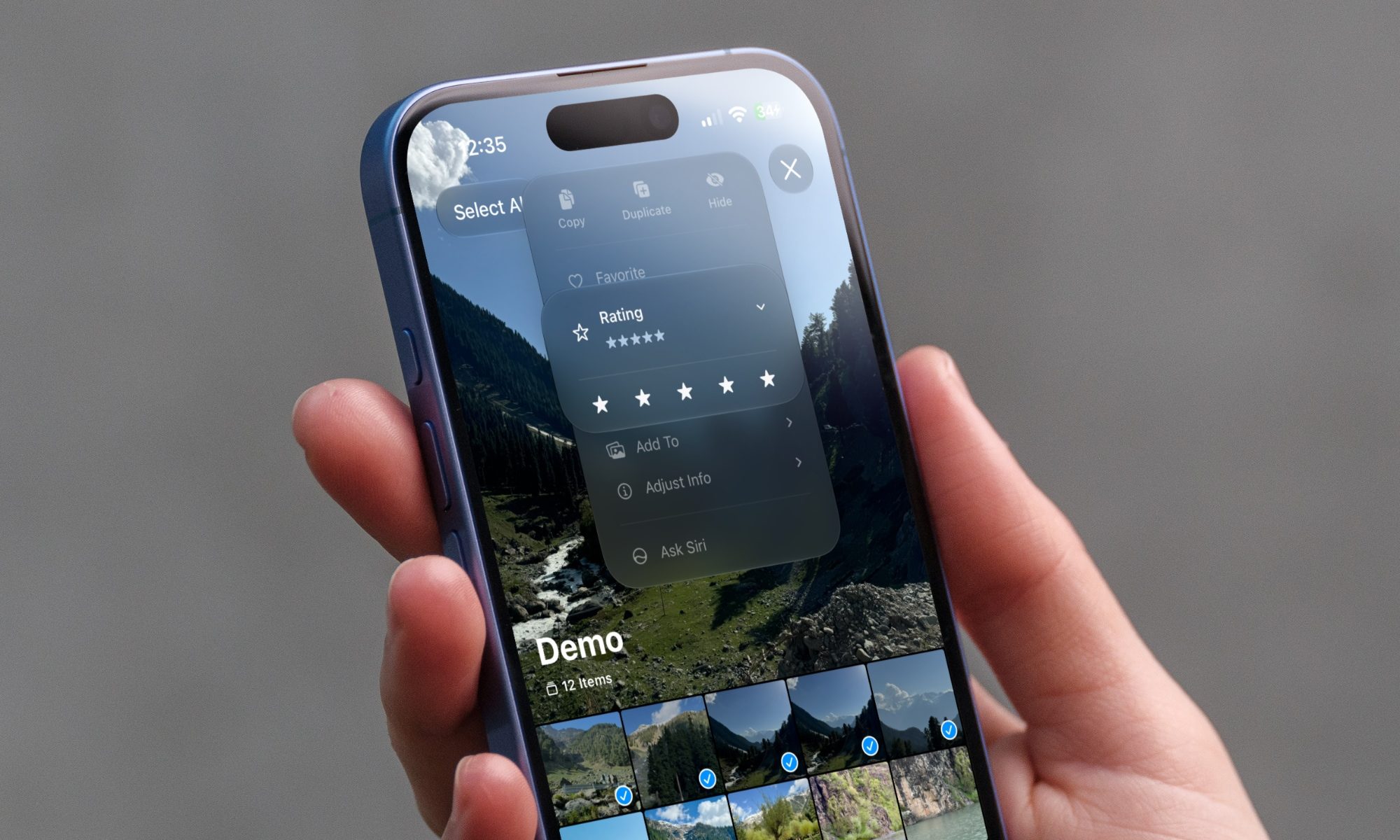
iOS 27 new star rating feature in Photos

Every June, after Apple wraps up its annual WWDC keynote, I install the latest iOS beta on my iPhone, watch the progress bar crawl to completion, and wait for the inevitable restart. For years, picking up my phone afterward felt almost identical to how it did before the update. 

I saw the same grid of icons, the same Control Center, and the same version of Siri until iOS 26 finally broke that pattern in 2025.

Read more
Android 17 makes a strong case for ignoring Android version numbers entirely
When the most noticeable change is a better Quick Settings button, the annual update cycle starts looking more like branding than progress.
Android 17 logo.

Android 17 finally separated the Wi-Fi and mobile data buttons, and I hate how much that improved my mood. For years, Android treated internet access like one mysterious blob, as if Wi-Fi and cellular data were emotionally codependent. In Android 17 Beta 3, Google split the old combined Internet button into separate Wi-Fi and mobile data tiles, making each connection easier to switch off with a single tap.

That’s a good change, which is also why it’s a little damning. When one of the cleanest wins in a major OS update is “the buttons make sense again,” the celebration gets awkward fast.

Read more