
  1. Home
  2. Computing
  3. Legacy Archives

Acer GD235HZ Lunges into 3D Display Market

Add as a preferred source on Google

Gamers and movie fans looking for some stomach-churning excitement from their computers will soon have a 3D display option from Acer: the company has just announced its GD235HZ 23.6-inch 3D-capable display, offering a native resolution of 1,920 by 1,080 pixels, a 120 HZ refresh rate, and support for 3D content when used with Nvidia’s 3D Vision active-shutter glasses—and appropriate Nvidia GeForce graphics hardware to push 3D content to the screen.
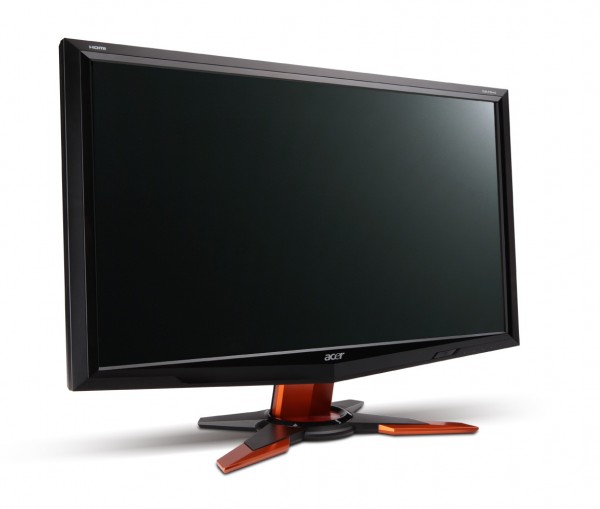
Acer GD235 HZ 3D Display
Image used with permission by copyright holder

“As 3D content becomes more widely available in popular games and videos, users desire computing products that can take advantage of these new capabilities,” said Acer America’s senior product marketing manager Irene Chan, in a statement. “We are excited to offer Acer’s first monitor to support 3D technology.”

Recommended Videos

The GD253HZ sports a an 80,000:1 dynamic contrast ratio, 300cd/m² of brightness, a 2ms response time, and claims to over 72 percent of the NTSC color gamut. The display has HDMI, DVI, and VGA inputs, a and supports VESA mounting; it’s also Energy Star rated, consuming 38.2 watts when operating and 1.85 watts when asleep. To make the 3D experience more bearable, Acer has rolled in Adaptive Contrast Management to enable users to adjust images frame-by-frame to achieve optimal contrast.

Acer says the GD235HZ will be available this month from authorized retailers for a suggested price of $399.99; the Nvidia 3D Vision Kit is already on the market for an additional $199.99.

Geoff Duncan
Former Contributor
Geoff Duncan writes, programs, edits, plays music, and delights in making software misbehave. He's probably the only member…
Your broken Windows 11 PC no longer needs a USB drive to come back to life
The Windows recovery tool we’ve all been waiting for is finally here.
Windows 11

If your Windows PC has ever refused to boot, you know the panic that follows. You scramble to find another computer, download the Windows installer, and create a bootable USB drive just to get your machine running again. Microsoft wants to end that headache with a new feature called Cloud Rebuild.

As reported by Windows Central, Cloud Rebuild lets you perform a full reinstall of Windows 11 without USB media or a custom image. Better yet, it doesn’t depend on your current installation being healthy, so it can even rescue a PC that won’t start.

Read more
Granola’s new voice typing feature lets you ditch the keyboard
Why type when you can just say it? Granola’s new trick works in any app.
Granola voice typing feature

Granola is an AI notepad for people whose calendars are packed with meetings. It quietly captures your calls using your computer’s audio, which means no awkward bot sitting in your meetings. By the time you hang up, it has already sorted out your notes, to-dos, and follow-ups.

Now, Granola wants to help you outside your meetings too. The company has added a new voice typing feature that lets you speak instead of type in any app you use. Best of all, every Granola user gets it at no cost, and there’s no cap on how many words you can dictate.

Read more
Google Gemini can now create and edit PDFs, documents, and more right inside your chat
No more downloading, editing, and uploading files all over again.
Gemini AI on a phone.

Google has recently released many updates introducing new features to its AI suite, and the latest one could save users dealing with documents a lot of tedious work. The company has added the ability to create, preview, and edit documents, PDFs, presentations, spreadsheets, and code directly within Gemini conversations. Previously, you could generate and download files, but now you can work on them without leaving the chat.

You can now make changes without starting over

Read more