
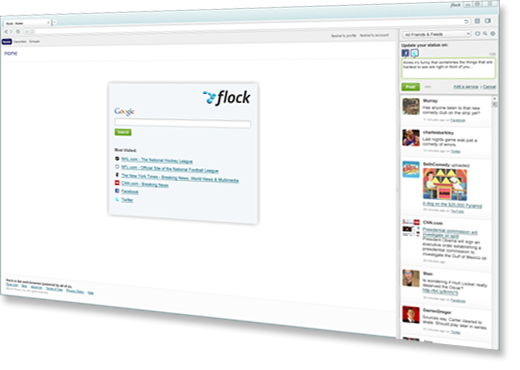
Flock always aimed to be a Web browser built around social media, providing integrated and easy access to social networking tools and updates while users are browsing the Web. Now, Flock has released a beat of Flock 3—for Windows only, so far—that builds on the browser’s social media focus while swapping out the engine under the hood: where previous versions of Flock were build on the Mozilla engine, FLock 3 is based on the Google-backed Chromium project, which is the same engine powering Google’s Chrome Web browser.
“Most of the Flock team started building browsers on Mozilla in late 2004, before Firefox 1.0 was released (we built Netscape 8.x together, which was Firefox-based, before working on Flock 1.x),” wrote Flock’s Clayton Stark, in the Flock blog. “As we start this new chapter with Chromium, it seems important to mention that I believe chromium.org would not even exist had mozilla.org not come before it. We didn’t choose Chromium over Mozilla as much as we chose Chromium after Mozilla.”
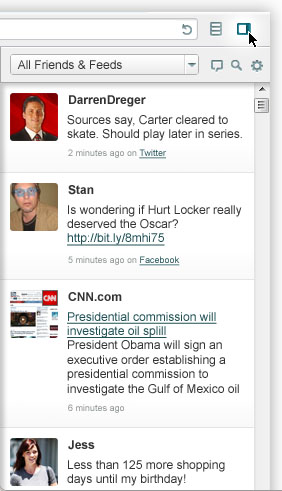
On the surface, the Flock 3 beta bears a strong resemblance to its predecessors, however, it does sport several new features that assist folks with accessing, consuming, and participating in social media. A right-side sidebar in the browser window effectively becomes the browser’s social networking center that enables users to read and reply to social networking updates; the sidebar can also be neatly hidden and configured. The sidebar also provides filtering capabilities: for instance, users can choose to filter for friends just on Twitter or Facebook, categories contacts (e.g. friends, family, work, bowling league, etc.)
A “Talk about this Page” button automatically makes a shortened URL of the current page suitable for use in a tweet or social networking update. Flock asks for your Facebook and Twitter account information when launched—if you don’t use those services, there’s not much point to using Flock over a conventional browser. Users will also want to create a Flock account to take advantage of social networking tools. Flock’s address bar not only handles searches, but also wheels through users’ history, favorites, and status updates—including those from your friends—so users can quickly find just what they want. Flock also supports Chrome extensions to add even more functionality to the browser.
Although Flock particularly register in the assessments of browser market share world wide (Internet Explorer still dominates, with Firefox a distant second and Chrome, Safari, and Opera typically battling for a distant third place), Flock claims to have about 8 million users worldwide. A beta version for Mac OS X should be available next month.


