During the Solidworks World 2017 conference focusing on 3D CAD applications, Lenovo introduced three new mobile workstations sporting the latest processor from Intel for professionals. They fall under the company’s ThinkPad P-series family of devices packed with optional Nvidia Quadro graphics, Thunderbolt 3 connectivity, and Ultra HD resolutions.
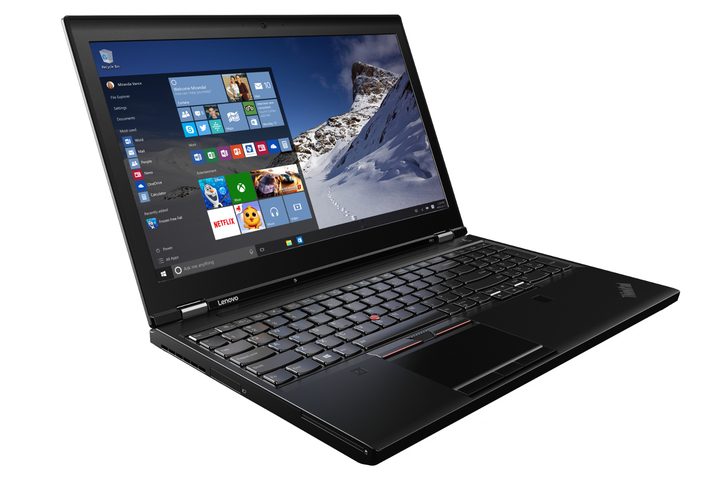
Lenovo ThinkPad P71 Mobile Workstation
Pictured above, this is the meatiest model of the trio and officially deemed as virtual reality ready. That is because customers have the option of choosing Nvidia’s Pascal-based Quadro P5000M discrete graphics chip for mobile workstations. It consists of 2,048 CUDA cores clocked at 1,513MHz, and a 256-bit memory interface supporting 16GB of dedicated GDDR5 memory.
Other notable features in Lenovo’s new workstation include support for up to 64GB of system memory and four internal storage options consisting of two hard drive connections and two PCIe SSD slots. There are plenty of ports for connecting VR headgear too such as four USB 3.0 ports, an HDMI port, and loads more. Customers not wanting Windows installed on this system have options for Ubuntu Linux and Red Hat Enterprise Linux as well.
“Content creators working with demanding VR workflows require the most robust and reliable performance possible,” says Bob Pette, vice president, Professional Visualization, Nvidia. “Lenovo’s VR-ready ThinkPad P71 with Quadro Pascal-based GPUs for mobile workstations provides the performance, features and memory required for creating the most compelling VR experiences anywhere.”
Here are the specs:
| Operating system: | Windows 10 Pro 64-bit Windows 10 Home Premium 64-bit Windows 10 Home Premium Single Language 64-bit Windows 10 Home Chinese Language Edition 64-bit Ubuntu Linux Red Hat Enterprise Linux |
| Screen size: | 17 inches |
| Screen type: | IPS |
| Resolution: | 1,920 x 1,080 at 300 nits 3,840 x 2,160 at 300 nits |
| Processor: | Intel Xeon E3-v6 CPU family Intel seventh-generation Core CPU family |
| Graphics: | Up to Nvidia’s Quadro P5000M discrete GPU |
| Memory: | 4x slots Up to 64GB DDR4 at 2,400MHz |
| Storage: | 1x DVD-RW optical drive (up to 1TB HDD with Bay Adapter) 2x HDD slots up to 1TB each 2x PCIe SSD slots up to 1TB each |
| Connectivity: | Intel Wireless AC + Bluetooth 4.1 vPro Intel Wireless AC + Bluetooth 4.1 4G LTE-A |
| Ports: | 1x SD card reader 4x USB 3.0 (one charges) 1x HDMI 1.4 1x Mini DisplayPort 1.2 2x Thunderbolt 3 1x Gigabit Ethernet 1x Docking connector 1x Microphone / headphone jack 1x Smart Card reader 1x ExpressCard slot |
| Battery: | 96 Watt-hour (8-cell) |
| Keyboard: | Numeric keypad included Backlit in most regions |
| Size: | 16.4 x 10.8 x 1.17 to 1.2 inches |
| Weight: | Starting at 7.6 pounds |
| Starting price: | $1,849 |
| Availability: | April 2017 |
Lenovo ThinkPad P51 Mobile Workstation
This workstation is very similar to the ThinkPad P71, only smaller. However, this model throws in a third resolution option and offers Nvidia’s Quadro M2200M discrete graphics chip as an option instead of the P5000M. This GPU is based on Nvidia’s older Maxwell design packing 1,024 CUDA cores clocked at 1,025MHz, and a 128-bit memory interface supporting 4GB of dedicated GDDR5 memory.
However, due to its size, Lenovo ripped out several features found in the larger P71 model. For instance, this workstation doesn’t provide an optical drive, and it only includes one hard drive connector instead of two. However, Lenovo provides two battery options with this model: A four-cell unit for configurations relying solely on Intel’s integrated graphics, and a six-cell unit that’s likely tossed in to help power the Quadro graphics chip.
Have a look:
| Operating system: | Windows 10 Pro 64-bit Windows 10 Home Premium 64-bit Windows 10 Home Premium Single Language 64-bit Windows 10 Home Chinese Language Edition 64-bit Ubuntu Linux Red Hat Enterprise Linux |
| Screen size: | 15.6 inches |
| Screen type: | IPS |
| Resolution: | 1,920 x 1,080 at 250 nits 1,920 x 1,080 at 220 nits 3,840 x 2,160 at 300 nits |
| Processor: | Intel Xeon E3-v6 CPU family Intel seventh-generation Core CPU family |
| Graphics: | Up to Nvidia’s Quadro M2200M discrete GPU |
| Memory: | 4x slots Up to 64GB DDR4 at 2,400MHz |
| Storage: | 1x HDD slot up to 1TB 2x PCIe SSD slots up to 1TB each Supports RAID 0 and RAID 1 |
| Connectivity: | Intel Wireless AC + Bluetooth 4.1 vPro Intel Wireless AC + Bluetooth 4.1 4G LTE-A |
| Ports: | 1x SD card reader 4x USB 3.0 (one charges) 1x HDMI 1.4 1x Mini DisplayPort 1.2 1x Thunderbolt 3 1x Gigabit Ethernet 1x Docking connector 1x Microphone / headphone jack 1x Smart Card reader 1x ExpressCard slot |
| Battery: | 66 Watt-hour (4-cell) 90 Watt-hour (6-cell) |
| Keyboard: | Numeric keypad included Backlit in most regions |
| Size: | 14.86 x 9.93 x 0.96 to 1.02 inches |
| Weight: | Starting at 5.6 pounds |
| Starting price: | $1,399 |
| Availability: | April 2017 |
Lenovo ThinkPad P51s Mobile Workstation
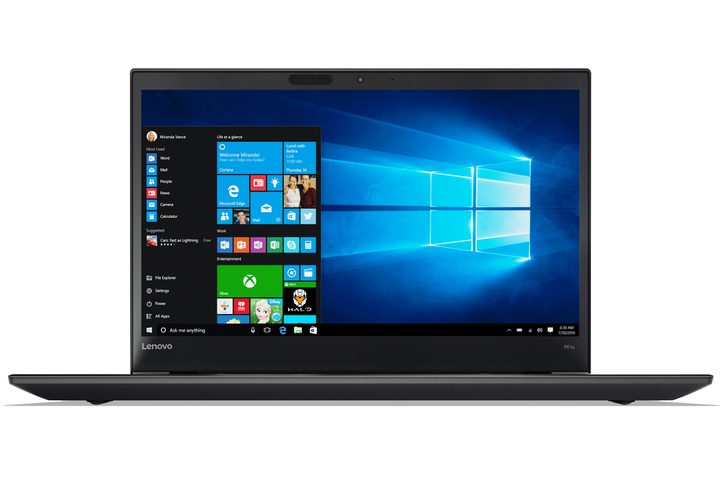
Finally, we have the ‘S’ version of Lenovo’s ThinkPad P51 workstation. Consider it as a watered-down version but adding a touchscreen option. The company only offers Windows 10 Pro and Windows 7 Pro with this unit, forcing customers to purchase the full-blown P51 model if they want other operating systems installed out of the box.
The same goes for customers wanting an Intel Xeon E3-v6 processor too, as Lenovo is only packing seventh-generation Intel Core processors in this model. Unfortunately, the actual processor selections were unavailable at the time of this publication but presumably, customers will have Core i3, Core i5, and Core i7 options.
As for other differences, this ‘S’ model only contains two slots for memory, only one connector for a hard drive, and one connector for a PCIe SSD. The Mini DisplayPort connector was removed as well as one of the USB 3.0 ports. There is also no ExpressCard slot for connecting peripherals.
However, what is notable with this model is that it relies on Lenovo’s Power Bridge technology. Essentially, the laptop includes one battery in the back and one in the front. Users can hot-swap the battery in the back so they are not dashing around looking for a power outlet before the laptop dies. The front battery only has one option while customers have three rear battery options.
Here are the specs:
| Operating system: | Windows 10 Pro Windows 7 Professional |
| Screen size: | 15.6 inches |
| Screen type: | IPS |
| Resolution: | 1,920 x 1,080 at 250 nits 1,920 x 1,080 at 250 nits with Touch 3,840 x 2,160 at 300 nits |
| Processor: | Up to seventh-generation Intel Core i7 |
| Graphics: | Nvidia Quadro M520M |
| Memory: | 2x slots Up to 32GB DDR4 @ 2,133MHz |
| Storage: | 1x HDD slot up to 1TB (5,200RPM) 1x NVMe PCIe SSD slot up to 1TB |
| Connectivity: | Intel Wireless AC + Bluetooth 4.1 vPro Intel Wireless AC + Bluetooth 4.1 4G LTE-A |
| Ports: | 1x SD card reader 3x USB 3.0 (one charges) 1x HDMI 1.4 1x Thunderbolt 3 (Type-C) 1x Gigabit Ethernet 1x Docking connector 1x Microphone / headphone jack 1x Smart Card reader |
| Battery (back): | 24 Watt-hour (3-cell) 48 Watt-hour (6-cell) 72 Watt-hour (6-cell) |
| Battery (front): | 32 Watt-hour (4-cell) |
| Keyboard: | Numeric keypad included Backlit in most regions |
| Size: | 14.4 x 9.95 x 0.78 to 0.79 inches |
| Weight: | Starting at 4.3 pounds |
| Starting price: | $1,049 |
| Availability: | March 2017 |