
  1. Home
  2. Computing
  3. Apple
  4. Legacy Archives

New Mac Pro gives Windows 7 the heave-ho, won’t run in Boot Camp

Add as a preferred source on Google

If you were looking forward to dual-booting Windows 7 on the brand new Mac Pro, you’re out of luck. According to allegedly leaked support documents, Apple has dropped Boot Camp support for Windows 7, making Microsoft’s most popular desktop operating system incompatible with Cupertino’s cylindrical powerhouse.

The documents reveal that the Mac Pro, which will sport Boot Camp 5, will only support Windows 8. The Twocanoes blog published screenshots of the Boot Camp setup assistant for the new Mac Pro, indicating that the program only supports “Windows 8 or later.”
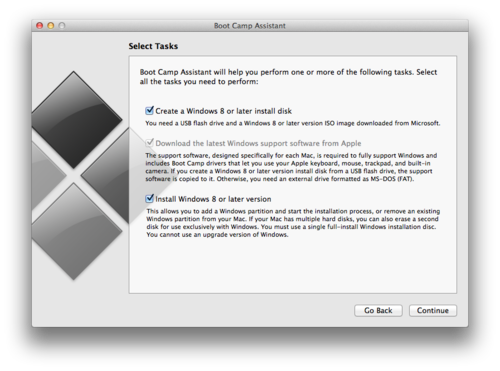
windows8orlater
Image Credit: Twocanoes Blog Image used with permission by copyright holder

Apple is definitely forcing Windows-booting Mac Pro users to run Windows 8: The question is why? The public’s incredibly slow adoption rate of Windows 8 paired with the popularity of Windows 7 makes this a curious decision. The most recent stats from Net Marketshare indicate that Windows 7’s desktop OS share sits at roughly 47 percent, while Windows 8 and 8.1’s is roughly 10 percent. We wonder whether future MacBooks and iMacs released later this year and beyond will also refuse to support Windows 7 in Boot Camp.

Recommended Videos

Will the lack of Windows 7 support in the new Mac Pro prevent you from buying Apple’s newest workstation? Or are you willing to live with using Windows 8/8.1 alongside OS X? Let us know in the comments below.

Mike Epstein
Former Associate Editor, Gaming
Michael is a New York-based tech and culture reporter, and a graduate of Northwestwern University’s Medill School of…
This cross-device clipboard app solves the copy-paste problem I keep running into on my Mac
ClipboardAI keeps a searchable history of everything you copy
Text, Electronics, Mobile Phone

I have lost count of how many times I have copied something important, copied another thing before pasting it, and then realized the first item was gone. It is a small frustration, but it happens often enough to become annoying. I recently came across ClipboardAI, which caught my attention because it goes beyond Apple’s built-in clipboard by saving copied items into a searchable history.

Instead of replacing the last thing you copied every time, ClipboardAI keeps a searchable record of copied text, links, codes, email addresses, phone numbers, addresses, and images across iPhone, iPad, and Mac. That means an older clip does not disappear just because you copied something new.

Read more
If you miss the feel of paper in the digital age, this app gives your Mac’s screen a textured look
A paper-like screen overlay could make long work sessions feel less harsh.
Advertisement, Poster, Electronics

Most screen-comfort tools work by changing color temperature. Apple’s Night Shift makes the screen warmer, often giving everything an orange tint. Paperman is an interesting alternative because it adds a subtle paper-like texture over the display instead.

The app is available for Mac and Windows, and it is designed to make a screen look closer to paper, matte glass, or an e-ink display. It softens the harsh contrast and reduces the glossy look of modern screens during long reading or writing sessions.

Read more
I dug these last-hour Prime Day smart home, laptop, and accessory deals that are irresistible
Deals up to 60% off, a few hours left, and no reason to wait any longer.
Electronics, Phone, Speaker

Amazon's Prime Day 2026 sale is in its final hours, giving you your last chance to get your hands on the best smart home, security, tablet, laptop, and accessory deals. I've pulled together the picks that are still live, still deeply discounted, and still worth buying before the sale ends tonight or until the stock lasts.

Best Amazon Prime Day deals on smart home devices

Read more